> ## Documentation Index
> Fetch the complete documentation index at: https://docs.usehatchapp.com/llms.txt
> Use this file to discover all available pages before exploring further.
# Audience Builder: Glossary and FAQ
The new version of the Audience Builder allows you to create even more specific lists of contacts by being able to query both the current state of data and past states of data for contacts.
Below is a glossary of all the operators as well as examples of what kinds of statements they are used for.
### Operator Glossary
There are a couple of things to consider when using the Audience Builder: The type of data that a field contains and whether you want to look at the current state of data for a contact or all historical data for a contact.
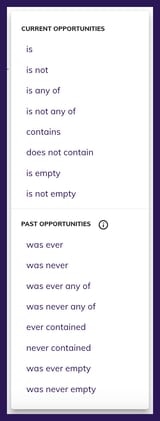
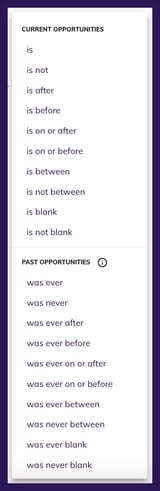
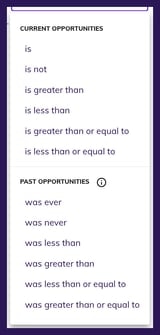
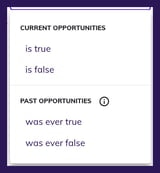
Each operator has a version which queries the current Hatch opportunity only, or queries all opportunities (example below). The operators you see in the list will depend on the data type of the selected field; the 4 data types are "text", "date", "number", "true/false" (shown in that order below).
 #### Text Fields
* is
* Definition: Show contacts that have, on their most recent Hatch opportunity, the exact queried value in the queried field, nothing more and nothing less
* Notes:
* This is not case-sensitive, so looking for `demo no sale` would still show contacts with `Demo No Sale`
* is not
* Definition: Show contacts that, on their most recent Hatch opportunity, do not have the exact queried value in the queried field
* Notes:
* This is not case-sensitive, so looking for `demo no sale` would still filter out contacts with `Demo No Sale`
* is any of
* Definition: Show contacts that, on their most recent Hatch opportunity, have any of the exact queried values in the queried field, nothing more and nothing less
* Notes:
* This is not case-sensitive, so looking for `cat`, `dog` would still show contacts with `Cat` or `Dog`
* is not any of
* Definition: Show contacts that, on their most recent Hatch opportunity, do not have any of the exact queried values in the queried field, nothing more and nothing less
* Notes:
* This is not case-sensitive, so looking for `cat`, `dog` would still filter out contacts with `Cat` or `Dog`
* contains
* Definition: Show contacts that, on their most recent Hatch opportunity, have what is typed anywhere in the queried value for the queried field
* Example: `Appointment Result` | `contains` | `Not` would return contacts that have any of the following in the field `Appointment Result`:
* `Not Demoed`
* `Not Qualified`
* `not run`
* `not scheduled`
* Notes:
* This is not case-sensitive, so looking for `demo no` would still show contacts with `Demo No Sale`
* does not contain
* Definition: Show contacts that, on their most recent Hatch opportunity, do not have what is typed anywhere in the queried value for the queried field
* Example: `Appointment Result` | `does not contain` | `Not` would filter out contacts that have any of the following in the field `Appointment Result`:
* `Not Demoed`
* `Not Qualified`
* `not run`
* `not scheduled`
* Notes:
* This is not case-sensitive, so looking for `demo no` would still filter out contacts with `Demo No Sale`
* is empty
* Definition: Show contacts that, on their most recent Hatch opportunity, do not have a value for this field
* is not empty
* Definition: Show contacts that, on their most recent Hatch opportunity, have *any* value for this field
* was ever
* Definition: Show contacts that have, on any of their Hatch opportunities, the exact queried value in the queried field, nothing more and nothing less
* Notes:
* This is not case-sensitive, so looking for `demo no sale` would still show contacts with `Demo No Sale`
* was never
* Definition: Show contacts that, on any of their Hatch opportunities, do not have the exact queried value in the queried field
* Notes:
* This is not case-sensitive, so looking for `demo no sale` would still filter out contacts with `Demo No Sale`
* was ever any of
* Definition: Show contacts that, on any of their Hatch opportunities, have any of the exact queried values in the queried field, nothing more and nothing less
* Notes:
* This is not case-sensitive, so looking for `cat`, `dog` would still show contacts with `Cat` or `Dog`
* was never any of
* Definition: Show contacts that, on any of their Hatch opportunities, do not have any of the exact queried values in the queried field, nothing more and nothing less
* Notes:
* This is not case-sensitive, so looking for `cat`, `dog` would still filter out contacts with `Cat` or `Dog`
* ever contained
* Definition: Show contacts that, on any of their Hatch opportunities, have what is typed anywhere in the queried value for the queried field
* Example: `Appointment Result` | `ever contained` | `Not` would return contacts that ever had any of the following in the field `Appointment Result`:
* `Not Demoed`
* `Not Qualified`
* `not run`
* `not scheduled`
* Notes:
* This is not case-sensitive, so looking for `demo no` would still show contacts with `Demo No Sale`
* never contained
* Definition: Show contacts that, on any of their Hatch opportunities, do not have what is typed anywhere in the queried value for the queried field
* Example: `Appointment Result` | `never contained` | `Not` would filter out contacts that ever had any of the following in the field `Appointment Result`:
* `Not Demoed`
* `Not Qualified`
* `not run`
* `not scheduled`
* Notes:
* This is not case-sensitive, so looking for `demo no` would still filter out contacts with `Demo No Sale`
* was ever empty
* Definition: Show contacts that, on any of their Hatch opportunities, do not have a value for this field
* was never empty
* Definition: Show contacts that, on any of their Hatch opportunities, have *any* value for this field
### Number Fields
Using a number field will only provide a text input as the value.
* is
* Definition: Show contacts that have, on their most recent Hatch opportunity, the exact number input in the queried field.
* is not
* Definition: Show contacts that do *not* have the exact number input in the queried field on their most recent Hatch opportunity
* is greater than
* Definition: Show contacts that have, on their most recent Hatch opportunity, a number in the queried field that is higher than the number input.
* is less than
* Definition: Show contacts that have, on their most recent Hatch opportunity, a number in the queried field that is lower than the number input.
* is greater than or equal to
* Definition: Show contacts that have, on their most recent Hatch opportunity, a number in the queried field that is higher than the number input or equal to the number input.
* is less than or equal to
* Definition: Show contacts that have, on their most recent Hatch opportunity, a number in the queried field that is lower than the number input or equal to the number input.
* is empty
* Definition: Show contacts that, on their most recent Hatch opportunity, do not have a value for this field
* is not empty
* Definition: Show contacts that, on their most recent Hatch opportunity, have *any* value for this field
* was ever
* Definition: Show contacts that have, on any of their Hatch opportunities, the exact number input in the queried field.
* was never
* Definition: Show contacts that do *not* have the exact number input in the queried field on any of their Hatch opportunities.
* was greater than
* Definition: Show contacts that have, on any of their Hatch opportunities, a number in the queried field that is higher than the number input.
* was less than
* Definition: Show contacts that have, on any of their Hatch opportunities, a number in the queried field that is lower than the number input.
* was greater than or equal to
* Definition: Show contacts that have, on any of their Hatch opportunities, a number in the queried field that is higher than the number input or equal to the number input.
* was less than or equal to
* Definition: Show contacts that have, on any of their Hatch opportunities, a number in the queried field that is lower than the number input or equal to the number input.
* was ever empty
* Definition: Show contacts that, on any of their Hatch opportunities, do not have a value for this field
* was never empty
* Definition: Show contacts that, on any of their Hatch opportunities, have *any* value for this field
### True/False
True/False fields do provide a value input because the query ends with the operators listed below.
* is true
* Definition: Show contacts that have, on their most recent Hatch opportunity, a value of `true` for the queried field.
* is false
* Definition: Show contacts that have, on their most recent Hatch opportunity, a value of `false` for the queried field.
* was ever true
* Definition: Show contacts that have, on any of their Hatch opportunities, a value of `true` for the queried field.
* was ever false
* Definition: Show contacts that have, on any of their Hatch opportunities, a value of `false` for the queried field.
### Date Fields
* is
* today
* Definition: Show contacts that, on their most recent opportunity, have the current calendar date in the queried field.
* custom date
* Definition: Show contacts that, on their most recent opportunity, have the selected calendar date in the queried field.
* range (This option allows you to choose a specific amount of days/months/years in the past or in the future (`2 days ago` or `3 months from now` for example))
* Definition: Show contacts that, on their most recent opportunity, have the selected time frame in the queried field.
* is not
* today
* Definition: Show contacts that, on their most recent opportunity, do not have the current calendar date in the queried field.
* custom date
* Definition: Show contacts that, on their most recent opportunity, do not have the selected calendar date in the queried field.
* range (This option allows you to choose a specific amount of days/months/years in the past or in the future (`2 days ago` or `3 months from now` for example))
* Definition: Show contacts that, on their most recent opportunity, do not have the selected time frame in the queried field.
* is after
* today
* Definition: Show contacts that, on their most recent opportunity, have a date after the current calendar date in the queried field.
* custom date
* Definition: Show contacts that, on their most recent opportunity, have a date after the selected calendar date in the queried field.
* range (This option allows you to choose a specific amount of days/months/years in the past or in the future (`2 days ago` or `3 months from now` for example))
* Definition: Show contacts that, on their most recent opportunity, have a date after the selected time frame in the queried field.
* is before
* today
* Definition: Show contacts that, on their most recent opportunity, have a date before the current calendar date in the queried field.
* custom date
* Definition: Show contacts that, on their most recent opportunity, have a date before the selected calendar date in the queried field.
* range (This option allows you to choose a specific amount of days/months/years in the past or in the future (`2 days ago` or `3 months from now` for example))
* Definition: Show contacts that, on their most recent opportunity, have a date before the selected time frame in the queried field.
* is on or after
* today
* Definition: Show contacts that, on their most recent opportunity, have a date on the current calendar date or after the current calendar date in the queried field.
* custom date
* Definition: Show contacts that, on their most recent opportunity, have a date on the selected calendar date or after the selected calendar date in the queried field.
* range (This option allows you to choose a specific amount of days/months/years in the past or in the future (`2 days ago` or `3 months from now` for example))
* Definition: Show contacts that, on their most recent opportunity, have a date on the selected time frame or after the selected time frame in the queried field.
* is on or before
* today
* Definition: Show contacts that, on their most recent opportunity, have a date on the current calendar date or before the current calendar date in the queried field.
* custom date
* Definition: Show contacts that, on their most recent opportunity, have a date on the selected calendar date or before the selected calendar date in the queried field.
* range (This option allows you to choose a specific amount of days/months/years in the past or in the future (`2 days ago` or `3 months from now` for example))
* Definition: Show contacts that, on their most recent opportunity, have a date on the selected time frame or before the selected time frame in the queried field.
* is between
* custom range
* Definition: Show contacts that, on their most recent opportunity, have a date between the selected calendar dates in the queried field.
* range (This option allows you to choose a specific amount of days/months/years in the past or in the future (`2-5 days ago` or `3-6 months from now` for example))
* Definition: Show contacts that, on their most recent opportunity, have a date between the selected time frames in the queried field.
* now and
* Definition: Show contacts that, on their most recent opportunity, have a date between right now the selected time frame in the queried field.
* is not between
* custom range
* Definition: Show contacts that, on their most recent opportunity, do not have a date between the selected calendar dates in the queried field.
* range (This option allows you to choose a specific amount of days/months/years in the past or in the future (`2-5 days ago` or `3-6 months from now` for example))
* Definition: Show contacts that, on their most recent opportunity, do not have a date between the selected time frames in the queried field.
* now and
* Definition: Show contacts that, on their most recent opportunity, do not have a date between right now the selected time frame in the queried field.
* is blank
* Definition: Show contacts that, on their most recent opportunity, do not have a date in the queried field.
* is not blank
* Definition: Show contacts that, on their most recent opportunity, have any date in the queried field.
* was ever
* today
* Definition: Show contacts that, on any of their Hatch opportunities, have the current calendar date in the queried field.
* custom date
* Definition: Show contacts that, on any of their Hatch opportunities, have the selected calendar date in the queried field.
* range (This option allows you to choose a specific amount of days/months/years in the past or in the future (`2 days ago` or `3 months from now` for example))
* Definition: Show contacts that, on any of their Hatch opportunities, have the selected time frame in the queried field.
* was never
* today
* Definition: Show contacts that, on any of their Hatch opportunities, do not have the current calendar date in the queried field.
* custom date
* Definition: Show contacts that, on any of their Hatch opportunities, do not have the selected calendar date in the queried field.
* range (This option allows you to choose a specific amount of days/months/years in the past or in the future (`2 days ago` or `3 months from now` for example))
* Definition: Show contacts that, on any of their Hatch opportunities, do not have the selected time frame in the queried field.
* was ever after
* today
* Definition: Show contacts that, on any of their Hatch opportunities, have a date after the current calendar date in the queried field.
* custom date
* Definition: Show contacts that, on any of their Hatch opportunities, have a date after the selected calendar date in the queried field.
* range (This option allows you to choose a specific amount of days/months/years in the past or in the future (`2 days ago` or `3 months from now` for example))
* Definition: Show contacts that, on any of their Hatch opportunities, have a date after the selected time frame in the queried field.
* was ever before
* today
* Definition: Show contacts that, on any of their Hatch opportunities, have a date before the current calendar date in the queried field.
* custom date
* Definition: Show contacts that, on any of their Hatch opportunities, have a date before the selected calendar date in the queried field.
* range (This option allows you to choose a specific amount of days/months/years in the past or in the future (`2 days ago` or `3 months from now` for example))
* Definition: Show contacts that, on any of their Hatch opportunities, have a date before the selected time frame in the queried field.
* was ever on or after
* today
* Definition: Show contacts that, on any of their Hatch opportunities, have a date on the current calendar date or after the current calendar date in the queried field.
* custom date
* Definition: Show contacts that, on any of their Hatch opportunities, have a date on the selected calendar date or after the selected calendar date in the queried field.
* range (This option allows you to choose a specific amount of days/months/years in the past or in the future (`2 days ago` or `3 months from now` for example))
* Definition: Show contacts that, on any of their Hatch opportunities, have a date on the selected time frame or after the selected time frame in the queried field.
* was ever on or before
* today
* Definition: Show contacts that, on any of their Hatch opportunities, have a date on the current calendar date or before the current calendar date in the queried field.
* custom date
* Definition: Show contacts that, on any of their Hatch opportunities, have a date on the selected calendar date or before the selected calendar date in the queried field.
* range (This option allows you to choose a specific amount of days/months/years in the past or in the future (`2 days ago` or `3 months from now` for example))
* Definition: Show contacts that, on any of their Hatch opportunities, have a date on the selected time frame or before the selected time frame in the queried field.
* was ever between
* custom range
* Definition: Show contacts that, on any of their Hatch opportunities, have a date between the selected calendar dates in the queried field.
* range (This option allows you to choose a specific amount of days/months/years in the past or in the future (`2-5 days ago` or `3-6 months from now` for example))
* Definition: Show contacts that, on any of their Hatch opportunities, have a date between the selected time frames in the queried field.
* now and
* Definition: Show contacts that, on any of their Hatch opportunities, have a date between right now the selected time frame in the queried field.
* was never between
* custom range
* Definition: Show contacts that, on any of their Hatch opportunities, do not have a date between the selected calendar dates in the queried field.
* range (This option allows you to choose a specific amount of days/months/years in the past or in the future (`2-5 days ago` or `3-6 months from now` for example))
* Definition: Show contacts that, on any of their Hatch opportunities, do not have a date between the selected time frames in the queried field.
* now and
* Definition: Show contacts that, on any of their Hatch opportunities, do not have a date between right now the selected time frame in the queried field.
* was ever blank
* Definition: Show contacts that, on any of their Hatch opportunities, do not have a date in the queried field.
* was never blank
* Definition: Show contacts that, on any of their Hatch opportunities, have any date in the queried field.
### Campaign and Communication-Specific Fields
`Campaign` | `Date`
* occurred
* Definition: Show contacts that have ever been in the specified campaign
* never occurred
* Definition: Show contacts that have never been in the specified campaign
`Communication` | `Date`
* occurred
* Definition: Show contacts that have ever had the specified communication
* never occurred
* Definition: Show contacts that have never had the specified communication
### Logic Notes
* Using operators that contain the word `ever` means that the query will look through all Hatch opportunities to find the information.
* If you search for multiple fields using `ever` operators, the Audience Builder will only return contacts that fit all of the criteria *on the same opportunity*.
* Using operators that contain the word `never` will look through all opportunities and make sure all of the contact’s opportunities do not contain or equal the queried value.
* For example, if you included `Shirt Color` `was never` `Blue` to your search, it will filter out contacts that have *any* opportunity where the `Shirt Color` is `Blue`, even if the contact fits all the rest of the criteria
* The Audience Builder will only show data from the current opportunity in the contacts table, but you will have the ability to click into any contact result to see all the opportunities of that contact
#### Text Fields
* is
* Definition: Show contacts that have, on their most recent Hatch opportunity, the exact queried value in the queried field, nothing more and nothing less
* Notes:
* This is not case-sensitive, so looking for `demo no sale` would still show contacts with `Demo No Sale`
* is not
* Definition: Show contacts that, on their most recent Hatch opportunity, do not have the exact queried value in the queried field
* Notes:
* This is not case-sensitive, so looking for `demo no sale` would still filter out contacts with `Demo No Sale`
* is any of
* Definition: Show contacts that, on their most recent Hatch opportunity, have any of the exact queried values in the queried field, nothing more and nothing less
* Notes:
* This is not case-sensitive, so looking for `cat`, `dog` would still show contacts with `Cat` or `Dog`
* is not any of
* Definition: Show contacts that, on their most recent Hatch opportunity, do not have any of the exact queried values in the queried field, nothing more and nothing less
* Notes:
* This is not case-sensitive, so looking for `cat`, `dog` would still filter out contacts with `Cat` or `Dog`
* contains
* Definition: Show contacts that, on their most recent Hatch opportunity, have what is typed anywhere in the queried value for the queried field
* Example: `Appointment Result` | `contains` | `Not` would return contacts that have any of the following in the field `Appointment Result`:
* `Not Demoed`
* `Not Qualified`
* `not run`
* `not scheduled`
* Notes:
* This is not case-sensitive, so looking for `demo no` would still show contacts with `Demo No Sale`
* does not contain
* Definition: Show contacts that, on their most recent Hatch opportunity, do not have what is typed anywhere in the queried value for the queried field
* Example: `Appointment Result` | `does not contain` | `Not` would filter out contacts that have any of the following in the field `Appointment Result`:
* `Not Demoed`
* `Not Qualified`
* `not run`
* `not scheduled`
* Notes:
* This is not case-sensitive, so looking for `demo no` would still filter out contacts with `Demo No Sale`
* is empty
* Definition: Show contacts that, on their most recent Hatch opportunity, do not have a value for this field
* is not empty
* Definition: Show contacts that, on their most recent Hatch opportunity, have *any* value for this field
* was ever
* Definition: Show contacts that have, on any of their Hatch opportunities, the exact queried value in the queried field, nothing more and nothing less
* Notes:
* This is not case-sensitive, so looking for `demo no sale` would still show contacts with `Demo No Sale`
* was never
* Definition: Show contacts that, on any of their Hatch opportunities, do not have the exact queried value in the queried field
* Notes:
* This is not case-sensitive, so looking for `demo no sale` would still filter out contacts with `Demo No Sale`
* was ever any of
* Definition: Show contacts that, on any of their Hatch opportunities, have any of the exact queried values in the queried field, nothing more and nothing less
* Notes:
* This is not case-sensitive, so looking for `cat`, `dog` would still show contacts with `Cat` or `Dog`
* was never any of
* Definition: Show contacts that, on any of their Hatch opportunities, do not have any of the exact queried values in the queried field, nothing more and nothing less
* Notes:
* This is not case-sensitive, so looking for `cat`, `dog` would still filter out contacts with `Cat` or `Dog`
* ever contained
* Definition: Show contacts that, on any of their Hatch opportunities, have what is typed anywhere in the queried value for the queried field
* Example: `Appointment Result` | `ever contained` | `Not` would return contacts that ever had any of the following in the field `Appointment Result`:
* `Not Demoed`
* `Not Qualified`
* `not run`
* `not scheduled`
* Notes:
* This is not case-sensitive, so looking for `demo no` would still show contacts with `Demo No Sale`
* never contained
* Definition: Show contacts that, on any of their Hatch opportunities, do not have what is typed anywhere in the queried value for the queried field
* Example: `Appointment Result` | `never contained` | `Not` would filter out contacts that ever had any of the following in the field `Appointment Result`:
* `Not Demoed`
* `Not Qualified`
* `not run`
* `not scheduled`
* Notes:
* This is not case-sensitive, so looking for `demo no` would still filter out contacts with `Demo No Sale`
* was ever empty
* Definition: Show contacts that, on any of their Hatch opportunities, do not have a value for this field
* was never empty
* Definition: Show contacts that, on any of their Hatch opportunities, have *any* value for this field
### Number Fields
Using a number field will only provide a text input as the value.
* is
* Definition: Show contacts that have, on their most recent Hatch opportunity, the exact number input in the queried field.
* is not
* Definition: Show contacts that do *not* have the exact number input in the queried field on their most recent Hatch opportunity
* is greater than
* Definition: Show contacts that have, on their most recent Hatch opportunity, a number in the queried field that is higher than the number input.
* is less than
* Definition: Show contacts that have, on their most recent Hatch opportunity, a number in the queried field that is lower than the number input.
* is greater than or equal to
* Definition: Show contacts that have, on their most recent Hatch opportunity, a number in the queried field that is higher than the number input or equal to the number input.
* is less than or equal to
* Definition: Show contacts that have, on their most recent Hatch opportunity, a number in the queried field that is lower than the number input or equal to the number input.
* is empty
* Definition: Show contacts that, on their most recent Hatch opportunity, do not have a value for this field
* is not empty
* Definition: Show contacts that, on their most recent Hatch opportunity, have *any* value for this field
* was ever
* Definition: Show contacts that have, on any of their Hatch opportunities, the exact number input in the queried field.
* was never
* Definition: Show contacts that do *not* have the exact number input in the queried field on any of their Hatch opportunities.
* was greater than
* Definition: Show contacts that have, on any of their Hatch opportunities, a number in the queried field that is higher than the number input.
* was less than
* Definition: Show contacts that have, on any of their Hatch opportunities, a number in the queried field that is lower than the number input.
* was greater than or equal to
* Definition: Show contacts that have, on any of their Hatch opportunities, a number in the queried field that is higher than the number input or equal to the number input.
* was less than or equal to
* Definition: Show contacts that have, on any of their Hatch opportunities, a number in the queried field that is lower than the number input or equal to the number input.
* was ever empty
* Definition: Show contacts that, on any of their Hatch opportunities, do not have a value for this field
* was never empty
* Definition: Show contacts that, on any of their Hatch opportunities, have *any* value for this field
### True/False
True/False fields do provide a value input because the query ends with the operators listed below.
* is true
* Definition: Show contacts that have, on their most recent Hatch opportunity, a value of `true` for the queried field.
* is false
* Definition: Show contacts that have, on their most recent Hatch opportunity, a value of `false` for the queried field.
* was ever true
* Definition: Show contacts that have, on any of their Hatch opportunities, a value of `true` for the queried field.
* was ever false
* Definition: Show contacts that have, on any of their Hatch opportunities, a value of `false` for the queried field.
### Date Fields
* is
* today
* Definition: Show contacts that, on their most recent opportunity, have the current calendar date in the queried field.
* custom date
* Definition: Show contacts that, on their most recent opportunity, have the selected calendar date in the queried field.
* range (This option allows you to choose a specific amount of days/months/years in the past or in the future (`2 days ago` or `3 months from now` for example))
* Definition: Show contacts that, on their most recent opportunity, have the selected time frame in the queried field.
* is not
* today
* Definition: Show contacts that, on their most recent opportunity, do not have the current calendar date in the queried field.
* custom date
* Definition: Show contacts that, on their most recent opportunity, do not have the selected calendar date in the queried field.
* range (This option allows you to choose a specific amount of days/months/years in the past or in the future (`2 days ago` or `3 months from now` for example))
* Definition: Show contacts that, on their most recent opportunity, do not have the selected time frame in the queried field.
* is after
* today
* Definition: Show contacts that, on their most recent opportunity, have a date after the current calendar date in the queried field.
* custom date
* Definition: Show contacts that, on their most recent opportunity, have a date after the selected calendar date in the queried field.
* range (This option allows you to choose a specific amount of days/months/years in the past or in the future (`2 days ago` or `3 months from now` for example))
* Definition: Show contacts that, on their most recent opportunity, have a date after the selected time frame in the queried field.
* is before
* today
* Definition: Show contacts that, on their most recent opportunity, have a date before the current calendar date in the queried field.
* custom date
* Definition: Show contacts that, on their most recent opportunity, have a date before the selected calendar date in the queried field.
* range (This option allows you to choose a specific amount of days/months/years in the past or in the future (`2 days ago` or `3 months from now` for example))
* Definition: Show contacts that, on their most recent opportunity, have a date before the selected time frame in the queried field.
* is on or after
* today
* Definition: Show contacts that, on their most recent opportunity, have a date on the current calendar date or after the current calendar date in the queried field.
* custom date
* Definition: Show contacts that, on their most recent opportunity, have a date on the selected calendar date or after the selected calendar date in the queried field.
* range (This option allows you to choose a specific amount of days/months/years in the past or in the future (`2 days ago` or `3 months from now` for example))
* Definition: Show contacts that, on their most recent opportunity, have a date on the selected time frame or after the selected time frame in the queried field.
* is on or before
* today
* Definition: Show contacts that, on their most recent opportunity, have a date on the current calendar date or before the current calendar date in the queried field.
* custom date
* Definition: Show contacts that, on their most recent opportunity, have a date on the selected calendar date or before the selected calendar date in the queried field.
* range (This option allows you to choose a specific amount of days/months/years in the past or in the future (`2 days ago` or `3 months from now` for example))
* Definition: Show contacts that, on their most recent opportunity, have a date on the selected time frame or before the selected time frame in the queried field.
* is between
* custom range
* Definition: Show contacts that, on their most recent opportunity, have a date between the selected calendar dates in the queried field.
* range (This option allows you to choose a specific amount of days/months/years in the past or in the future (`2-5 days ago` or `3-6 months from now` for example))
* Definition: Show contacts that, on their most recent opportunity, have a date between the selected time frames in the queried field.
* now and
* Definition: Show contacts that, on their most recent opportunity, have a date between right now the selected time frame in the queried field.
* is not between
* custom range
* Definition: Show contacts that, on their most recent opportunity, do not have a date between the selected calendar dates in the queried field.
* range (This option allows you to choose a specific amount of days/months/years in the past or in the future (`2-5 days ago` or `3-6 months from now` for example))
* Definition: Show contacts that, on their most recent opportunity, do not have a date between the selected time frames in the queried field.
* now and
* Definition: Show contacts that, on their most recent opportunity, do not have a date between right now the selected time frame in the queried field.
* is blank
* Definition: Show contacts that, on their most recent opportunity, do not have a date in the queried field.
* is not blank
* Definition: Show contacts that, on their most recent opportunity, have any date in the queried field.
* was ever
* today
* Definition: Show contacts that, on any of their Hatch opportunities, have the current calendar date in the queried field.
* custom date
* Definition: Show contacts that, on any of their Hatch opportunities, have the selected calendar date in the queried field.
* range (This option allows you to choose a specific amount of days/months/years in the past or in the future (`2 days ago` or `3 months from now` for example))
* Definition: Show contacts that, on any of their Hatch opportunities, have the selected time frame in the queried field.
* was never
* today
* Definition: Show contacts that, on any of their Hatch opportunities, do not have the current calendar date in the queried field.
* custom date
* Definition: Show contacts that, on any of their Hatch opportunities, do not have the selected calendar date in the queried field.
* range (This option allows you to choose a specific amount of days/months/years in the past or in the future (`2 days ago` or `3 months from now` for example))
* Definition: Show contacts that, on any of their Hatch opportunities, do not have the selected time frame in the queried field.
* was ever after
* today
* Definition: Show contacts that, on any of their Hatch opportunities, have a date after the current calendar date in the queried field.
* custom date
* Definition: Show contacts that, on any of their Hatch opportunities, have a date after the selected calendar date in the queried field.
* range (This option allows you to choose a specific amount of days/months/years in the past or in the future (`2 days ago` or `3 months from now` for example))
* Definition: Show contacts that, on any of their Hatch opportunities, have a date after the selected time frame in the queried field.
* was ever before
* today
* Definition: Show contacts that, on any of their Hatch opportunities, have a date before the current calendar date in the queried field.
* custom date
* Definition: Show contacts that, on any of their Hatch opportunities, have a date before the selected calendar date in the queried field.
* range (This option allows you to choose a specific amount of days/months/years in the past or in the future (`2 days ago` or `3 months from now` for example))
* Definition: Show contacts that, on any of their Hatch opportunities, have a date before the selected time frame in the queried field.
* was ever on or after
* today
* Definition: Show contacts that, on any of their Hatch opportunities, have a date on the current calendar date or after the current calendar date in the queried field.
* custom date
* Definition: Show contacts that, on any of their Hatch opportunities, have a date on the selected calendar date or after the selected calendar date in the queried field.
* range (This option allows you to choose a specific amount of days/months/years in the past or in the future (`2 days ago` or `3 months from now` for example))
* Definition: Show contacts that, on any of their Hatch opportunities, have a date on the selected time frame or after the selected time frame in the queried field.
* was ever on or before
* today
* Definition: Show contacts that, on any of their Hatch opportunities, have a date on the current calendar date or before the current calendar date in the queried field.
* custom date
* Definition: Show contacts that, on any of their Hatch opportunities, have a date on the selected calendar date or before the selected calendar date in the queried field.
* range (This option allows you to choose a specific amount of days/months/years in the past or in the future (`2 days ago` or `3 months from now` for example))
* Definition: Show contacts that, on any of their Hatch opportunities, have a date on the selected time frame or before the selected time frame in the queried field.
* was ever between
* custom range
* Definition: Show contacts that, on any of their Hatch opportunities, have a date between the selected calendar dates in the queried field.
* range (This option allows you to choose a specific amount of days/months/years in the past or in the future (`2-5 days ago` or `3-6 months from now` for example))
* Definition: Show contacts that, on any of their Hatch opportunities, have a date between the selected time frames in the queried field.
* now and
* Definition: Show contacts that, on any of their Hatch opportunities, have a date between right now the selected time frame in the queried field.
* was never between
* custom range
* Definition: Show contacts that, on any of their Hatch opportunities, do not have a date between the selected calendar dates in the queried field.
* range (This option allows you to choose a specific amount of days/months/years in the past or in the future (`2-5 days ago` or `3-6 months from now` for example))
* Definition: Show contacts that, on any of their Hatch opportunities, do not have a date between the selected time frames in the queried field.
* now and
* Definition: Show contacts that, on any of their Hatch opportunities, do not have a date between right now the selected time frame in the queried field.
* was ever blank
* Definition: Show contacts that, on any of their Hatch opportunities, do not have a date in the queried field.
* was never blank
* Definition: Show contacts that, on any of their Hatch opportunities, have any date in the queried field.
### Campaign and Communication-Specific Fields
`Campaign` | `Date`
* occurred
* Definition: Show contacts that have ever been in the specified campaign
* never occurred
* Definition: Show contacts that have never been in the specified campaign
`Communication` | `Date`
* occurred
* Definition: Show contacts that have ever had the specified communication
* never occurred
* Definition: Show contacts that have never had the specified communication
### Logic Notes
* Using operators that contain the word `ever` means that the query will look through all Hatch opportunities to find the information.
* If you search for multiple fields using `ever` operators, the Audience Builder will only return contacts that fit all of the criteria *on the same opportunity*.
* Using operators that contain the word `never` will look through all opportunities and make sure all of the contact’s opportunities do not contain or equal the queried value.
* For example, if you included `Shirt Color` `was never` `Blue` to your search, it will filter out contacts that have *any* opportunity where the `Shirt Color` is `Blue`, even if the contact fits all the rest of the criteria
* The Audience Builder will only show data from the current opportunity in the contacts table, but you will have the ability to click into any contact result to see all the opportunities of that contact * To the right is an example of a contact with three opportunities. In this picture, the 2nd most recent opportunity is expanded.
* Queries that use a `contain` operator will only provide a text input for the value, not an autocomplete of options, since the user is looking for a partial match
* The Audience Builder is built so that when using *only past operators* with the `and` connector, it will retrieve contacts where all the criteria matched on a *single* opportunity, not mixing-and-matching data from different opportunities
* We only allow 2 levels of nesting. Notice in the screenshot that once you have added a nest within a nest, you can no longer add more nesting
* To the right is an example of a contact with three opportunities. In this picture, the 2nd most recent opportunity is expanded.
* Queries that use a `contain` operator will only provide a text input for the value, not an autocomplete of options, since the user is looking for a partial match
* The Audience Builder is built so that when using *only past operators* with the `and` connector, it will retrieve contacts where all the criteria matched on a *single* opportunity, not mixing-and-matching data from different opportunities
* We only allow 2 levels of nesting. Notice in the screenshot that once you have added a nest within a nest, you can no longer add more nesting * When querying dates, all ranges are *inclusive* , meaning that if you query:
* 06/17/2024 - 06/24/2024
* You will get all dates with a calendar date **on or between** June 17, 2024 12:00am and June 24, 2024 11:59pm
* 2 - 5 days ago
* You will get anything with a calendar date that was 2, 3, 4, or 5 days ago
### FAQ
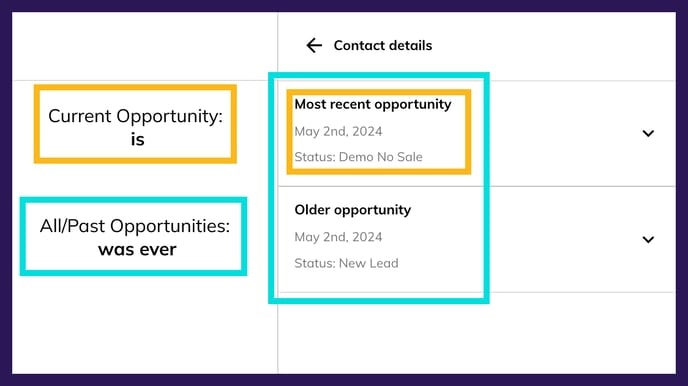
The Most recent opportunity is the set of data related to a contact that came into Hatch most recently.
* When querying dates, all ranges are *inclusive* , meaning that if you query:
* 06/17/2024 - 06/24/2024
* You will get all dates with a calendar date **on or between** June 17, 2024 12:00am and June 24, 2024 11:59pm
* 2 - 5 days ago
* You will get anything with a calendar date that was 2, 3, 4, or 5 days ago
### FAQ
The Most recent opportunity is the set of data related to a contact that came into Hatch most recently.
Anything that is not the Most recent opportunity is considered an Older opportunity.
When you use operators like is vs was ever, what you are saying is:
is: The query must be true specifically on the Most recent opportunitywas ever: The query can be true on any of the contact’s opportunities, whether or not the opportunity is the most recent set of data for a contact.
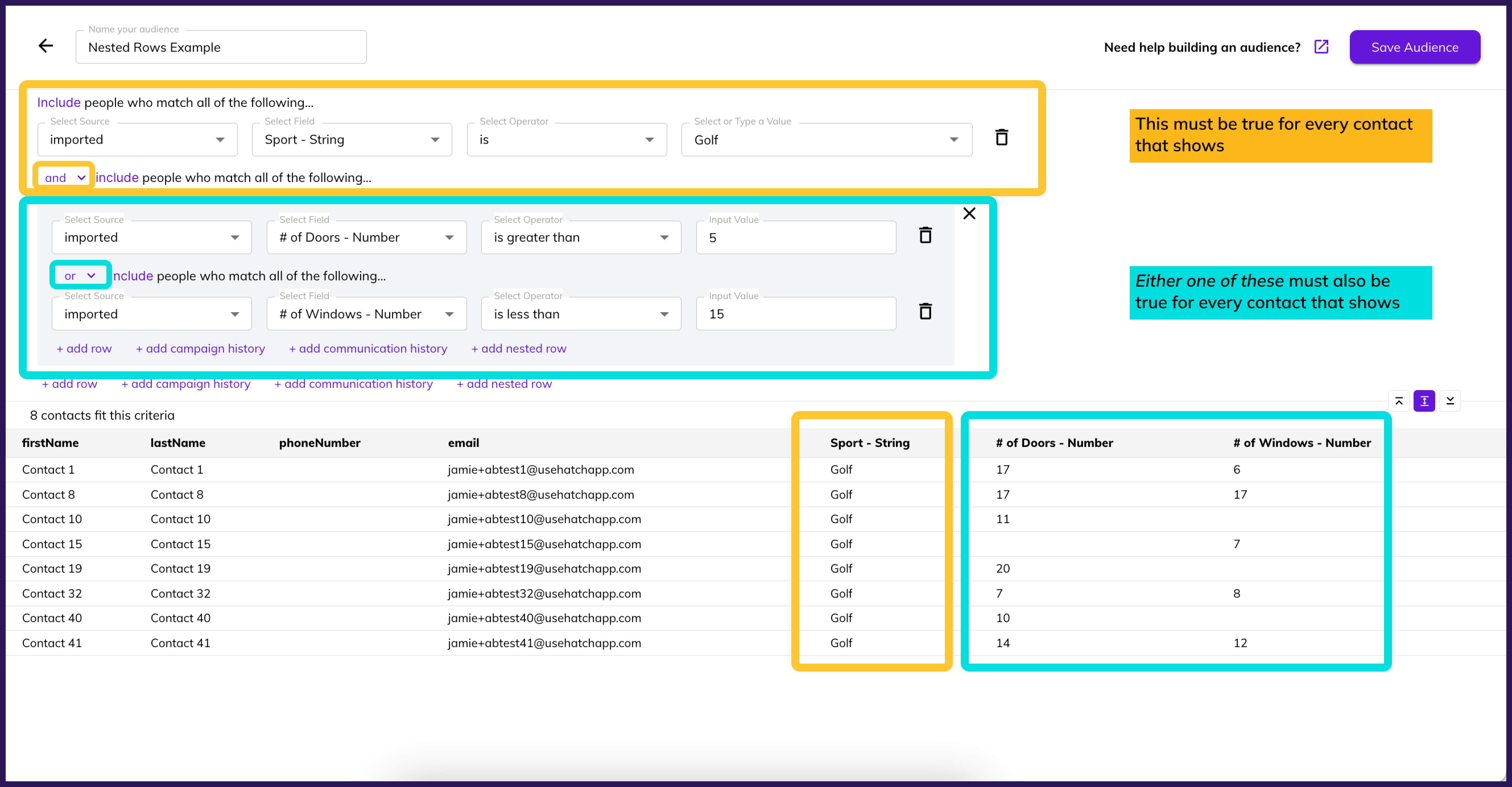
 A Nested Row is a way to put a query within a query to use both the
 and connector and the or connector.
-
For example:
Using only and connectors means “for a contact to show, it must fit every one of the rows in my Audience”!
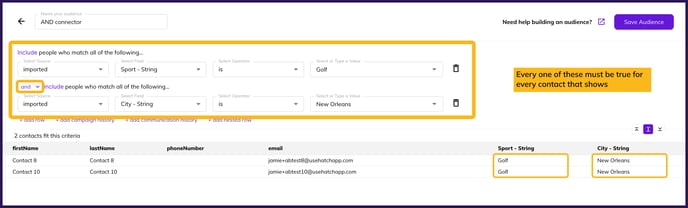
In this example, contacts will only show if the Sport is Golf AND the City is New Orleans.
-
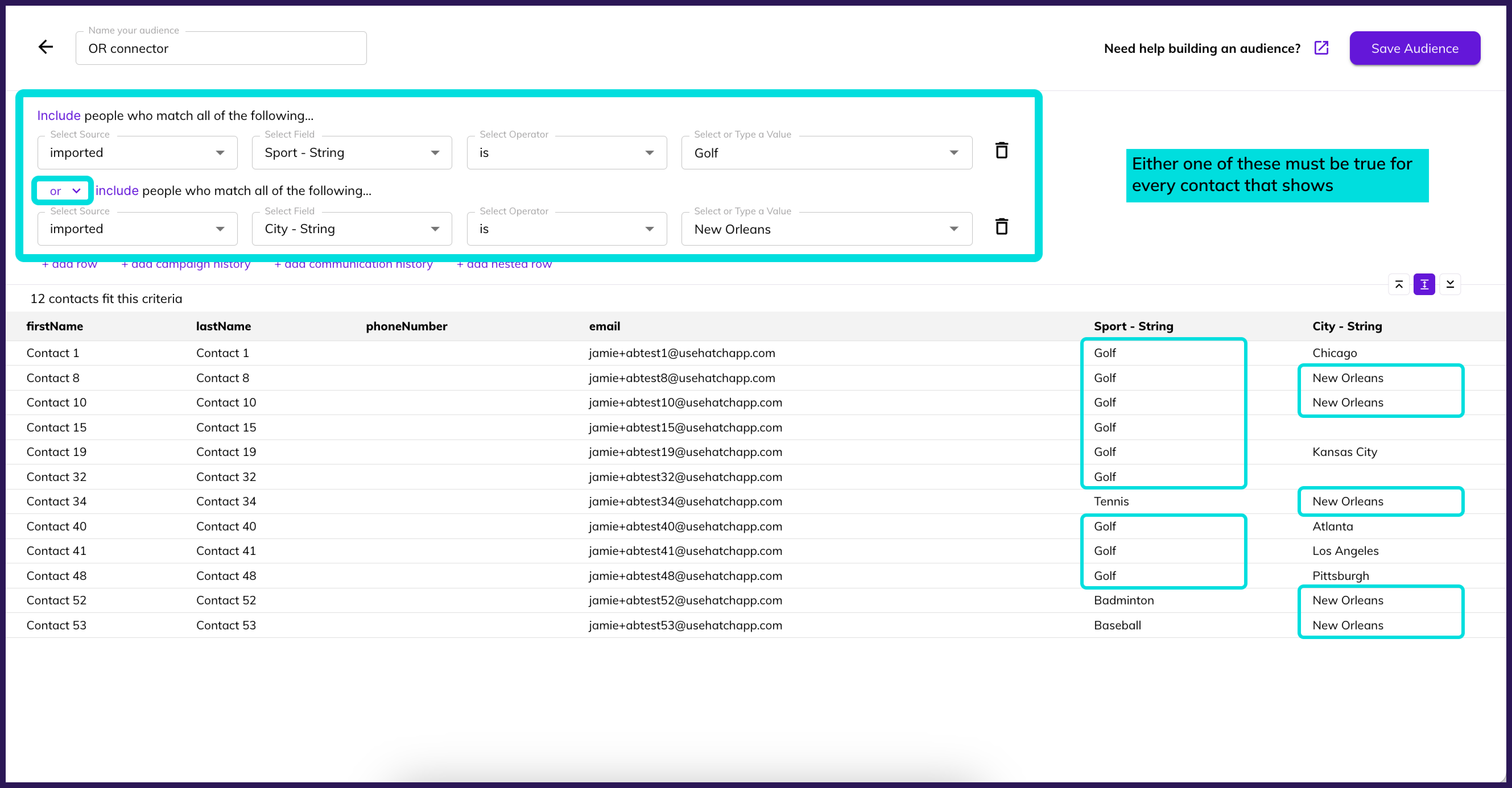
Using only
or connectors means “for a contact to show, it must fit any one of the rows in my Audience”!
-
Nested rows are a way to say “I want contacts that fit this row
and either one of these rows!"
When you use the Date field for campaign history, you are querying the date that the campaign started.
For example, if your row says:
Sales Follow-Up | Date | was ever between | now and | 5 | days | ago
what you are saying is:
- Show me contacts that started the Sales Follow-Up campaign between right now and 5 calendar days ago