> ## Documentation Index
> Fetch the complete documentation index at: https://docs.usehatchapp.com/llms.txt
> Use this file to discover all available pages before exploring further.
# Add Contact to Campaign from the Contact Card
> Adding a contact to campaign directly from the contact's conversation is a great way to keep your salesboard organized while still making sure contacts receive messages.
### Step by Step
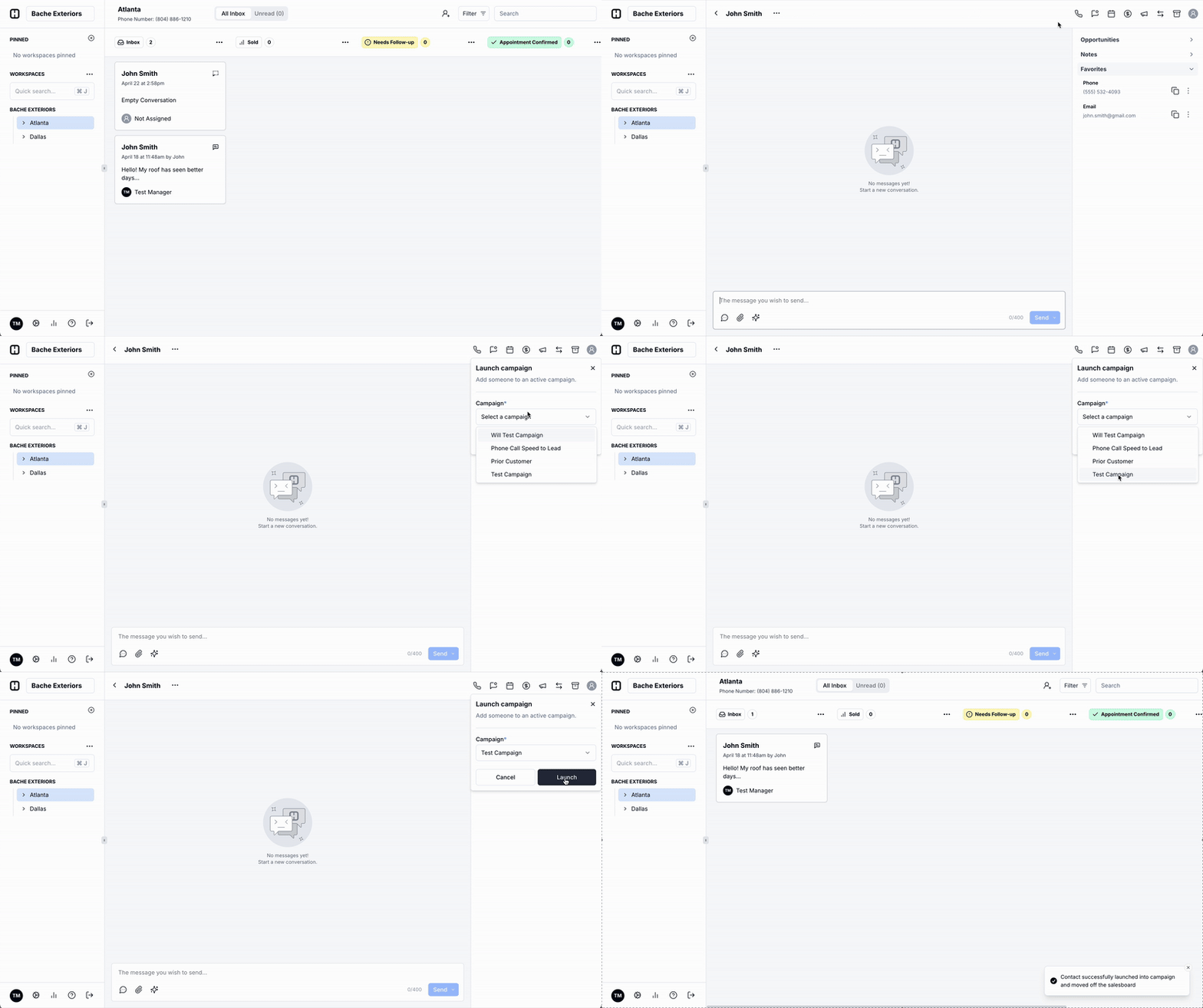 1. Navigate to a **contact card** on your Board.
2. In the top-right corner, click the the megaphone icon to **launch a campaign**.
3. Pick your campaign, and hit **Launch**. The contact will be launched into the campaign, and be moved off your board for safe keeping (find them on the Contacts page at any time).
4. When they respond to your campaign message, they will pop back up on your board and you can continue the conversation.
### Frequently Asked Questions
No! Typically, customers use a [Workflow](/how-to-use-hatch/workflows/workflows-overview) to get campaign messages to a contact. You can also manually launch contacts into a campaign from the Contacts page.
Contacts can only ever be in one campaign at a time. If you launch them into a campaign from open contact card, they can not be placed into another campaign until the campaign ends or the contact is taken out of the campaign.
Launching a contact directly from the conversation is an easy way to put the contact into a multi-touch campaign when you are ready to do so. If you only want to send one message to a contact, you should [schedule the message](/how-to-use-hatch/board-contact-card/contact-card-basics) directly from the contact card for a future time.
1. Navigate to a **contact card** on your Board.
2. In the top-right corner, click the the megaphone icon to **launch a campaign**.
3. Pick your campaign, and hit **Launch**. The contact will be launched into the campaign, and be moved off your board for safe keeping (find them on the Contacts page at any time).
4. When they respond to your campaign message, they will pop back up on your board and you can continue the conversation.
### Frequently Asked Questions
No! Typically, customers use a [Workflow](/how-to-use-hatch/workflows/workflows-overview) to get campaign messages to a contact. You can also manually launch contacts into a campaign from the Contacts page.
Contacts can only ever be in one campaign at a time. If you launch them into a campaign from open contact card, they can not be placed into another campaign until the campaign ends or the contact is taken out of the campaign.
Launching a contact directly from the conversation is an easy way to put the contact into a multi-touch campaign when you are ready to do so. If you only want to send one message to a contact, you should [schedule the message](/how-to-use-hatch/board-contact-card/contact-card-basics) directly from the contact card for a future time.