> ## Documentation Index
> Fetch the complete documentation index at: https://docs.usehatchapp.com/llms.txt
> Use this file to discover all available pages before exploring further.
# Conversations
The Conversations page shows a real-time log of all customer interactions across your organization.
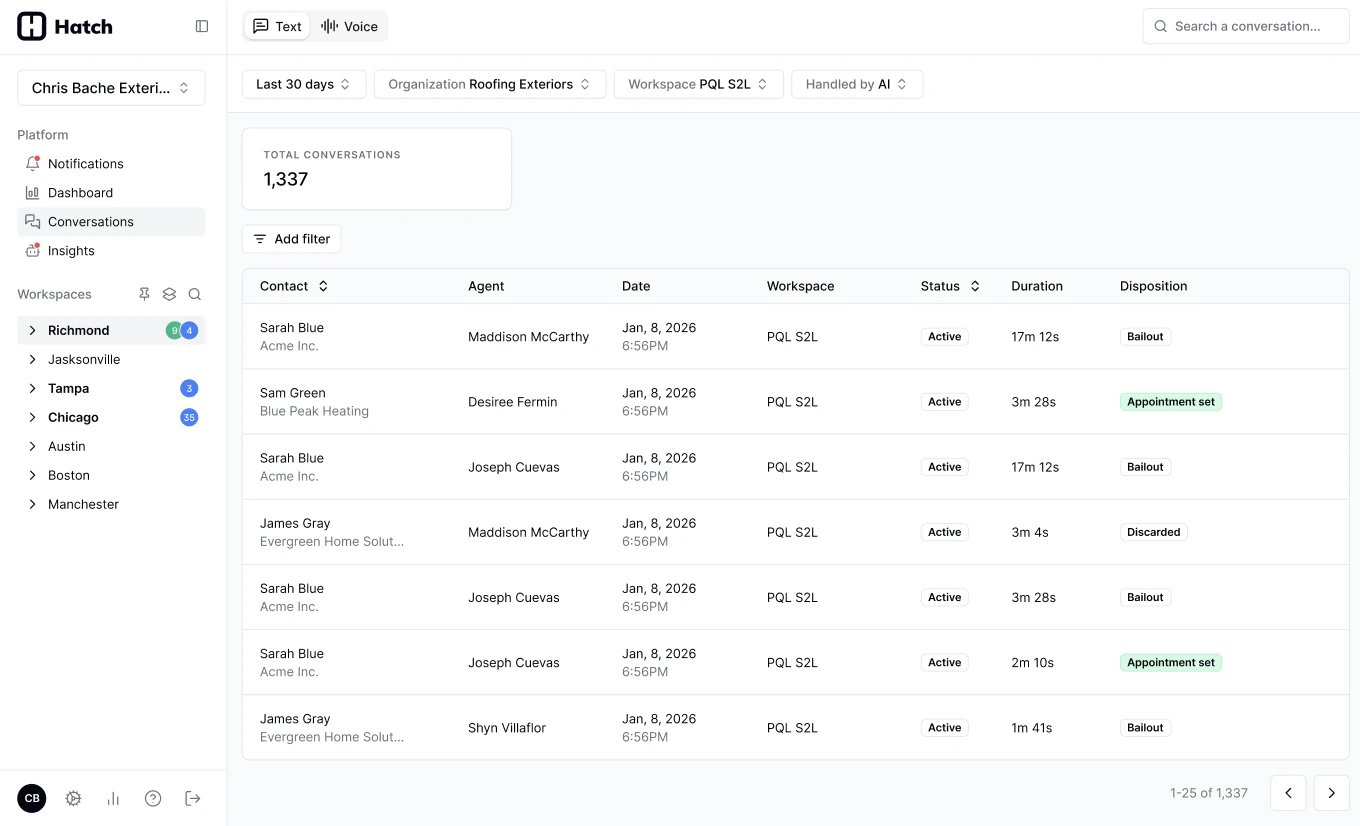 Each row represents a single conversation, created whenever a new interaction occurs.
## What you can do
For each conversation, you can quickly understand, in real-time:
* When it happened
* Who the contact is
* Which agent handled it (multiple agents may be involved)
* Disposition (the outcome of the conversation)
Filter the page to find what you care above:
* Search by **contact name, phone number, or email**
* Filter by:
* Organization
* Workspace
* Agent
* Date range
* Open any conversation to view full details and context
* (More filters to come)
***
## Navigation
* Go to Conversations in the left-hand sidebar
* **Voice** and **Text** tabs allow you to switch between conversation types
* Additional filters let you distinguish between **AI (chatbot)** and **human-handled** conversations
Each row represents a single conversation, created whenever a new interaction occurs.
## What you can do
For each conversation, you can quickly understand, in real-time:
* When it happened
* Who the contact is
* Which agent handled it (multiple agents may be involved)
* Disposition (the outcome of the conversation)
Filter the page to find what you care above:
* Search by **contact name, phone number, or email**
* Filter by:
* Organization
* Workspace
* Agent
* Date range
* Open any conversation to view full details and context
* (More filters to come)
***
## Navigation
* Go to Conversations in the left-hand sidebar
* **Voice** and **Text** tabs allow you to switch between conversation types
* Additional filters let you distinguish between **AI (chatbot)** and **human-handled** conversations
 ***
### Voice AI insights
For Voice AI conversations, you can access [**Conversational Analytics**](/how-to-use-hatch/conversations/conversational-analytics) directly to evaluate performance and outcomes.
### Real-time updates
Conversations update in real time—refresh the page to see the latest activity.
***
***
### Voice AI insights
For Voice AI conversations, you can access [**Conversational Analytics**](/how-to-use-hatch/conversations/conversational-analytics) directly to evaluate performance and outcomes.
### Real-time updates
Conversations update in real time—refresh the page to see the latest activity.
***