> ## Documentation Index
> Fetch the complete documentation index at: https://docs.usehatchapp.com/llms.txt
> Use this file to discover all available pages before exploring further.
# CSR and Agents Table
> Every column in the AI Agents and Human Agents tables on the Dashboard.
The [Dashboard](/how-to-use-hatch/dashboard/dashboard-overview) lists everyone handling conversations in your organization across two tables — **AI Agents** and **Human Agents**. They carry different columns, because an AI agent and a CSR are judged on different things.
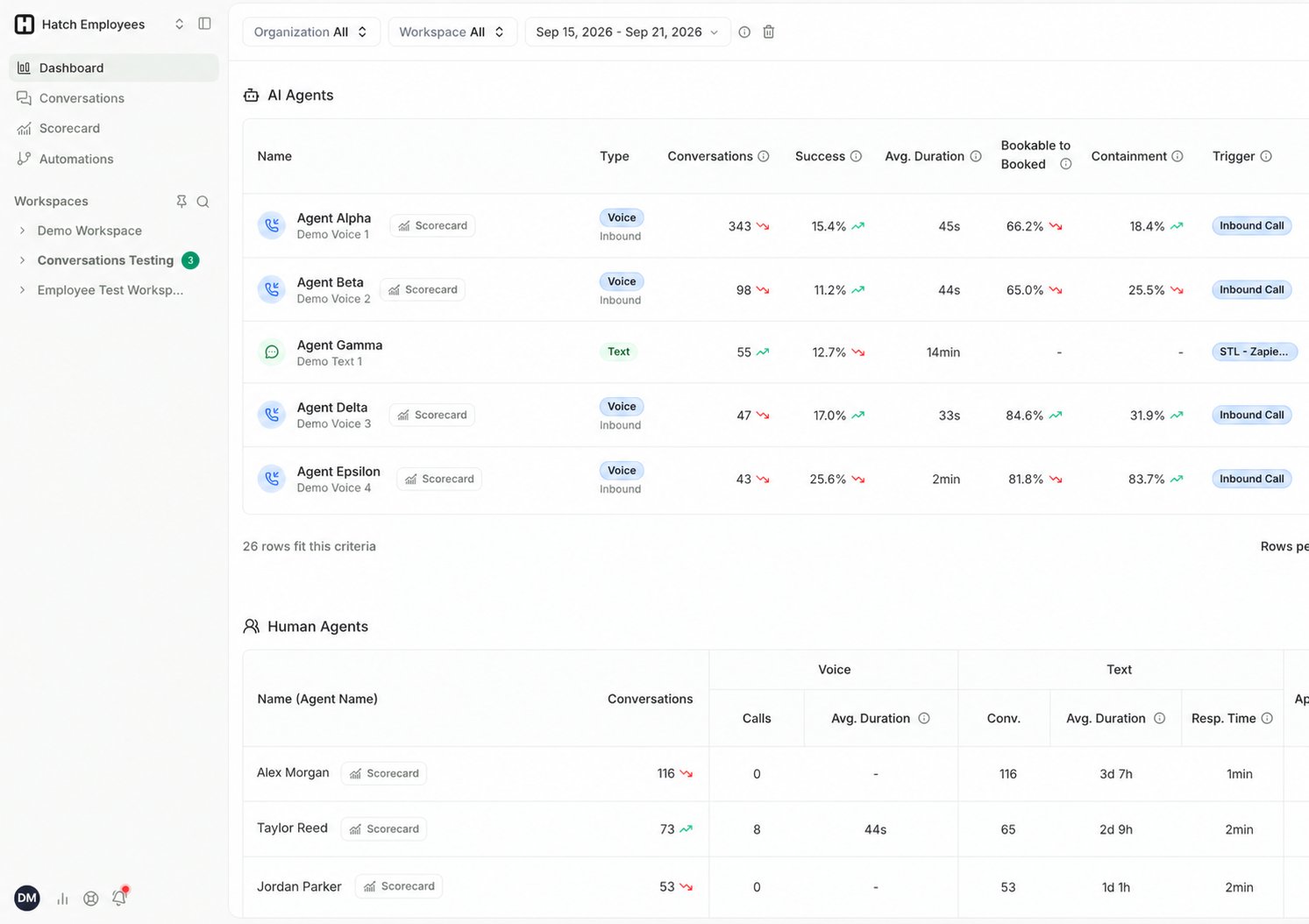 Most columns have an ⓘ tooltip in the app. Hover a column header for a quick definition without leaving the page.
## AI Agents
| Column | What it means |
| ---------------------------------- | ---------------------------------------------------------------------------------------------------------------------------------------------------------------------------------------------------------------------------------- |
| **Type** | The kind of agent — for example a Voice or Text agent. |
| **Conversations** | How many conversations the agent handled in the selected period. |
| **Success** | The percentage of those conversations that closed with a disposition you've marked as successful. See [Configuring Dispositions](/how-to-use-hatch/reporting-settings/configuring-dispositions). |
| **Avg. Duration** | How long a typical conversation ran. **Median**, not mean. |
| **Bookable to Booked** | The percentage of **bookable** calls the agent booked — the headline conversion number, since it ignores calls that were never bookable. **AI agents only.** See [Conversation Metrics](/how-to-use-hatch/conversations/glossary). |
| **Containment** | How much the agent saw through on its own. On **voice**, the percentage of calls that were neither **transferred** nor **abandoned**. On **text**, the percentage of conversations a human user took over. |
| **Trigger** | What starts the agent — for example an inbound call to a workspace, or a response to a campaign. |
| **Appointments · Sales · Revenue** | The outcomes attributed to that agent's conversations. |
## Human Agents
A CSR may work both channels, so the middle of this table splits into **Voice** and **Text** groups.
| Column | Channel | What it means |
| ---------------------------------- | ------- | ---------------------------------------------------------------------------------- |
| **Conversations** | Both | Total conversations handled across both channels. |
| **Calls** | Voice | How many calls the CSR took. |
| **Avg. Duration** | Voice | **Median** call length. |
| **Avg. Score** | Voice | The average score across the CSR's calls. |
| **Conv.** | Text | How many text conversations the CSR handled. |
| **Avg. Duration** | Text | **Median** length of a text conversation. |
| **Resp. Time** | Text | How quickly the CSR sent the **first response to a new campaign lead**. Text only. |
| **Appointments · Sales · Revenue** | Both | The outcomes attributed to that CSR's conversations. |
## How metrics are calculated
**Success** is based on the **dispositions** applied at the end of each conversation. You mark specific dispositions as successful, and Hatch uses that configuration to calculate every success-related metric on both tables. Set this under [Settings → Dispositions](/how-to-use-hatch/reporting-settings/configuring-dispositions).
If your success numbers look low or empty, check your disposition configuration first. A conversation that was never closed out with a disposition can't be counted as a success. See [Dispositions in Hatch](/how-to-use-hatch/board-contact-card/dispositions-in-hatch).
**Duration and response-time** columns use the **median**, not the mean. A median tells you what a typical conversation looked like; an average would be dragged around by outliers such as a call left connected for an hour.
## Filtering
Both tables respect the Dashboard filters — **organization**, **workspace**, and **time period**. Each table also has its own **Agent** picker for jumping straight to one agent.
## Going deeper
Click any AI agent to open its [Voice AI Scorecard](/how-to-use-hatch/dashboard/voice-ai-scorecard), or click through to the [Conversations page](/how-to-use-hatch/conversations/conversations) to read the conversations behind any number.
## Related Articles
* [Dashboard Overview](/how-to-use-hatch/dashboard/dashboard-overview): the Dashboard and how its metrics are calculated.
* [Voice AI Scorecard](/how-to-use-hatch/dashboard/voice-ai-scorecard): per-agent Voice AI performance.
* [Glossary](/how-to-use-hatch/conversations/glossary): what makes a call bookable, and what Handling means.
Most columns have an ⓘ tooltip in the app. Hover a column header for a quick definition without leaving the page.
## AI Agents
| Column | What it means |
| ---------------------------------- | ---------------------------------------------------------------------------------------------------------------------------------------------------------------------------------------------------------------------------------- |
| **Type** | The kind of agent — for example a Voice or Text agent. |
| **Conversations** | How many conversations the agent handled in the selected period. |
| **Success** | The percentage of those conversations that closed with a disposition you've marked as successful. See [Configuring Dispositions](/how-to-use-hatch/reporting-settings/configuring-dispositions). |
| **Avg. Duration** | How long a typical conversation ran. **Median**, not mean. |
| **Bookable to Booked** | The percentage of **bookable** calls the agent booked — the headline conversion number, since it ignores calls that were never bookable. **AI agents only.** See [Conversation Metrics](/how-to-use-hatch/conversations/glossary). |
| **Containment** | How much the agent saw through on its own. On **voice**, the percentage of calls that were neither **transferred** nor **abandoned**. On **text**, the percentage of conversations a human user took over. |
| **Trigger** | What starts the agent — for example an inbound call to a workspace, or a response to a campaign. |
| **Appointments · Sales · Revenue** | The outcomes attributed to that agent's conversations. |
## Human Agents
A CSR may work both channels, so the middle of this table splits into **Voice** and **Text** groups.
| Column | Channel | What it means |
| ---------------------------------- | ------- | ---------------------------------------------------------------------------------- |
| **Conversations** | Both | Total conversations handled across both channels. |
| **Calls** | Voice | How many calls the CSR took. |
| **Avg. Duration** | Voice | **Median** call length. |
| **Avg. Score** | Voice | The average score across the CSR's calls. |
| **Conv.** | Text | How many text conversations the CSR handled. |
| **Avg. Duration** | Text | **Median** length of a text conversation. |
| **Resp. Time** | Text | How quickly the CSR sent the **first response to a new campaign lead**. Text only. |
| **Appointments · Sales · Revenue** | Both | The outcomes attributed to that CSR's conversations. |
## How metrics are calculated
**Success** is based on the **dispositions** applied at the end of each conversation. You mark specific dispositions as successful, and Hatch uses that configuration to calculate every success-related metric on both tables. Set this under [Settings → Dispositions](/how-to-use-hatch/reporting-settings/configuring-dispositions).
If your success numbers look low or empty, check your disposition configuration first. A conversation that was never closed out with a disposition can't be counted as a success. See [Dispositions in Hatch](/how-to-use-hatch/board-contact-card/dispositions-in-hatch).
**Duration and response-time** columns use the **median**, not the mean. A median tells you what a typical conversation looked like; an average would be dragged around by outliers such as a call left connected for an hour.
## Filtering
Both tables respect the Dashboard filters — **organization**, **workspace**, and **time period**. Each table also has its own **Agent** picker for jumping straight to one agent.
## Going deeper
Click any AI agent to open its [Voice AI Scorecard](/how-to-use-hatch/dashboard/voice-ai-scorecard), or click through to the [Conversations page](/how-to-use-hatch/conversations/conversations) to read the conversations behind any number.
## Related Articles
* [Dashboard Overview](/how-to-use-hatch/dashboard/dashboard-overview): the Dashboard and how its metrics are calculated.
* [Voice AI Scorecard](/how-to-use-hatch/dashboard/voice-ai-scorecard): per-agent Voice AI performance.
* [Glossary](/how-to-use-hatch/conversations/glossary): what makes a call bookable, and what Handling means.