> ## Documentation Index
> Fetch the complete documentation index at: https://docs.usehatchapp.com/llms.txt
> Use this file to discover all available pages before exploring further.
# Voice AI Scorecard
> Per-agent call performance for your Voice AI agents — booking conversion, not booked reasons, handling, and call categories.
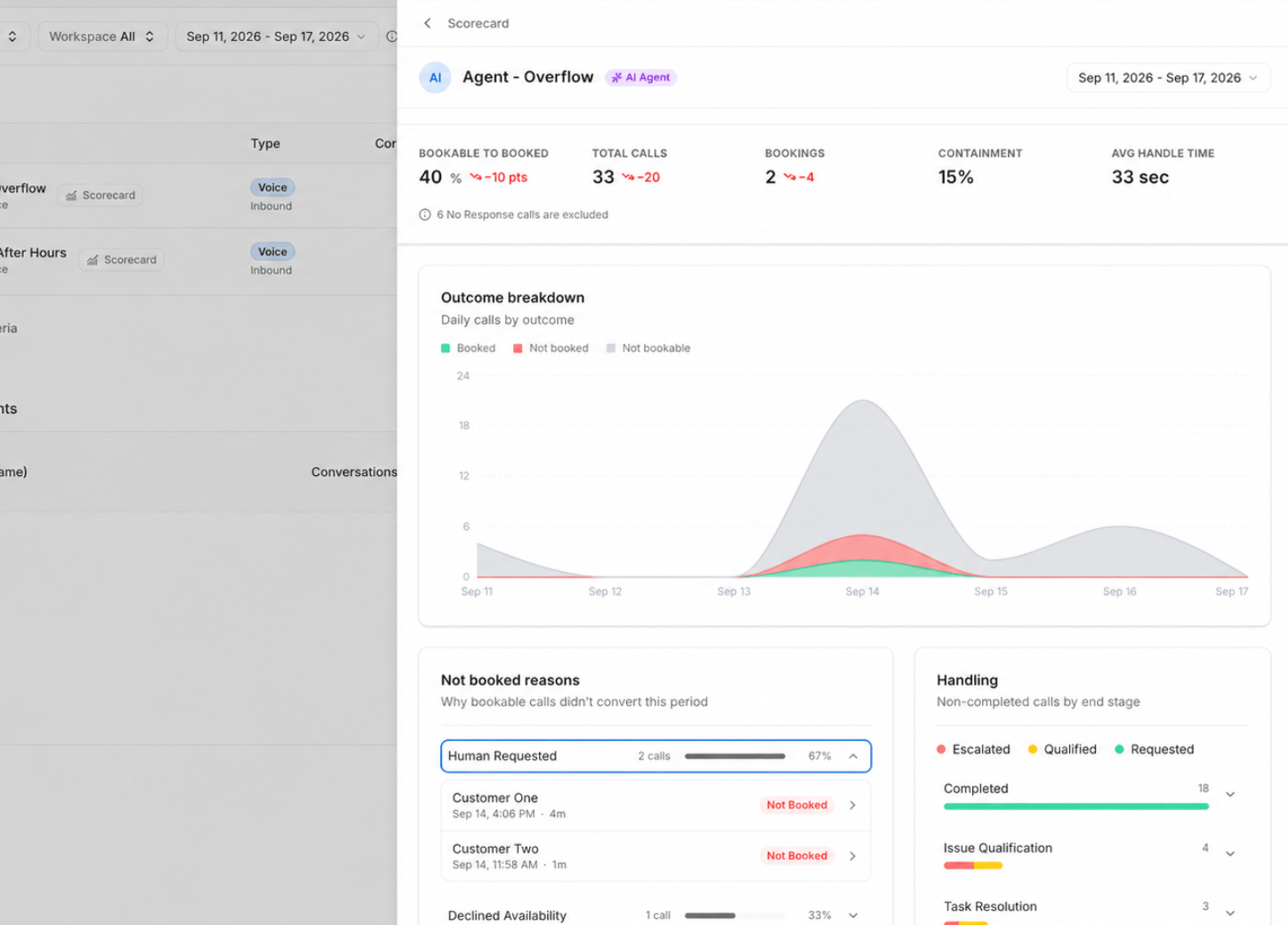
The Voice AI Scorecard shows call performance for a **single Voice AI agent**. Where the [CSR and Agents Table](/how-to-use-hatch/dashboard/csr-and-agents-table) compares every agent side by side, the Scorecard goes deep on one — showing not just how it's converting, but where it's losing calls and why.
Not Booked Reason, Handling Stage, and Handoff Classification — with every possible value and what it means.
## Getting there
Click the **Scorecard** button on the [Dashboard](/how-to-use-hatch/dashboard/dashboard-overview) view.
You'll see the Scorecard for any agent you can already see on the Dashboard — there's no separate permission to request.
The Scorecard covers **Voice AI agents** today. Support for AI Text and outbound agents is on the way.
## What it shows
Insights update in real time as calls come in.
How many calls are being booked, and how many were never bookable in the first place. Separating the two matters — a low booking count is only a problem if those calls were winnable. See [Conversation Metrics](/how-to-use-hatch/conversations/glossary) for what makes a call bookable.
Hatch automatically analyses every bookable call the agent **didn't** book and groups them by reason. This is the fastest way to find out what's actually costing you bookings, rather than guessing from a conversion rate.
Where calls are transferring during the booking process. Use this to work out whether a handoff was a proper escalation or a gap in the agent's setup — and therefore where to put your attention next.
What callers are actually ringing about. If the category mix doesn't match what your agent is configured for, that mismatch is usually worth fixing before anything else.
## Drilling into the calls
Most visuals on the Scorecard drill down to the specific calls behind them. Click through from any figure to see real examples on the [Conversations page](/how-to-use-hatch/conversations/conversations), where you can play the recording, read the transcript, and check the Context tab.
A rate on its own doesn't tell you what to change — the calls do. When you find one that went wrong, [flag it](/how-to-use-hatch/conversations/flagging-a-call) so your Hatch team can work it through to resolution.
## Metrics glossary
Every metric on the Scorecard — **Not Booked Reason**, **Handling Stage**, **Handoff Classification**, and the rest — is defined value by value in the [Glossary](/how-to-use-hatch/conversations/glossary#scorecard-metrics).
## Questions it answers
* How is this specific agent performing?
* What's driving its bookable-to-booked conversion?
* Where are the problem areas, and what should I fix first?
## Related Articles
* [Glossary](/how-to-use-hatch/conversations/glossary#scorecard-metrics): every Scorecard metric, value by value.
* [Dashboard Overview](/how-to-use-hatch/dashboard/dashboard-overview): the Dashboard and how its metrics are calculated.
* [CSR and Agents Table](/how-to-use-hatch/dashboard/csr-and-agents-table): compare every agent side by side.
* [Review your new AI Agent](/getting-started/hatch-assistant/review-your-new-ai-agent): where to start with a newly launched agent.