> ## Documentation Index
> Fetch the complete documentation index at: https://docs.usehatchapp.com/llms.txt
> Use this file to discover all available pages before exploring further.
# improveit360 (i360) Lightning
> An automatic and bi-directional sync between Hatch and improveit360
### Overview
* **Type:** CRM
* **Set-Up:** OAuth (Credentials)
* **Sync Frequency:** 15 minutes
### Setting Up the Integration
#### Instructions
Here’s what we need to get started:
1. Navigate to the Hatch app marketplace.
2. Click "Configure" on the improveit360 Lightning integration
3. The integration uses OAuth protocol to allow access to the Salesforce APIs, so all you need to do it click *connect* and then *authorize* on the i360 screen that will pop-up. Once authorized, return to the Hatch integration screen and the connection bubble should be blue.
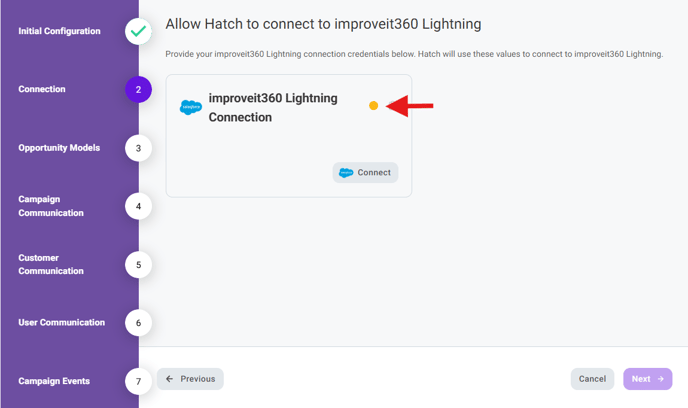 4. Continue through the configuration wizard to select the desired data objects and push communication options.
5. Don't forget to click Finish in order to save.
### Objects that Sync with Hatch
* Sales Opportunity (+ Contact + Account)
* Sales Appointment
* Project (and optionally Project Activities)
*Any fields or values under these objects will be syncing in Hatch and are available in the Hatch product.*
### How are Hatch opportunities created?
When an **opportunity** is generated that doesn’t match an existing **contact** , a new **contact** will be created. A new **opportunity** will be added to an existing **contact** if a match is found.
The integration will replace an existing Hatch opportunity when:
* The sync’d Hatch External ID matches the existing opportunity’s Hatch External ID (see below for how the External ID is mapped)
The integration will create an additional (new) Hatch opportunity when:
* The sync’d Hatch External ID does not match the existing opportunity’s Hatch External ID (see below for how the External ID is mapped)
### Hatch → lmproveit360
Hatch events and communications can be sync’d to Improveit360 Lightning in the following scenarios. These options are configured during the integration setup and can be reconfigured at any time.
**Push Events can be configured to appear in Improveit360 in the following locations:**
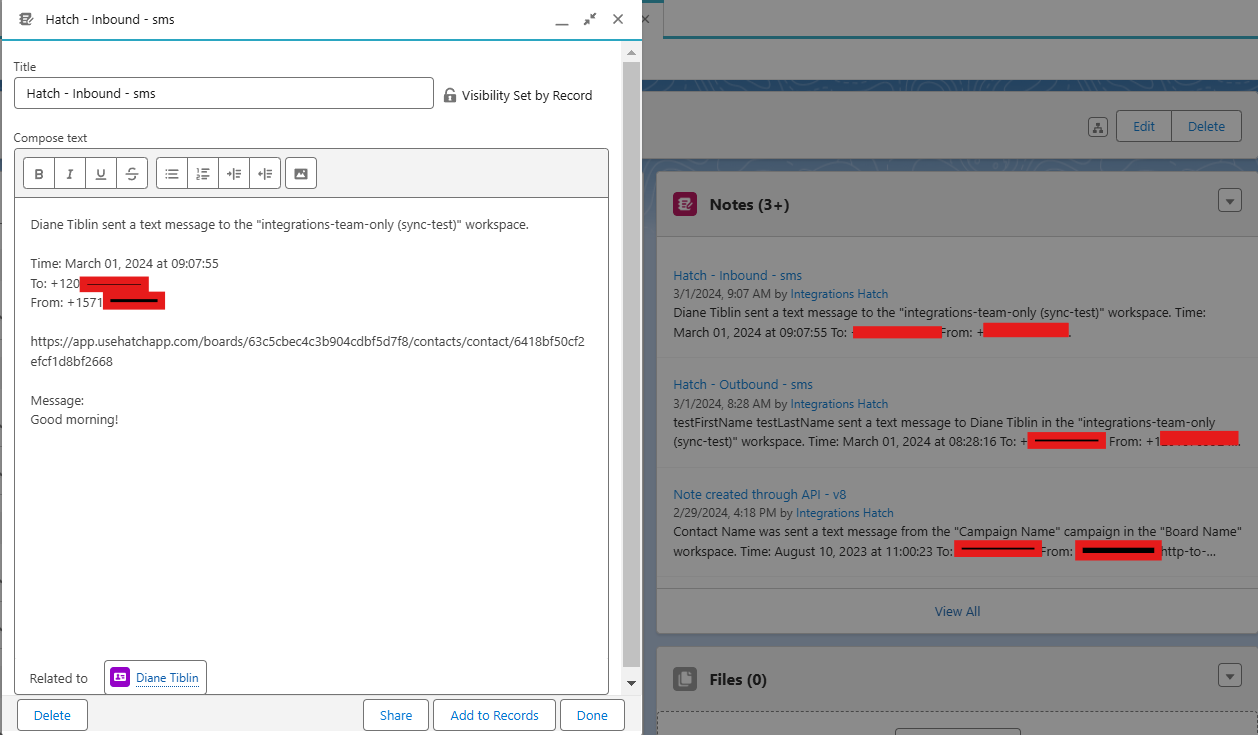
* A Note related to the Contact
4. Continue through the configuration wizard to select the desired data objects and push communication options.
5. Don't forget to click Finish in order to save.
### Objects that Sync with Hatch
* Sales Opportunity (+ Contact + Account)
* Sales Appointment
* Project (and optionally Project Activities)
*Any fields or values under these objects will be syncing in Hatch and are available in the Hatch product.*
### How are Hatch opportunities created?
When an **opportunity** is generated that doesn’t match an existing **contact** , a new **contact** will be created. A new **opportunity** will be added to an existing **contact** if a match is found.
The integration will replace an existing Hatch opportunity when:
* The sync’d Hatch External ID matches the existing opportunity’s Hatch External ID (see below for how the External ID is mapped)
The integration will create an additional (new) Hatch opportunity when:
* The sync’d Hatch External ID does not match the existing opportunity’s Hatch External ID (see below for how the External ID is mapped)
### Hatch → lmproveit360
Hatch events and communications can be sync’d to Improveit360 Lightning in the following scenarios. These options are configured during the integration setup and can be reconfigured at any time.
**Push Events can be configured to appear in Improveit360 in the following locations:**
* A Note related to the Contact
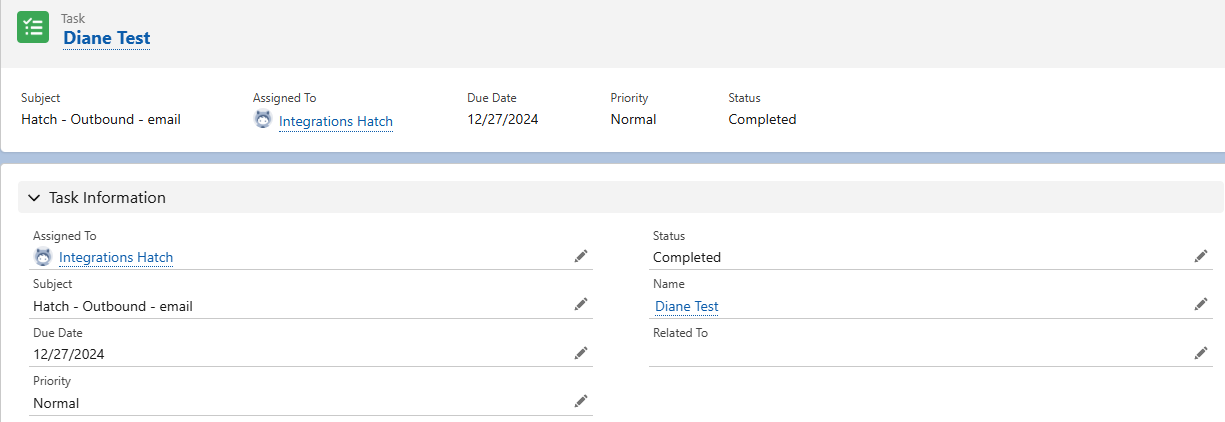
 * A completed Task related to the Contact (where the event details can be found in a comment)
 **The following Hatch events are supported:**
* When a Hatch campaign sends an outbound communication to a contact
* When a Hatch user sends an outbound communication to a contact
* When a contact sends an inbound communication to a Hatch workspace
* When specific events occur within a Hatch campaign:
* A contact is launched (added) to a Hatch campaign
* A contact is sent the first message of a Hatch campaign
* A contact is removed from a Hatch campaign before it has ended
* A contact completed a Hatch campaign
### Frequently Asked Questions
Most of the time this error occurs, it's due to missing API permissions. In particular, it's worth checking to make sure the user you're attempting to authorizing Hatch with [**has Connected Apps OAuth Usage enabled**](https://help.salesforce.com/s/articleView?id=005132365\&type=1).
On the profile level, there is a new permission that needs to be added to the **custom** Admin Profile regarding Connected Apps:\
\
*Setup>Profile( Admin)>Edit>Administrative Permission*\
\
In here, check the box that says 'Approve Uninstalled Connected Apps'.
Afterwards, make sure you saved the changes and attempt to reintegrate with Hatch.
**The following Hatch events are supported:**
* When a Hatch campaign sends an outbound communication to a contact
* When a Hatch user sends an outbound communication to a contact
* When a contact sends an inbound communication to a Hatch workspace
* When specific events occur within a Hatch campaign:
* A contact is launched (added) to a Hatch campaign
* A contact is sent the first message of a Hatch campaign
* A contact is removed from a Hatch campaign before it has ended
* A contact completed a Hatch campaign
### Frequently Asked Questions
Most of the time this error occurs, it's due to missing API permissions. In particular, it's worth checking to make sure the user you're attempting to authorizing Hatch with [**has Connected Apps OAuth Usage enabled**](https://help.salesforce.com/s/articleView?id=005132365\&type=1).
On the profile level, there is a new permission that needs to be added to the **custom** Admin Profile regarding Connected Apps:\
\
*Setup>Profile( Admin)>Edit>Administrative Permission*\
\
In here, check the box that says 'Approve Uninstalled Connected Apps'.
Afterwards, make sure you saved the changes and attempt to reintegrate with Hatch.