> ## Documentation Index
> Fetch the complete documentation index at: https://docs.usehatchapp.com/llms.txt
> Use this file to discover all available pages before exploring further.
# ServiceMinder
> What is Hatch's ServiceMinder integration, how it works, and where to begin.
### Overview
* **Type:** CRM
* **Version:** Prismatic/Hatch App Marketplace
* **Setup Type:** Credentials
* **Sync Frequency:** 15 minutes
### Setting Up the Integration
#### Instructions
1. Navigate to the Hatch app marketplace
2. Click *Connect* on the ServiceMinder integration
3. Enter your ServiceMinder API Key, User ID, and desired timezone
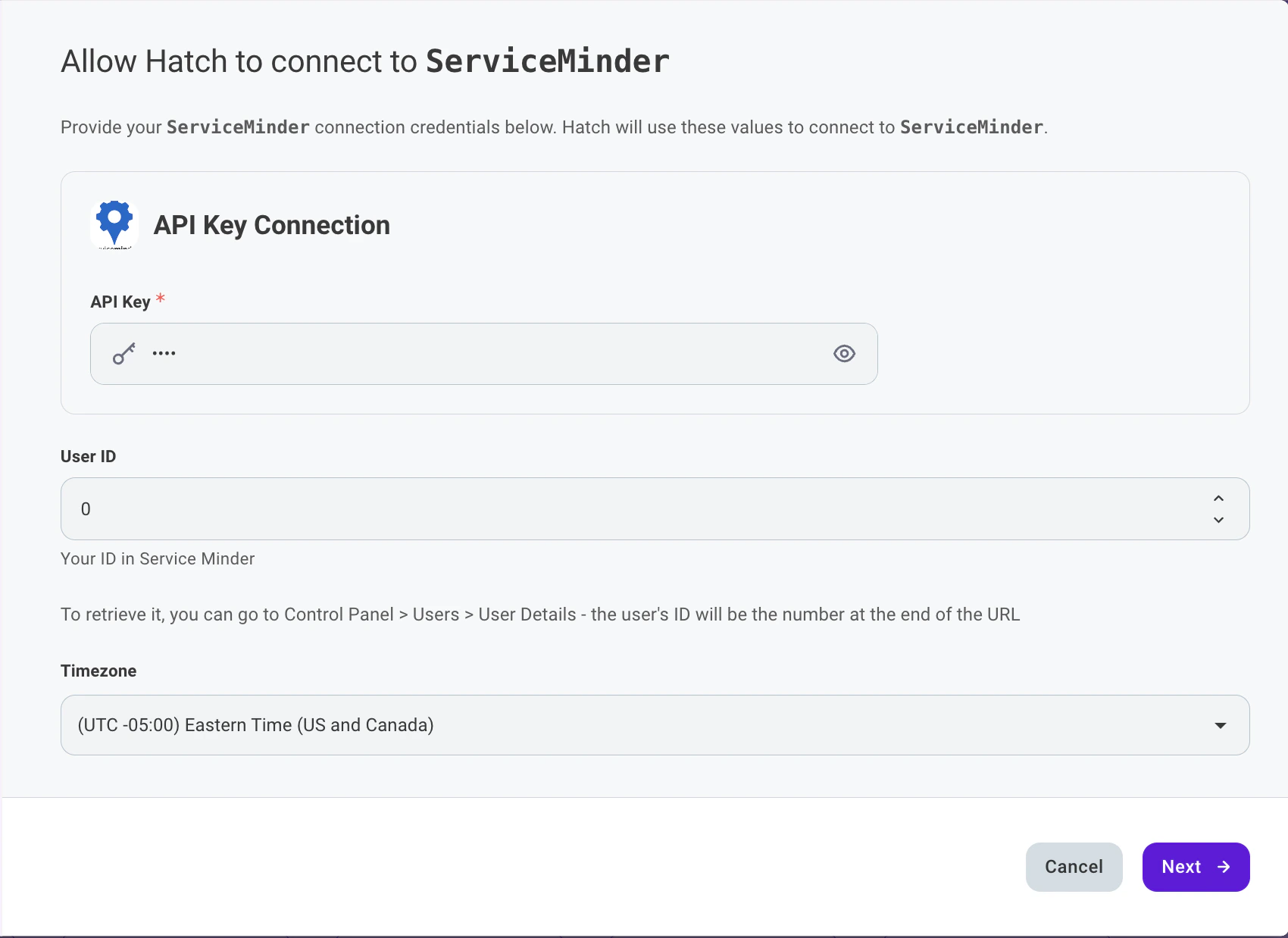 4. Select which data objects from ServiceMinder you would like Hatch to retrieve: Appointments, Proposals, Contacts
5. Select whether you would like Hatch to sync customer communications with Contact Notes
6. Click *Finish* to save.
### Objects that Sync from ServiceMinder Into Hatch
* **Appointment**
* **Proposals**
* **Contacts**
*Any fields or values under these objects will be syncing in Hatch and are available in the Hatch product.*
### How is ServiceMinder data stored in Hatch?
#### Opportunity Models
There are three types of Hatch opportunities that the ServiceMinder integration creates:
* **Contact Opportunity** — Created from ServiceMinder Contact records. Includes customer details such as name, email, and phone number.
* **Appointment Opportunity** — Created from ServiceMinder Appointment records. Includes scheduling, service, and billing details.
* **Proposal Opportunity** — Created from ServiceMinder Proposal records. Includes pricing, service, and status details along with any custom fields.
#### Opportunity Creation & Update
When an **opportunity** is generated that doesn't match an existing **contact**, a new **contact** will be created. A new **opportunity** will be added to an existing **contact** if a match is found.
The integration will replace an existing Hatch opportunity when:
* The synced Hatch External ID matches the existing opportunity's Hatch External ID (see below for how the External ID is mapped)
The integration will create an additional (new) Hatch opportunity when:
* The synced Hatch External ID does not match the existing opportunity's Hatch External ID (see below for how the External ID is mapped)
### What ServiceMinder data is available in Hatch?
#### Standard Field Mapping
**Contact Opportunity**
The base object of this opportunity model is the ServiceMinder **Contact**. Therefore, (as an example) the `Id` field below would indicate the ID of the ServiceMinder Contact record.
| Hatch Standard Field | ServiceMinder Detail Field |
| --------------------- | ----------------------------------------- |
| `Email` | `Email` |
| `External ID` | `Id` |
| `External Contact ID` | `Id` |
| `External Created At` | `CreatedAt` |
| `External Updated At` | `UpdatedAt` |
| `First Name` | `Name` (first portion) |
| `Last Name` | `Name` (last portion) |
| `Phone Number` | `Pri Phone` (or, if missing: `Alt Phone`) |
**Appointment Opportunity**
The base object of this opportunity model is the ServiceMinder **Appointment**. Therefore, (as an example) the `Id` field below would indicate the ID of the ServiceMinder Appointment record.
| Hatch Standard Field | ServiceMinder Detail Field |
| --------------------- | ----------------------------------------- |
| `Email` | `Email` |
| `External ID` | `Id` |
| `External Contact ID` | `Contact Id` |
| `External Created At` | `CreatedAt` |
| `External Updated At` | `Updated At` |
| `First Name` | `Name` (first portion) |
| `Last Name` | `Name` (last portion) |
| `Phone Number` | `Pri Phone` (or, if missing: `Alt Phone`) |
| `Status` | `Status` |
**Proposal Opportunity**
The base object of this opportunity model is the ServiceMinder **Proposal**. Therefore, (as an example) the `Id` field below would indicate the ID of the ServiceMinder Proposal record. If a Proposal has an empty status, Hatch will default the status to "Unknown".
| Hatch Standard Field | ServiceMinder Detail Field |
| --------------------- | -------------------------- |
| `Email` | `Email` |
| `External ID` | `Id` |
| `External Contact ID` | `Contact Id` |
| `External Created At` | `Created` |
| `External Updated At` | `Updated` |
| `First Name` | `Name` (first portion) |
| `Last Name` | `Name` (last portion) |
| `Phone Number` | `Phone` |
| `Status` | `Status` |
#### Detail Fields
The following fields are available in the opportunity details for each opportunity model:
**Contact Opportunity**
| Field | Type |
| ----------- | ------ |
| `Id` | Number |
| `Name` | String |
| `Email` | String |
| `Pri Phone` | String |
| `Alt Phone` | String |
| `CreatedAt` | Date |
| `UpdatedAt` | Date |
**Appointment Opportunity**
| Field | Type |
| -------------------------- | ------ |
| `Id` | Number |
| `Contact Id` | Number |
| `Name` | String |
| `Status` | String |
| `Scheduled Start` | String |
| `Scheduled Duration Clock` | String |
| `Address1` | String |
| `Address2` | String |
| `City` | String |
| `State` | String |
| `Postal Code` | String |
| `Email` | String |
| `Pri Phone` | String |
| `Alt Phone` | String |
| `Service` | String |
| `Service Agent` | String |
| `Additional Agents` | String |
| `Actual Start` | String |
| `Actual Finish` | String |
| `Actual Duration Clock` | String |
| `Constraints` | String |
| `GeoZones` | String |
| `Flash Message` | String |
| `Total` | String |
| `Tentative` | String |
| `Accounting Class` | String |
| `Confirmation` | String |
| `En Route` | String |
| `Canceled At` | String |
| `Cancel Reason` | String |
| `Invoice` | String |
| `Rework For` | String |
| `Proposal Id` | String |
| `Tax` | String |
| `Start Distance` | String |
| `Appt Flash Message` | String |
| `Created By` | String |
| `Labor` | String |
| `Materials` | String |
| `Updated At` | String |
| `Subtotal` | String |
| `Channel` | String |
| `Campaign` | String |
| `Team` | String |
| `Service Agent Start` | String |
| `Service Agent Finish` | String |
| `Actual Duration Man` | String |
| `Community` | String |
| `CreatedAt` | Date |
**Proposal Opportunity**
| Field | Type |
| ------------------------------ | ------ |
| `Id` | Number |
| `Contact Id` | Number |
| `Name` | String |
| `Status` | String |
| `Date` | String |
| `Accepted Date` | String |
| `Service` | String |
| `Title` | String |
| `Duration` | String |
| `Visits` | String |
| `Email` | String |
| `Phone` | String |
| `Address 1` | String |
| `Address 2` | String |
| `City` | String |
| `State` | String |
| `Zip` | String |
| `Subtotal` | String |
| `Value` | String |
| `Deposit` | String |
| `Progress %` | String |
| `Invoiced %` | String |
| `Owner` | String |
| `Channel` | String |
| `Campaign` | String |
| `Last Viewed` | String |
| `Sent` | String |
| `Created` | String |
| `Accounting Class` | String |
| `Contact Category` | String |
| `Type` | String |
| `Decline Reason` | String |
| `Decline Date` | String |
| `Gross Subtotal` | String |
| `Accepted By` | String |
| `Territory ID` | String |
| `Change Order For Proposal Id` | String |
| `Materials` | String |
| `Labor` | String |
| `Expenses` | String |
| `Updated` | String |
| `Revenue Category` | String |
| `Asset Start Date` | String |
| `Asset Days` | String |
| `Managed By` | String |
| `Last Printed` | String |
| `Options` | String |
### Does Hatch sync information back to ServiceMinder?
Hatch events and/or communications can be synced to ServiceMinder in the following scenarios. These options are configurable during the integration setup. If enabled, Hatch will log the push communications as a **Contact Note** on the associated ServiceMinder Contact record.
Keep in mind that push communications occur instantaneously. There must be a ServiceMinder record in Hatch at the time of the communication event in order for it to succeed.
* When a Hatch campaign sends a text/email/voicemail to a contact
* When a contact calls or sends a text/email/voicemail to a Hatch workspace
* When a Hatch user calls or sends a text/email to a contact
* When events occur within a Hatch campaign
* A contact is launched (added) to a Hatch campaign
* A contact is sent the first message of a Hatch campaign
* A contact is removed from a Hatch campaign before it has ended
* A contact completed a Hatch campaign
### FAQ
Every 15 minutes.
Yes. During the integration setup, you can individually enable or disable syncing for Contacts, Appointments, and Proposals.
If a ServiceMinder Proposal has an empty status field, Hatch will default the status to "Unknown".
ServiceMinder provides a single combined Name field. Hatch automatically splits this into separate First Name and Last Name fields.
When push communications are enabled, Hatch communications will appear as Contact Notes on the associated ServiceMinder Contact record. Each note includes a title describing the communication type and a body with the message content.
Hatch does not update any status in ServiceMinder through the integration. However, if you change the status in ServiceMinder, Hatch will update that contact's information the next time it syncs (every 15 minutes).
Select the timezone your organization operates in. Hatch uses this setting to correctly convert timestamps when syncing data between ServiceMinder and Hatch.
***
4. Select which data objects from ServiceMinder you would like Hatch to retrieve: Appointments, Proposals, Contacts
5. Select whether you would like Hatch to sync customer communications with Contact Notes
6. Click *Finish* to save.
### Objects that Sync from ServiceMinder Into Hatch
* **Appointment**
* **Proposals**
* **Contacts**
*Any fields or values under these objects will be syncing in Hatch and are available in the Hatch product.*
### How is ServiceMinder data stored in Hatch?
#### Opportunity Models
There are three types of Hatch opportunities that the ServiceMinder integration creates:
* **Contact Opportunity** — Created from ServiceMinder Contact records. Includes customer details such as name, email, and phone number.
* **Appointment Opportunity** — Created from ServiceMinder Appointment records. Includes scheduling, service, and billing details.
* **Proposal Opportunity** — Created from ServiceMinder Proposal records. Includes pricing, service, and status details along with any custom fields.
#### Opportunity Creation & Update
When an **opportunity** is generated that doesn't match an existing **contact**, a new **contact** will be created. A new **opportunity** will be added to an existing **contact** if a match is found.
The integration will replace an existing Hatch opportunity when:
* The synced Hatch External ID matches the existing opportunity's Hatch External ID (see below for how the External ID is mapped)
The integration will create an additional (new) Hatch opportunity when:
* The synced Hatch External ID does not match the existing opportunity's Hatch External ID (see below for how the External ID is mapped)
### What ServiceMinder data is available in Hatch?
#### Standard Field Mapping
**Contact Opportunity**
The base object of this opportunity model is the ServiceMinder **Contact**. Therefore, (as an example) the `Id` field below would indicate the ID of the ServiceMinder Contact record.
| Hatch Standard Field | ServiceMinder Detail Field |
| --------------------- | ----------------------------------------- |
| `Email` | `Email` |
| `External ID` | `Id` |
| `External Contact ID` | `Id` |
| `External Created At` | `CreatedAt` |
| `External Updated At` | `UpdatedAt` |
| `First Name` | `Name` (first portion) |
| `Last Name` | `Name` (last portion) |
| `Phone Number` | `Pri Phone` (or, if missing: `Alt Phone`) |
**Appointment Opportunity**
The base object of this opportunity model is the ServiceMinder **Appointment**. Therefore, (as an example) the `Id` field below would indicate the ID of the ServiceMinder Appointment record.
| Hatch Standard Field | ServiceMinder Detail Field |
| --------------------- | ----------------------------------------- |
| `Email` | `Email` |
| `External ID` | `Id` |
| `External Contact ID` | `Contact Id` |
| `External Created At` | `CreatedAt` |
| `External Updated At` | `Updated At` |
| `First Name` | `Name` (first portion) |
| `Last Name` | `Name` (last portion) |
| `Phone Number` | `Pri Phone` (or, if missing: `Alt Phone`) |
| `Status` | `Status` |
**Proposal Opportunity**
The base object of this opportunity model is the ServiceMinder **Proposal**. Therefore, (as an example) the `Id` field below would indicate the ID of the ServiceMinder Proposal record. If a Proposal has an empty status, Hatch will default the status to "Unknown".
| Hatch Standard Field | ServiceMinder Detail Field |
| --------------------- | -------------------------- |
| `Email` | `Email` |
| `External ID` | `Id` |
| `External Contact ID` | `Contact Id` |
| `External Created At` | `Created` |
| `External Updated At` | `Updated` |
| `First Name` | `Name` (first portion) |
| `Last Name` | `Name` (last portion) |
| `Phone Number` | `Phone` |
| `Status` | `Status` |
#### Detail Fields
The following fields are available in the opportunity details for each opportunity model:
**Contact Opportunity**
| Field | Type |
| ----------- | ------ |
| `Id` | Number |
| `Name` | String |
| `Email` | String |
| `Pri Phone` | String |
| `Alt Phone` | String |
| `CreatedAt` | Date |
| `UpdatedAt` | Date |
**Appointment Opportunity**
| Field | Type |
| -------------------------- | ------ |
| `Id` | Number |
| `Contact Id` | Number |
| `Name` | String |
| `Status` | String |
| `Scheduled Start` | String |
| `Scheduled Duration Clock` | String |
| `Address1` | String |
| `Address2` | String |
| `City` | String |
| `State` | String |
| `Postal Code` | String |
| `Email` | String |
| `Pri Phone` | String |
| `Alt Phone` | String |
| `Service` | String |
| `Service Agent` | String |
| `Additional Agents` | String |
| `Actual Start` | String |
| `Actual Finish` | String |
| `Actual Duration Clock` | String |
| `Constraints` | String |
| `GeoZones` | String |
| `Flash Message` | String |
| `Total` | String |
| `Tentative` | String |
| `Accounting Class` | String |
| `Confirmation` | String |
| `En Route` | String |
| `Canceled At` | String |
| `Cancel Reason` | String |
| `Invoice` | String |
| `Rework For` | String |
| `Proposal Id` | String |
| `Tax` | String |
| `Start Distance` | String |
| `Appt Flash Message` | String |
| `Created By` | String |
| `Labor` | String |
| `Materials` | String |
| `Updated At` | String |
| `Subtotal` | String |
| `Channel` | String |
| `Campaign` | String |
| `Team` | String |
| `Service Agent Start` | String |
| `Service Agent Finish` | String |
| `Actual Duration Man` | String |
| `Community` | String |
| `CreatedAt` | Date |
**Proposal Opportunity**
| Field | Type |
| ------------------------------ | ------ |
| `Id` | Number |
| `Contact Id` | Number |
| `Name` | String |
| `Status` | String |
| `Date` | String |
| `Accepted Date` | String |
| `Service` | String |
| `Title` | String |
| `Duration` | String |
| `Visits` | String |
| `Email` | String |
| `Phone` | String |
| `Address 1` | String |
| `Address 2` | String |
| `City` | String |
| `State` | String |
| `Zip` | String |
| `Subtotal` | String |
| `Value` | String |
| `Deposit` | String |
| `Progress %` | String |
| `Invoiced %` | String |
| `Owner` | String |
| `Channel` | String |
| `Campaign` | String |
| `Last Viewed` | String |
| `Sent` | String |
| `Created` | String |
| `Accounting Class` | String |
| `Contact Category` | String |
| `Type` | String |
| `Decline Reason` | String |
| `Decline Date` | String |
| `Gross Subtotal` | String |
| `Accepted By` | String |
| `Territory ID` | String |
| `Change Order For Proposal Id` | String |
| `Materials` | String |
| `Labor` | String |
| `Expenses` | String |
| `Updated` | String |
| `Revenue Category` | String |
| `Asset Start Date` | String |
| `Asset Days` | String |
| `Managed By` | String |
| `Last Printed` | String |
| `Options` | String |
### Does Hatch sync information back to ServiceMinder?
Hatch events and/or communications can be synced to ServiceMinder in the following scenarios. These options are configurable during the integration setup. If enabled, Hatch will log the push communications as a **Contact Note** on the associated ServiceMinder Contact record.
Keep in mind that push communications occur instantaneously. There must be a ServiceMinder record in Hatch at the time of the communication event in order for it to succeed.
* When a Hatch campaign sends a text/email/voicemail to a contact
* When a contact calls or sends a text/email/voicemail to a Hatch workspace
* When a Hatch user calls or sends a text/email to a contact
* When events occur within a Hatch campaign
* A contact is launched (added) to a Hatch campaign
* A contact is sent the first message of a Hatch campaign
* A contact is removed from a Hatch campaign before it has ended
* A contact completed a Hatch campaign
### FAQ
Every 15 minutes.
Yes. During the integration setup, you can individually enable or disable syncing for Contacts, Appointments, and Proposals.
If a ServiceMinder Proposal has an empty status field, Hatch will default the status to "Unknown".
ServiceMinder provides a single combined Name field. Hatch automatically splits this into separate First Name and Last Name fields.
When push communications are enabled, Hatch communications will appear as Contact Notes on the associated ServiceMinder Contact record. Each note includes a title describing the communication type and a body with the message content.
Hatch does not update any status in ServiceMinder through the integration. However, if you change the status in ServiceMinder, Hatch will update that contact's information the next time it syncs (every 15 minutes).
Select the timezone your organization operates in. Hatch uses this setting to correctly convert timestamps when syncing data between ServiceMinder and Hatch.
***