> ## Documentation Index
> Fetch the complete documentation index at: https://docs.usehatchapp.com/llms.txt
> Use this file to discover all available pages before exploring further.

# Glossary

> What every AI conversation metric means — on the Conversations page and on the Voice AI Scorecard.

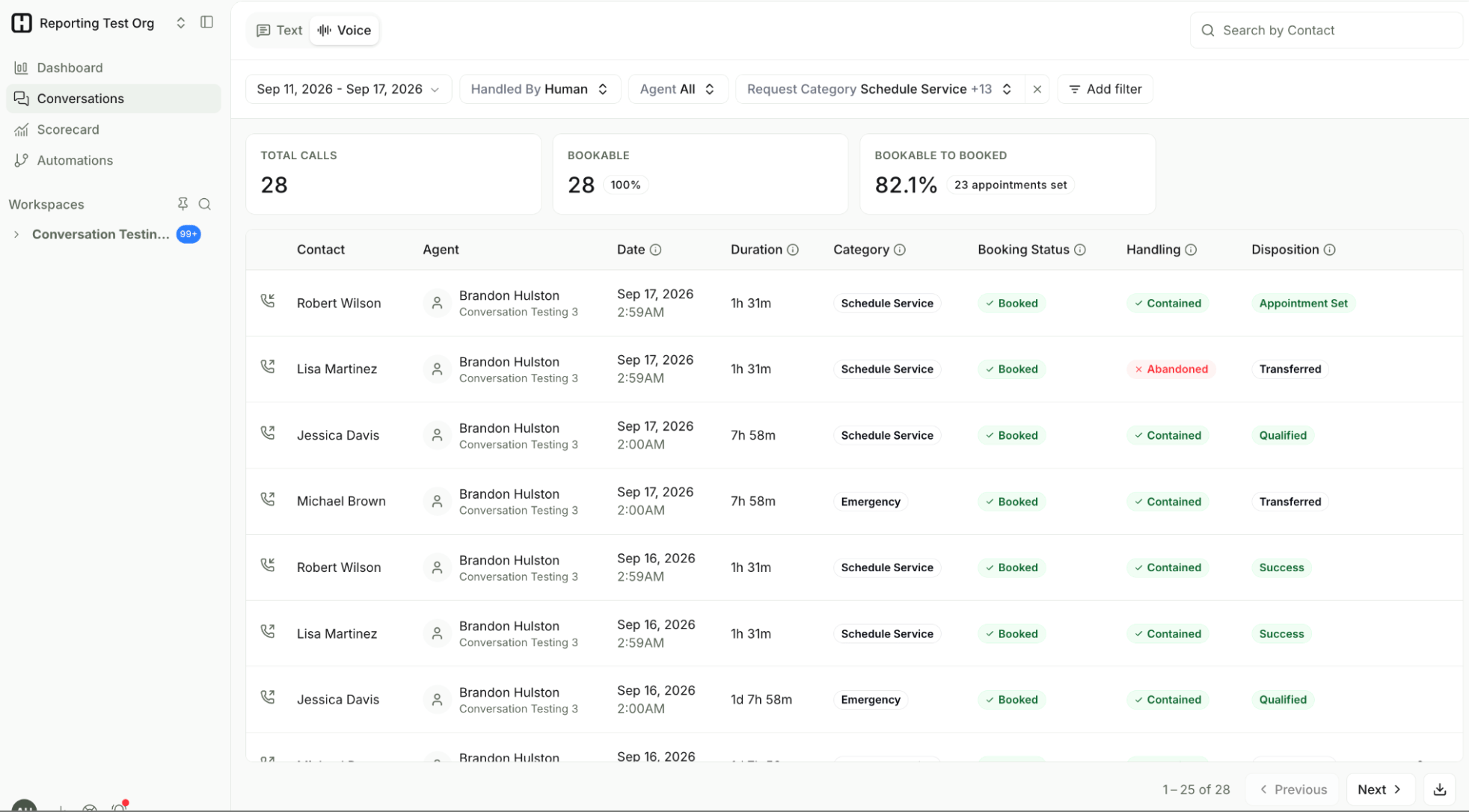
Click a conversation on the [Conversations page](/how-to-use-hatch/conversations/conversations) to see all the metrics for that call.

<Note>
  You can't change which metrics show on the Conversations page at this point.
</Note>

<img src="https://mintcdn.com/usehatchapp/hxsNxu11HU6wnd_I/images/how-to-use-hatch/conversations/conversations_page_new.png?fit=max&auto=format&n=hxsNxu11HU6wnd_I&q=85&s=fe49b954de5780572c8bc636bee0b6ad" alt="Conversation Metrics" width="1964" height="1086" data-path="images/how-to-use-hatch/conversations/conversations_page_new.png" />

<Note>
  These are LLM-generated metrics, which means they are not fully deterministic. Aggregate KPIs exclude irrelevant calls such as spam and no-response.
</Note>

***

## Metrics on the Conversations page

Every AI Voice call is labelled against four metrics.

<AccordionGroup>
  <Accordion title="Category">
    <p>The caller's primary intent during the call — what they actually rang up about.</p>
    <p><strong>Possible values:</strong> Schedule Service, Reschedule, Appointment Confirmation, Emergency, Technical Support, Billing Inquiry, Warranty, Cancellation, Quote Request, Transfer Request, Follow Up, Complaint, General Question, Spam, No Response, Other.</p>
  </Accordion>

  <Accordion title="Booking Status">
    <p>Whether the call should have produced a booking, and whether it did. This is a single status combining two underlying judgements: was the call <em>bookable</em>, and was it <em>booked</em>.</p>
    <p>A call is <strong>bookable</strong> when a real customer calls in with a serviceable need and intent that the agent is configured to book. Calls from disqualified callers (for example, someone who isn't the homeowner) and calls about job types the agent isn't configured for (for example, emergencies or same-day work) are <strong>not</strong> bookable.</p>
    <p><strong>Possible values:</strong></p>

    <ul>
      <li><strong>Booked</strong> — the call was bookable and the agent completed the booking.</li>
      <li><strong>Not booked</strong> — the call was bookable, but no booking was made. These are your missed opportunities, and the most useful calls to review.</li>
      <li><strong>Not bookable</strong> — the call was never bookable in the first place, so no booking was expected. Nothing went wrong here.</li>
    </ul>

    <p>If a <a href="/getting-started/hatch-assistant/commands-calendar">calendar</a> is not set up, "Booked" is based on the agent's ability to confirm an appointment with the caller rather than on a real calendar write.</p>
  </Accordion>

  <Accordion title="Handling">
    <p>Whether your Voice AI agent handled the call on its own, handed it off, or never got the chance.</p>
    <p><strong>Possible values:</strong></p>

    <ul>
      <li><strong>Contained</strong> — the agent handled the call independently, start to finish.</li>
      <li><strong>Transferred</strong> — the agent passed the call to a person or an external number. See <a href="/getting-started/hatch-assistant/voice-at-live-transfers">Live Transfers</a>.</li>
      <li><strong>Abandoned</strong> — the contact ended the call before it reached a resolution.</li>
    </ul>
  </Accordion>

  <Accordion title="Disposition">
    <p>The outcome label applied when the conversation closed. For an AI agent, this is simply the disposition configured on the <code>/end</code> commands in that bot's instructions — so the values you see here are the ones your team set up.</p>
    <p>See <a href="/how-to-use-hatch/board-contact-card/dispositions-in-hatch">Dispositions in Hatch</a> for how to manage the list, and <a href="/how-to-use-hatch/reporting-settings/configuring-dispositions">Configuring Dispositions</a> for reporting settings.</p>
  </Accordion>
</AccordionGroup>

***

## Scorecard metrics

These metrics appear on the [Voice AI Scorecard](/how-to-use-hatch/dashboard/voice-ai-scorecard) rather than on the Conversations page. They go a level deeper — explaining *why* a bookable call didn't book, and *where* in the call a handoff or hang-up happened.

<AccordionGroup>
  <Accordion title="Not Booked Reason">
    <p>Why the agent didn't book a call that was bookable. Hatch analyses every bookable call that didn't result in a booking and groups them by reason, so you can see what's actually costing you bookings rather than inferring it from a conversion rate.</p>
    <p><strong>Possible values:</strong></p>

    <ul>
      <li><strong>No Availability</strong> — the agent didn't return any relevant times.</li>
      <li><strong>Declined Availability</strong> — the caller rejected the availability the agent offered.</li>
      <li><strong>Pricing</strong> — fees, or an issue with pricing.</li>
      <li><strong>Human Requested</strong> — the caller asked for a human in the middle of being booked by the agent.</li>
      <li><strong>Customer Gave Up</strong> — the caller abandoned the call and hung up.</li>
      <li><strong>Tool Error</strong> — the agent hit a tool error (a lookup, the scheduler, and so on) that stopped the lead booking.</li>
      <li><strong>Other</strong></li>
    </ul>
  </Accordion>

  <Accordion title="Handling Stage">
    <p>Where in the call a handoff or an abandonment happened — how far the conversation got before it stopped.</p>
    <p><strong>Possible values, in the order a call moves through them:</strong></p>

    <ol>
      <li><strong>Intake</strong> — the opening of the call, before anything has been established.</li>
      <li><strong>Contact Confirmation</strong> — confirming who the caller is and their details.</li>
      <li><strong>Issue Qualification</strong> — working out what the caller needs and whether it's something the agent can serve.</li>
      <li><strong>Task Resolution</strong> — handling a request that isn't a booking.</li>
      <li><strong>Scheduling</strong> — finding and confirming an appointment time.</li>
      <li><strong>Completed</strong> — the call reached its end state.</li>
    </ol>

    <p><strong>Task Resolution</strong> and <strong>Scheduling</strong> are mutually exclusive — a call goes down one branch or the other after Issue Qualification, never both. So a call that handed off at <strong>Issue Qualification</strong> never progressed to either.</p>
  </Accordion>

  <Accordion title="Handoff Classification">
    <p>Why the call was transferred, and whether that handoff was working as intended or points at a gap in the agent's setup.</p>
    <p><strong>Possible values:</strong></p>

    <ul>
      <li><strong>Escalated</strong> — the caller specifically asked for a human part-way through working with the agent.</li>
      <li><strong>Qualified</strong> — the agent passed the lead off properly, exactly as configured. These calls are usually not bookable.</li>
      <li><strong>Requested</strong> — the caller asked for someone at the very start of the call.</li>
      <li><strong>No Handoff</strong> — there was no handoff.</li>
    </ul>

    <p>Read this alongside <strong>Handling Stage</strong>. An agent configured to hand leads off will show a <strong>Qualified</strong> handoff at the <strong>Issue Qualification</strong> stage — that's the system working as intended, not a failure.</p>
  </Accordion>
</AccordionGroup>

***

## Rates

Two aggregate rates roll up from the metrics above and are the quickest read on how an agent is performing.

<AccordionGroup>
  <Accordion title="Bookable to Booked">
    The percentage of bookable calls where the agent successfully completed a booking. This is the headline performance number for an inbound booking agent, because it ignores the calls that were never bookable and measures only the ones the agent was configured to win.
  </Accordion>

  <Accordion title="Containment">
    The percentage of calls the agent saw through on its own. A call is **not** contained if it was **transferred** or **abandoned**, so containment is everything left over once those two are taken out — it's the share of calls with a **Handling** value of Contained. A falling containment rate usually means the agent is hitting questions or job types it isn't configured for, or that callers are hanging up mid-conversation.
  </Accordion>
</AccordionGroup>

***

## Related Articles

* [Conversations Page](/how-to-use-hatch/conversations/conversations): where these metrics appear, and how to filter by them.
* [Voice AI Scorecard](/how-to-use-hatch/dashboard/voice-ai-scorecard): where the Scorecard metrics live.
* [How to Review Conversations](/how-to-use-hatch/conversations/reviewing-conversations): open a call, listen to the recording, and flag an issue.
