Here’s how to track the results of your conversations in Hatch
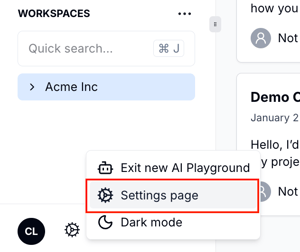
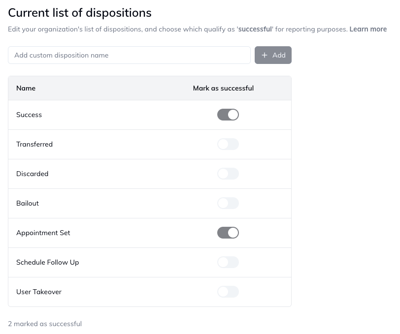
When a contact responds to an outbound Hatch campaign, they’ll appear front and center on your salesboard. Whether a Hatch AI Agent responds to the contact, or a Hatch user reaches out directly, the conversation will get assigned a disposition , to help you keep track of what happened to the contact once they hit the salesboard.How do I manage dispositions in Hatch?Each organization in Hatch has one list of dispositions, for both human and AI conversations.Managers in Hatch can go to the organization’s settings page to add and manage dispositionsFrom the dispositions settings page, a manager can:
Add a new disposition
Delete an existing disposition
Determine which dispositions should be marked as ‘successful’ for reporting purposes
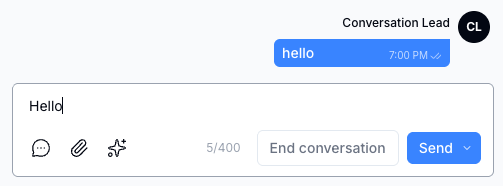
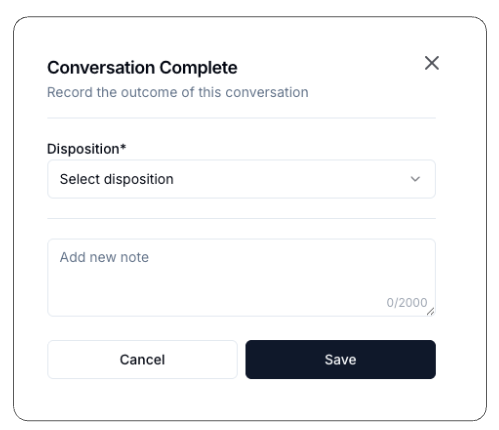
When does a ‘conversation’ start?For human users, as soon as an outbound message (SMS, email, Yelp) is sent by a user, the ‘end conversation’ button will appear in the messaging box.For AI agents, a text conversation starts as soon as an inbound message is received in response to an outbound campaign to which the agent is assigned.What happens when a user ends a conversation?If you’re finished with a text conversation with a contact, you can hit the ‘End conversation’ button to close it out—this will take the contact card off the salesboard. If you want to hand off to another user, or keep the contact on the salesboard, you can move the card to a new column, or assign it to another user (see Contact Card Basics)Now that the conversation is complete, the user will see the Conversation Complete modal, where they can select a disposition from the drop-down and optionally add a note:By default, the following dispositions will appear in this drop-down:
Success
Appointment set
Discarded
Transferred
Schedule follow-up
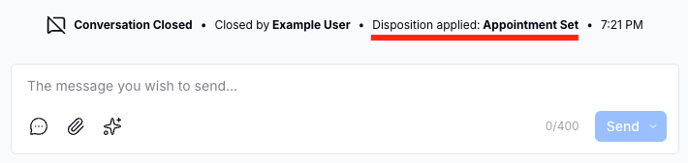
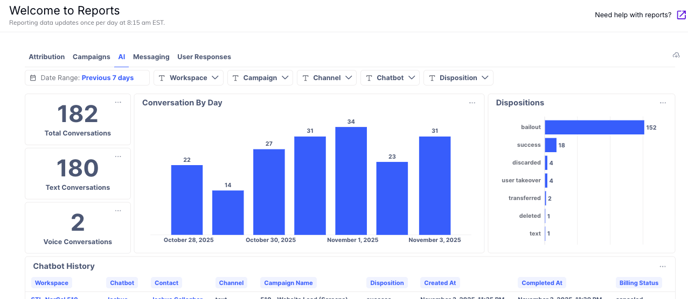
How can I keep track of all the conversation records?Currently, we store a record in the contact history that a given disposition was applied before for both human and AI agent conversations, so when users revisit the contact, a record will be displayed.On the reporting tab, you can also keep track of the results of AI conversations and their associated dispositions, and we’re currently working on adding the results of human conversations to reporting as well.In the near future, we’ll have dedicated pages built into Hatch where you can keep track of new conversation records in real time—stay tuned!Can I still add a new disposition from the AI playground?Yes! If you use the /end command in the playground, you can still add a new disposition from the drop-down list, and it will be stored on the same organization-level list as on the settings page.What happens if I delete an existing disposition?If you delete an existing disposition, it will no longer appear in the Conversation Complete modal when closing a conversation. AI Agents will continue to use that disposition if it’s assigned to an /End command within the Decision Tree. However, you’ll need to update the command before republishing the bot to ensure it reflects your changes.
⌘I
{"docsConfig":{"theme":"almond","$schema":"https://mintlify.com/schema.json","name":"Hatch Documentation","colors":{"primary":"#0F281B","light":"#ffffff","dark":"#0F281B"},"logo":{"light":"https://mintcdn.com/usehatchapp/9Zr4P9UDCE4u8Jx8/logo/hatch-logo.svg?fit=max\u0026auto=format\u0026n=9Zr4P9UDCE4u8Jx8\u0026q=85\u0026s=2441740d4879e1ae72139f9557bca917","dark":"https://mintcdn.com/usehatchapp/9Zr4P9UDCE4u8Jx8/logo/hatch-logo-dark-mode.svg?fit=max\u0026auto=format\u0026n=9Zr4P9UDCE4u8Jx8\u0026q=85\u0026s=331ee29575f7b6d72637b4d4c58b8c45","href":"https://docs.usehatchapp.com/"},"favicon":"https://mintlify.s3.us-west-1.amazonaws.com/usehatchapp/logo/hatch.svg","navbar":{"links":[{"href":"https://www.usehatchapp.com/get-a-demo","label":"Get a demo"}],"primary":{"type":"button","label":"Login","href":"https://app.usehatchapp.com/"}},"footer":{"socials":{"x":"https://x.com/usehatchapp","linkedin":"https://www.linkedin.com/company/usehatchapp"}},"styling":{"latex":false},"navigation":{"pages":[]}},"deployment":{"deploymentMetadataValue":{"subdomain":"usehatchapp","hasAudioNarration":false,"actualSubdomain":"usehatchapp","customDomains":["docs.usehatchapp.com"],"gitSource":{"type":"github","owner":"hatch1fy","repo":"hatch-external-docs","deployBranch":"main","contentDirectory":"","isPrivate":true,"mountPath":"","label":""},"entitlements":{"AI_CHAT":{"status":"ENABLED"},"WEB_MCP":{"status":"ENABLED"},"NARRATION":{"status":"ENABLED"}},"buildId":"6afba7c767e50413b098444f","clientVersion":"0.0.4227","searchFilterCounts":[{"language":"default","tag":"How to use Hatch","count":62},{"language":"default","tag":"Integrations","count":55},{"language":"default","tag":"Getting started","count":25},{"language":"default","tag":"Lead Sources","count":21},{"language":"default","tag":"Academy","count":20},{"language":"default","tag":"CRMs \u0026 Field Management Systems","count":19},{"language":"default","tag":"Hatch AI Agents","count":9},{"language":"default","tag":"Campaigns","count":9},{"language":"default","tag":"Account Settings","count":8},{"language":"default","tag":"Workspace Settings","count":7}]},"assistantConfig":{"enableAskAiButton":false,"enableStarterQuestions":false,"enableAskAiSearchBar":true},"basePath":"","hasChatPermissions":true,"hasWebMcpPermissions":true,"toggles":[{"name":"kill-isr","enabled":true,"variant":{"name":"disabled","enabled":false,"feature_enabled":true},"impressionData":false},{"name":"custom-rbac-roles","enabled":true,"variant":{"name":"disabled","enabled":false,"feature_enabled":true},"impressionData":false},{"name":"agent-mintlify-slack","enabled":true,"variant":{"name":"disabled","enabled":false,"feature_enabled":true},"impressionData":false},{"name":"agent-integrations-settings","enabled":true,"variant":{"name":"disabled","enabled":false,"feature_enabled":true},"impressionData":false},{"name":"rbac-expansion","enabled":true,"variant":{"name":"disabled","enabled":false,"feature_enabled":true},"impressionData":false},{"name":"automations-pr-grouping","enabled":true,"variant":{"name":"disabled","enabled":false,"feature_enabled":true},"impressionData":false},{"name":"custom-prefix","enabled":true,"variant":{"name":"disabled","enabled":false,"feature_enabled":true},"impressionData":false},{"name":"analytics-v7","enabled":true,"variant":{"name":"disabled","enabled":false,"feature_enabled":true},"impressionData":false},{"name":"user-flows-analytics","enabled":true,"variant":{"name":"disabled","enabled":false,"feature_enabled":true},"impressionData":false},{"name":"no-publish-flow","enabled":true,"variant":{"name":"disabled","enabled":false,"feature_enabled":true},"impressionData":false},{"name":"workos-onboarding","enabled":true,"variant":{"name":"disabled","enabled":false,"feature_enabled":true},"impressionData":false},{"name":"snapshot-serving-live","enabled":true,"variant":{"name":"disabled","enabled":false,"feature_enabled":true},"impressionData":false},{"name":"stripTemperatureMiddleware","enabled":true,"variant":{"name":"disabled","enabled":false,"feature_enabled":true},"impressionData":false},{"name":"support-platform-pylon-zendesk","enabled":true,"variant":{"name":"disabled","enabled":false,"feature_enabled":true},"impressionData":false},{"name":"snapshot-serving","enabled":true,"variant":{"name":"disabled","enabled":false,"feature_enabled":true},"impressionData":false},{"name":"instant-rollback","enabled":true,"variant":{"name":"disabled","enabled":false,"feature_enabled":true},"impressionData":false},{"name":"granular-notifications-server","enabled":true,"variant":{"name":"disabled","enabled":false,"feature_enabled":true},"impressionData":false},{"name":"granular-notifications","enabled":true,"variant":{"name":"disabled","enabled":false,"feature_enabled":true},"impressionData":false},{"name":"automations-fable","enabled":true,"variant":{"name":"disabled","enabled":false,"feature_enabled":true},"impressionData":false},{"name":"fixed-ai-action-pricing","enabled":true,"variant":{"name":"disabled","enabled":false,"feature_enabled":true},"impressionData":false},{"name":"automation-resolve-merge-conflict","enabled":true,"variant":{"name":"disabled","enabled":false,"feature_enabled":true},"impressionData":false},{"name":"scoped-publishing","enabled":true,"variant":{"name":"disabled","enabled":false,"feature_enabled":true},"impressionData":false},{"name":"mintql","enabled":true,"variant":{"name":"disabled","enabled":false,"feature_enabled":true},"impressionData":false},{"name":"page-level-analytics","enabled":true,"variant":{"name":"disabled","enabled":false,"feature_enabled":true},"impressionData":false},{"name":"editor-version-history-v2","enabled":true,"variant":{"name":"disabled","enabled":false,"feature_enabled":true},"impressionData":false},{"name":"billing-page-v2","enabled":true,"variant":{"name":"disabled","enabled":false,"feature_enabled":true},"impressionData":false},{"name":"full-page-search","enabled":true,"variant":{"name":"disabled","enabled":false,"feature_enabled":true},"impressionData":false},{"name":"workspace-projects","enabled":true,"variant":{"name":"disabled","enabled":false,"feature_enabled":true},"impressionData":false},{"name":"assistant-v5","enabled":true,"variant":{"name":"disabled","enabled":false,"feature_enabled":true},"impressionData":false},{"name":"fork-pr-previews","enabled":true,"variant":{"name":"disabled","enabled":false,"feature_enabled":true},"impressionData":false},{"name":"revalidation-jwt","enabled":true,"variant":{"name":"disabled","enabled":false,"feature_enabled":true},"impressionData":false},{"name":"workos-sso-scim","enabled":true,"variant":{"name":"disabled","enabled":false,"feature_enabled":true},"impressionData":false},{"name":"hobby-abuse-scan","enabled":true,"variant":{"name":"disabled","enabled":false,"feature_enabled":true},"impressionData":false},{"name":"dashboard-inbox","enabled":true,"variant":{"name":"disabled","enabled":false,"feature_enabled":true},"impressionData":false},{"name":"workos-signup","enabled":true,"variant":{"name":"disabled","enabled":false,"feature_enabled":true},"impressionData":false},{"name":"turbopuffer-dual-write","enabled":true,"variant":{"name":"disabled","enabled":false,"feature_enabled":true},"impressionData":false},{"name":"workos-enabled","enabled":true,"variant":{"name":"disabled","enabled":false,"feature_enabled":true},"impressionData":false},{"name":"approve-review-flow","enabled":true,"variant":{"name":"disabled","enabled":false,"feature_enabled":true},"impressionData":false},{"name":"editor-metadata","enabled":true,"variant":{"name":"disabled","enabled":false,"feature_enabled":true},"impressionData":false},{"name":"sso-setup-deadline-banner","enabled":true,"variant":{"name":"disabled","enabled":false,"feature_enabled":true},"impressionData":false},{"name":"turbopuffer-serve","enabled":true,"variant":{"name":"disabled","enabled":false,"feature_enabled":true},"impressionData":false},{"name":"live-agents","enabled":true,"variant":{"name":"disabled","enabled":false,"feature_enabled":true},"impressionData":false},{"name":"starter-pricing","enabled":true,"variant":{"name":"treatment","enabled":true,"payload":{"type":"string","value":"treatment"},"feature_enabled":true},"impressionData":false},{"name":"llms-txt-v2","enabled":true,"variant":{"name":"disabled","enabled":false,"feature_enabled":true},"impressionData":false},{"name":"wildcard-email-auth","enabled":true,"variant":{"name":"disabled","enabled":false,"feature_enabled":true},"impressionData":false}],"googleFontsInlined":true},"customCss":[{"filePath":"styles.css","content":"html.light body{background:#F9F8F6}html.light #content-container,html.light .border{border:1px solid rgb(15 40 27 / 15%)}"}]}
{"page":{"pagePath":"how-to-use-hatch/board-contact-card/dispositions-in-hatch","slug":"/how-to-use-hatch/board-contact-card/dispositions-in-hatch","pageMetadata":{"title":"Dispositions in Hatch","description":"Here's how to track the results of your conversations in Hatch","href":"/how-to-use-hatch/board-contact-card/dispositions-in-hatch"},"description":{"compiledSource":"\"use strict\";\nconst {jsx: _jsx} = arguments[0];\nconst {useMDXComponents: _provideComponents} = arguments[0];\nfunction _createMdxContent(props) {\n const _components = {\n p: \"p\",\n ..._provideComponents(),\n ...props.components\n };\n return _jsx(_components.p, {\n children: \"Here’s how to track the results of your conversations in Hatch\"\n });\n}\nfunction MDXContent(props = {}) {\n const {wrapper: MDXLayout} = {\n ..._provideComponents(),\n ...props.components\n };\n return MDXLayout ? _jsx(MDXLayout, {\n ...props,\n children: _jsx(_createMdxContent, {\n ...props\n })\n }) : _createMdxContent(props);\n}\nreturn {\n default: MDXContent\n};\n","frontmatter":{},"scope":{}},"pageType":"default","mdx":{"mdxSource":{"compiledSource":"\"use strict\";const{Fragment:_Fragment,jsx:_jsx,jsxs:_jsxs}=arguments[0];const{useMDXComponents:_provideComponents}=arguments[0];function _createMdxContent(props){const _components={a:`a`,em:`em`,li:`li`,p:`p`,strong:`strong`,ul:`ul`,..._provideComponents(),...props.components},{OptimizedImage}=_components;if(!OptimizedImage)_missingMdxReference(`OptimizedImage`,true);return _jsxs(_Fragment,{children:[_jsxs(_components.p,{children:[`When a contact responds to an outbound Hatch campaign, they’ll appear front and center on your salesboard. Whether a Hatch AI Agent responds to the contact, or a Hatch user reaches out directly, the conversation will get assigned a `,_jsx(_components.em,{children:`disposition`}),` , to help you keep track of what happened to the contact once they hit the salesboard.`]}),`\n`,_jsx(_components.p,{children:_jsx(_components.em,{children:_jsx(_components.strong,{children:`How do I manage dispositions in Hatch?`})})}),`\n`,_jsx(OptimizedImage,{src:`https://mintcdn.com/usehatchapp/LVxm54KWM4keny_d/images/how-to-use-hatch/board-contact-card/Screenshot-2025-11-03-at-5-22-43%E2%80%AFPM-png.png?fit=max\u0026auto=format\u0026n=LVxm54KWM4keny_d\u0026q=85\u0026s=7f835891dafb5017b9357e971a6c3b4e`,alt:``,\"data-og-width\":`300`,width:`300`,\"data-og-height\":`252`,height:`252`,\"data-path\":`images/how-to-use-hatch/board-contact-card/Screenshot-2025-11-03-at-5-22-43 PM-png.png`,\"data-optimize\":`true`,\"data-opv\":`3`,srcset:`https://mintcdn.com/usehatchapp/LVxm54KWM4keny_d/images/how-to-use-hatch/board-contact-card/Screenshot-2025-11-03-at-5-22-43%E2%80%AFPM-png.png?w=280\u0026fit=max\u0026auto=format\u0026n=LVxm54KWM4keny_d\u0026q=85\u0026s=f144f805be6e74ad5662ca6794504f27 280w, https://mintcdn.com/usehatchapp/LVxm54KWM4keny_d/images/how-to-use-hatch/board-contact-card/Screenshot-2025-11-03-at-5-22-43%E2%80%AFPM-png.png?w=560\u0026fit=max\u0026auto=format\u0026n=LVxm54KWM4keny_d\u0026q=85\u0026s=de1cb8b67ad860166ebf5ffc291adf11 560w, https://mintcdn.com/usehatchapp/LVxm54KWM4keny_d/images/how-to-use-hatch/board-contact-card/Screenshot-2025-11-03-at-5-22-43%E2%80%AFPM-png.png?w=840\u0026fit=max\u0026auto=format\u0026n=LVxm54KWM4keny_d\u0026q=85\u0026s=e5abe7518dfc2b6dda3f672ca256486d 840w, https://mintcdn.com/usehatchapp/LVxm54KWM4keny_d/images/how-to-use-hatch/board-contact-card/Screenshot-2025-11-03-at-5-22-43%E2%80%AFPM-png.png?w=1100\u0026fit=max\u0026auto=format\u0026n=LVxm54KWM4keny_d\u0026q=85\u0026s=494a8adcd6afa59517123c824909d9e5 1100w, https://mintcdn.com/usehatchapp/LVxm54KWM4keny_d/images/how-to-use-hatch/board-contact-card/Screenshot-2025-11-03-at-5-22-43%E2%80%AFPM-png.png?w=1650\u0026fit=max\u0026auto=format\u0026n=LVxm54KWM4keny_d\u0026q=85\u0026s=f2fda2863d449bc59ead108dec8ca392 1650w, https://mintcdn.com/usehatchapp/LVxm54KWM4keny_d/images/how-to-use-hatch/board-contact-card/Screenshot-2025-11-03-at-5-22-43%E2%80%AFPM-png.png?w=2500\u0026fit=max\u0026auto=format\u0026n=LVxm54KWM4keny_d\u0026q=85\u0026s=6fe281618b454b076bd6161feec3b41a 2500w`}),`\n`,_jsx(_components.p,{children:`Each organization in Hatch has one list of dispositions, for both human and AI conversations.`}),`\n`,_jsx(_components.p,{children:`Managers in Hatch can go to the organization’s settings page to add and manage dispositions`}),`\n`,_jsx(OptimizedImage,{src:`https://mintcdn.com/usehatchapp/LVxm54KWM4keny_d/images/how-to-use-hatch/board-contact-card/Screenshot-2025-11-04-at-5-46-02%E2%80%AFPM-png.png?fit=max\u0026auto=format\u0026n=LVxm54KWM4keny_d\u0026q=85\u0026s=24abd0fc7f4a108b500825fdab497280`,alt:``,\"data-og-width\":`400`,width:`400`,\"data-og-height\":`334`,height:`334`,\"data-path\":`images/how-to-use-hatch/board-contact-card/Screenshot-2025-11-04-at-5-46-02 PM-png.png`,\"data-optimize\":`true`,\"data-opv\":`3`,srcset:`https://mintcdn.com/usehatchapp/LVxm54KWM4keny_d/images/how-to-use-hatch/board-contact-card/Screenshot-2025-11-04-at-5-46-02%E2%80%AFPM-png.png?w=280\u0026fit=max\u0026auto=format\u0026n=LVxm54KWM4keny_d\u0026q=85\u0026s=467dde93ef9917941e71e4ac89ab6cfb 280w, https://mintcdn.com/usehatchapp/LVxm54KWM4keny_d/images/how-to-use-hatch/board-contact-card/Screenshot-2025-11-04-at-5-46-02%E2%80%AFPM-png.png?w=560\u0026fit=max\u0026auto=format\u0026n=LVxm54KWM4keny_d\u0026q=85\u0026s=7f507ac4db0b582843f52b521d9fbbdf 560w, https://mintcdn.com/usehatchapp/LVxm54KWM4keny_d/images/how-to-use-hatch/board-contact-card/Screenshot-2025-11-04-at-5-46-02%E2%80%AFPM-png.png?w=840\u0026fit=max\u0026auto=format\u0026n=LVxm54KWM4keny_d\u0026q=85\u0026s=b3ae688bfa00f3a5e16d1509a3da21b5 840w, https://mintcdn.com/usehatchapp/LVxm54KWM4keny_d/images/how-to-use-hatch/board-contact-card/Screenshot-2025-11-04-at-5-46-02%E2%80%AFPM-png.png?w=1100\u0026fit=max\u0026auto=format\u0026n=LVxm54KWM4keny_d\u0026q=85\u0026s=af8f59fd5f0c7b31f0eb34a9a36d1329 1100w, https://mintcdn.com/usehatchapp/LVxm54KWM4keny_d/images/how-to-use-hatch/board-contact-card/Screenshot-2025-11-04-at-5-46-02%E2%80%AFPM-png.png?w=1650\u0026fit=max\u0026auto=format\u0026n=LVxm54KWM4keny_d\u0026q=85\u0026s=bc01b1ad6b960f501a5a930f7c229936 1650w, https://mintcdn.com/usehatchapp/LVxm54KWM4keny_d/images/how-to-use-hatch/board-contact-card/Screenshot-2025-11-04-at-5-46-02%E2%80%AFPM-png.png?w=2500\u0026fit=max\u0026auto=format\u0026n=LVxm54KWM4keny_d\u0026q=85\u0026s=31091dd51291972a4e19bac3509cd5dc 2500w`}),`\n`,_jsx(_components.p,{children:`From the dispositions settings page, a manager can:`}),`\n`,_jsxs(_components.ul,{children:[`\n`,_jsxs(_components.li,{children:[`\n`,_jsx(_components.p,{children:`Add a new disposition`}),`\n`]}),`\n`,_jsxs(_components.li,{children:[`\n`,_jsx(_components.p,{children:`Delete an existing disposition`}),`\n`]}),`\n`,_jsxs(_components.li,{children:[`\n`,_jsx(_components.p,{children:`Determine which dispositions should be marked as ‘successful’ for reporting purposes`}),`\n`]}),`\n`]}),`\n`,_jsx(_components.p,{children:_jsx(_components.em,{children:_jsx(_components.strong,{children:`When does a ‘conversation’ start?`})})}),`\n`,_jsx(OptimizedImage,{src:`https://mintcdn.com/usehatchapp/LVxm54KWM4keny_d/images/how-to-use-hatch/board-contact-card/Screenshot-2025-11-04-at-6-01-31%E2%80%AFPM-png.png?fit=max\u0026auto=format\u0026n=LVxm54KWM4keny_d\u0026q=85\u0026s=1cc0dde8ed6d4b84c7ea18e1e55187a5`,alt:``,\"data-og-width\":`503`,width:`503`,\"data-og-height\":`186`,height:`186`,\"data-path\":`images/how-to-use-hatch/board-contact-card/Screenshot-2025-11-04-at-6-01-31 PM-png.png`,\"data-optimize\":`true`,\"data-opv\":`3`,srcset:`https://mintcdn.com/usehatchapp/LVxm54KWM4keny_d/images/how-to-use-hatch/board-contact-card/Screenshot-2025-11-04-at-6-01-31%E2%80%AFPM-png.png?w=280\u0026fit=max\u0026auto=format\u0026n=LVxm54KWM4keny_d\u0026q=85\u0026s=cb9b7f09a117216f9a0dfcb8c59f745c 280w, https://mintcdn.com/usehatchapp/LVxm54KWM4keny_d/images/how-to-use-hatch/board-contact-card/Screenshot-2025-11-04-at-6-01-31%E2%80%AFPM-png.png?w=560\u0026fit=max\u0026auto=format\u0026n=LVxm54KWM4keny_d\u0026q=85\u0026s=52b10f8e0f5ef47b1c3c91f661092c72 560w, https://mintcdn.com/usehatchapp/LVxm54KWM4keny_d/images/how-to-use-hatch/board-contact-card/Screenshot-2025-11-04-at-6-01-31%E2%80%AFPM-png.png?w=840\u0026fit=max\u0026auto=format\u0026n=LVxm54KWM4keny_d\u0026q=85\u0026s=25a84c8f03f0b87f3508e5aafdfdf817 840w, https://mintcdn.com/usehatchapp/LVxm54KWM4keny_d/images/how-to-use-hatch/board-contact-card/Screenshot-2025-11-04-at-6-01-31%E2%80%AFPM-png.png?w=1100\u0026fit=max\u0026auto=format\u0026n=LVxm54KWM4keny_d\u0026q=85\u0026s=3e9dd450df309e29dd36a903177b43e5 1100w, https://mintcdn.com/usehatchapp/LVxm54KWM4keny_d/images/how-to-use-hatch/board-contact-card/Screenshot-2025-11-04-at-6-01-31%E2%80%AFPM-png.png?w=1650\u0026fit=max\u0026auto=format\u0026n=LVxm54KWM4keny_d\u0026q=85\u0026s=76d287bafdf2268a24658b0ec557b075 1650w, https://mintcdn.com/usehatchapp/LVxm54KWM4keny_d/images/how-to-use-hatch/board-contact-card/Screenshot-2025-11-04-at-6-01-31%E2%80%AFPM-png.png?w=2500\u0026fit=max\u0026auto=format\u0026n=LVxm54KWM4keny_d\u0026q=85\u0026s=aebcfb82ce9eef7df8119d63ce7bd3be 2500w`}),`\n`,_jsx(_components.p,{children:`For human users, as soon as an outbound message (SMS, email, Yelp) is sent by a user, the ‘end conversation’ button will appear in the messaging box.`}),`\n`,_jsx(_components.p,{children:`For AI agents, a text conversation starts as soon as an inbound message is received in response to an outbound campaign to which the agent is assigned.`}),`\n`,_jsx(_components.p,{children:_jsx(_components.em,{children:_jsx(_components.strong,{children:`What happens when a user ends a conversation?`})})}),`\n`,_jsxs(_components.p,{children:[`If you’re finished with a text conversation with a contact, you can hit the ‘End conversation’ button to close it out—this will take the contact card `,_jsx(_components.em,{children:`off`}),` the salesboard. If you want to hand off to another user, or keep the contact on the salesboard, you can move the card to a new column, or assign it to another user (see `,_jsx(_components.a,{href:`/how-to-use-hatch/board-contact-card/contact-card-basics`,children:`Contact Card Basics`}),`)`]}),`\n`,_jsx(_components.p,{children:`Now that the conversation is complete, the user will see the Conversation Complete modal, where they can select a disposition from the drop-down and optionally add a note:`}),`\n`,_jsx(OptimizedImage,{src:`https://mintcdn.com/usehatchapp/LVxm54KWM4keny_d/images/how-to-use-hatch/board-contact-card/Screenshot-2025-11-03-at-11-51-28%E2%80%AFAM-png.png?fit=max\u0026auto=format\u0026n=LVxm54KWM4keny_d\u0026q=85\u0026s=9f5eba661d26bcb271844cf63e42869a`,alt:``,\"data-og-width\":`499`,width:`499`,\"data-og-height\":`430`,height:`430`,\"data-path\":`images/how-to-use-hatch/board-contact-card/Screenshot-2025-11-03-at-11-51-28 AM-png.png`,\"data-optimize\":`true`,\"data-opv\":`3`,srcset:`https://mintcdn.com/usehatchapp/LVxm54KWM4keny_d/images/how-to-use-hatch/board-contact-card/Screenshot-2025-11-03-at-11-51-28%E2%80%AFAM-png.png?w=280\u0026fit=max\u0026auto=format\u0026n=LVxm54KWM4keny_d\u0026q=85\u0026s=7d74fc612b43d4b839b800472e507c7a 280w, https://mintcdn.com/usehatchapp/LVxm54KWM4keny_d/images/how-to-use-hatch/board-contact-card/Screenshot-2025-11-03-at-11-51-28%E2%80%AFAM-png.png?w=560\u0026fit=max\u0026auto=format\u0026n=LVxm54KWM4keny_d\u0026q=85\u0026s=f12207cc8a649d6298a1806455b06fd9 560w, https://mintcdn.com/usehatchapp/LVxm54KWM4keny_d/images/how-to-use-hatch/board-contact-card/Screenshot-2025-11-03-at-11-51-28%E2%80%AFAM-png.png?w=840\u0026fit=max\u0026auto=format\u0026n=LVxm54KWM4keny_d\u0026q=85\u0026s=eac891cbf53da4d092e90197ef734ded 840w, https://mintcdn.com/usehatchapp/LVxm54KWM4keny_d/images/how-to-use-hatch/board-contact-card/Screenshot-2025-11-03-at-11-51-28%E2%80%AFAM-png.png?w=1100\u0026fit=max\u0026auto=format\u0026n=LVxm54KWM4keny_d\u0026q=85\u0026s=149e9c762cf43120a74b9e5cfdecfec2 1100w, https://mintcdn.com/usehatchapp/LVxm54KWM4keny_d/images/how-to-use-hatch/board-contact-card/Screenshot-2025-11-03-at-11-51-28%E2%80%AFAM-png.png?w=1650\u0026fit=max\u0026auto=format\u0026n=LVxm54KWM4keny_d\u0026q=85\u0026s=a4dbe79a4b98f7138747da37c0826451 1650w, https://mintcdn.com/usehatchapp/LVxm54KWM4keny_d/images/how-to-use-hatch/board-contact-card/Screenshot-2025-11-03-at-11-51-28%E2%80%AFAM-png.png?w=2500\u0026fit=max\u0026auto=format\u0026n=LVxm54KWM4keny_d\u0026q=85\u0026s=f2acb11bff9df9db8e5e106e59da2c46 2500w`}),`\n`,_jsx(_components.p,{children:`By default, the following dispositions will appear in this drop-down:`}),`\n`,_jsxs(_components.ul,{children:[`\n`,_jsx(_components.li,{children:`Success`}),`\n`,_jsx(_components.li,{children:`Appointment set`}),`\n`,_jsx(_components.li,{children:`Discarded`}),`\n`,_jsx(_components.li,{children:`Transferred`}),`\n`,_jsx(_components.li,{children:`Schedule follow-up`}),`\n`]}),`\n`,_jsx(_components.p,{children:_jsx(_components.em,{children:_jsx(_components.strong,{children:`How can I keep track of all the conversation records?`})})}),`\n`,_jsx(_components.p,{children:`Currently, we store a record in the contact history that a given disposition was applied before for both human and AI agent conversations, so when users revisit the contact, a record will be displayed.`}),`\n`,_jsx(OptimizedImage,{src:`https://mintcdn.com/usehatchapp/LVxm54KWM4keny_d/images/how-to-use-hatch/board-contact-card/Screenshot-2025-11-04-at-6-22-37%E2%80%AFPM-png.png?fit=max\u0026auto=format\u0026n=LVxm54KWM4keny_d\u0026q=85\u0026s=f5930cabaa62e854da65625f412ba8c2`,alt:``,\"data-og-width\":`688`,width:`688`,\"data-og-height\":`163`,height:`163`,\"data-path\":`images/how-to-use-hatch/board-contact-card/Screenshot-2025-11-04-at-6-22-37 PM-png.png`,\"data-optimize\":`true`,\"data-opv\":`3`,srcset:`https://mintcdn.com/usehatchapp/LVxm54KWM4keny_d/images/how-to-use-hatch/board-contact-card/Screenshot-2025-11-04-at-6-22-37%E2%80%AFPM-png.png?w=280\u0026fit=max\u0026auto=format\u0026n=LVxm54KWM4keny_d\u0026q=85\u0026s=9edbd36863a0e8535afae76181e23589 280w, https://mintcdn.com/usehatchapp/LVxm54KWM4keny_d/images/how-to-use-hatch/board-contact-card/Screenshot-2025-11-04-at-6-22-37%E2%80%AFPM-png.png?w=560\u0026fit=max\u0026auto=format\u0026n=LVxm54KWM4keny_d\u0026q=85\u0026s=4a00199f61ac5ba8b45ea9056cfd0a9a 560w, https://mintcdn.com/usehatchapp/LVxm54KWM4keny_d/images/how-to-use-hatch/board-contact-card/Screenshot-2025-11-04-at-6-22-37%E2%80%AFPM-png.png?w=840\u0026fit=max\u0026auto=format\u0026n=LVxm54KWM4keny_d\u0026q=85\u0026s=2e6ca5e88234a4b339d76f442b6aed96 840w, https://mintcdn.com/usehatchapp/LVxm54KWM4keny_d/images/how-to-use-hatch/board-contact-card/Screenshot-2025-11-04-at-6-22-37%E2%80%AFPM-png.png?w=1100\u0026fit=max\u0026auto=format\u0026n=LVxm54KWM4keny_d\u0026q=85\u0026s=c29dba38df2cc54e1633b4e81067e268 1100w, https://mintcdn.com/usehatchapp/LVxm54KWM4keny_d/images/how-to-use-hatch/board-contact-card/Screenshot-2025-11-04-at-6-22-37%E2%80%AFPM-png.png?w=1650\u0026fit=max\u0026auto=format\u0026n=LVxm54KWM4keny_d\u0026q=85\u0026s=75ed0f3c7ebe0cddcf4a9a0b64294015 1650w, https://mintcdn.com/usehatchapp/LVxm54KWM4keny_d/images/how-to-use-hatch/board-contact-card/Screenshot-2025-11-04-at-6-22-37%E2%80%AFPM-png.png?w=2500\u0026fit=max\u0026auto=format\u0026n=LVxm54KWM4keny_d\u0026q=85\u0026s=561679fb1c82c5df62f1d45bb0c013c2 2500w`}),`\n`,_jsx(_components.p,{children:`On the reporting tab, you can also keep track of the results of AI conversations and their associated dispositions, and we’re currently working on adding the results of human conversations to reporting as well.`}),`\n`,_jsx(OptimizedImage,{src:`https://mintcdn.com/usehatchapp/-Zo0lQiuH8yTqJHV/images/how-to-use-hatch/board-contact-card/Screenshot-2025-11-04-at-6-51-06%E2%80%AFPM-png.png?fit=max\u0026auto=format\u0026n=-Zo0lQiuH8yTqJHV\u0026q=85\u0026s=48a191aba071f80d45bb8c60fcfe9dae`,alt:``,\"data-og-width\":`688`,width:`688`,\"data-og-height\":`299`,height:`299`,\"data-path\":`images/how-to-use-hatch/board-contact-card/Screenshot-2025-11-04-at-6-51-06 PM-png.png`,\"data-optimize\":`true`,\"data-opv\":`3`,srcset:`https://mintcdn.com/usehatchapp/-Zo0lQiuH8yTqJHV/images/how-to-use-hatch/board-contact-card/Screenshot-2025-11-04-at-6-51-06%E2%80%AFPM-png.png?w=280\u0026fit=max\u0026auto=format\u0026n=-Zo0lQiuH8yTqJHV\u0026q=85\u0026s=74aa709d8aacf50c3ee9e72b11f39e44 280w, https://mintcdn.com/usehatchapp/-Zo0lQiuH8yTqJHV/images/how-to-use-hatch/board-contact-card/Screenshot-2025-11-04-at-6-51-06%E2%80%AFPM-png.png?w=560\u0026fit=max\u0026auto=format\u0026n=-Zo0lQiuH8yTqJHV\u0026q=85\u0026s=ea81a87a0ce7cb2cbc5cd7c235d3bcd9 560w, https://mintcdn.com/usehatchapp/-Zo0lQiuH8yTqJHV/images/how-to-use-hatch/board-contact-card/Screenshot-2025-11-04-at-6-51-06%E2%80%AFPM-png.png?w=840\u0026fit=max\u0026auto=format\u0026n=-Zo0lQiuH8yTqJHV\u0026q=85\u0026s=628aaf6fc1099d151a49055ea7722143 840w, https://mintcdn.com/usehatchapp/-Zo0lQiuH8yTqJHV/images/how-to-use-hatch/board-contact-card/Screenshot-2025-11-04-at-6-51-06%E2%80%AFPM-png.png?w=1100\u0026fit=max\u0026auto=format\u0026n=-Zo0lQiuH8yTqJHV\u0026q=85\u0026s=c9c088284d7758c4958190f997a20f3d 1100w, https://mintcdn.com/usehatchapp/-Zo0lQiuH8yTqJHV/images/how-to-use-hatch/board-contact-card/Screenshot-2025-11-04-at-6-51-06%E2%80%AFPM-png.png?w=1650\u0026fit=max\u0026auto=format\u0026n=-Zo0lQiuH8yTqJHV\u0026q=85\u0026s=2dd9ef4e2f56ea18e4084c0cace20589 1650w, https://mintcdn.com/usehatchapp/-Zo0lQiuH8yTqJHV/images/how-to-use-hatch/board-contact-card/Screenshot-2025-11-04-at-6-51-06%E2%80%AFPM-png.png?w=2500\u0026fit=max\u0026auto=format\u0026n=-Zo0lQiuH8yTqJHV\u0026q=85\u0026s=78b7083aba21471ad7568682a874147e 2500w`}),`\n`,_jsx(_components.p,{children:`In the near future, we’ll have dedicated pages built into Hatch where you can keep track of new conversation records in real time—stay tuned!`}),`\n`,_jsx(_components.p,{children:_jsx(_components.em,{children:_jsx(_components.strong,{children:`Can I still add a new disposition from the AI playground?`})})}),`\n`,_jsx(_components.p,{children:_jsx(_components.em,{children:_jsx(OptimizedImage,{src:`https://mintcdn.com/usehatchapp/LVxm54KWM4keny_d/images/how-to-use-hatch/board-contact-card/Screenshot-2025-11-04-at-5-56-30%E2%80%AFPM-png.png?fit=max\u0026auto=format\u0026n=LVxm54KWM4keny_d\u0026q=85\u0026s=714fc52bcd4570fae1c6193aaab49c34`,alt:``,\"data-og-width\":`562`,width:`562`,\"data-og-height\":`504`,height:`504`,\"data-path\":`images/how-to-use-hatch/board-contact-card/Screenshot-2025-11-04-at-5-56-30 PM-png.png`,\"data-optimize\":`true`,\"data-opv\":`3`,srcset:`https://mintcdn.com/usehatchapp/LVxm54KWM4keny_d/images/how-to-use-hatch/board-contact-card/Screenshot-2025-11-04-at-5-56-30%E2%80%AFPM-png.png?w=280\u0026fit=max\u0026auto=format\u0026n=LVxm54KWM4keny_d\u0026q=85\u0026s=c4ee5698d0d7fe74bd29c2e1685c0c08 280w, https://mintcdn.com/usehatchapp/LVxm54KWM4keny_d/images/how-to-use-hatch/board-contact-card/Screenshot-2025-11-04-at-5-56-30%E2%80%AFPM-png.png?w=560\u0026fit=max\u0026auto=format\u0026n=LVxm54KWM4keny_d\u0026q=85\u0026s=912ceef10feff6f5a6978a31ceec3e18 560w, https://mintcdn.com/usehatchapp/LVxm54KWM4keny_d/images/how-to-use-hatch/board-contact-card/Screenshot-2025-11-04-at-5-56-30%E2%80%AFPM-png.png?w=840\u0026fit=max\u0026auto=format\u0026n=LVxm54KWM4keny_d\u0026q=85\u0026s=28e17b15570cd8ae37b0741a1b2b0805 840w, https://mintcdn.com/usehatchapp/LVxm54KWM4keny_d/images/how-to-use-hatch/board-contact-card/Screenshot-2025-11-04-at-5-56-30%E2%80%AFPM-png.png?w=1100\u0026fit=max\u0026auto=format\u0026n=LVxm54KWM4keny_d\u0026q=85\u0026s=8ba41f77430aa7e34f79a6e8ab58453b 1100w, https://mintcdn.com/usehatchapp/LVxm54KWM4keny_d/images/how-to-use-hatch/board-contact-card/Screenshot-2025-11-04-at-5-56-30%E2%80%AFPM-png.png?w=1650\u0026fit=max\u0026auto=format\u0026n=LVxm54KWM4keny_d\u0026q=85\u0026s=fc980164ce328396946a5b929b9614f9 1650w, https://mintcdn.com/usehatchapp/LVxm54KWM4keny_d/images/how-to-use-hatch/board-contact-card/Screenshot-2025-11-04-at-5-56-30%E2%80%AFPM-png.png?w=2500\u0026fit=max\u0026auto=format\u0026n=LVxm54KWM4keny_d\u0026q=85\u0026s=f9000f122595b449eb234425f0e39af4 2500w`,inline:true})})}),`\n`,_jsxs(_components.p,{children:[`Yes! If you use the `,_jsx(_components.em,{children:`/end`}),` command in the playground, you can still add a new disposition from the drop-down list, and it will be stored on the same organization-level list as on the settings page.`]}),`\n`,_jsx(_components.p,{children:_jsx(_components.em,{children:_jsx(_components.strong,{children:`What happens if I delete an existing disposition?`})})}),`\n`,_jsx(_components.p,{children:`If you delete an existing disposition, it will no longer appear in the Conversation Complete modal when closing a conversation. AI Agents will continue to use that disposition if it’s assigned to an /End command within the Decision Tree. However, you’ll need to update the command before republishing the bot to ensure it reflects your changes.`})]})}function MDXContent(props={}){const{wrapper:MDXLayout}={..._provideComponents(),...props.components};return MDXLayout?_jsx(MDXLayout,{...props,children:_jsx(_createMdxContent,{...props})}):_createMdxContent(props)}return{default:MDXContent};function _missingMdxReference(id,component){throw new Error(`Expected `+(component?`component`:`object`)+\" `\"+id+\"` to be defined: you likely forgot to import, pass, or provide it.\")}","frontmatter":{},"scope":{"config":{},"pageMetadata":{"title":"Dispositions in Hatch","description":"Here's how to track the results of your conversations in Hatch","href":"/how-to-use-hatch/board-contact-card/dispositions-in-hatch"}}},"mdxSourceWithNoJs":null},"mdxExtracts":{"tableOfContents":[],"codeExamples":{}},"jsLinks":[],"subdomain":"usehatchapp","siteName":"Hatch Documentation","title":"Dispositions in Hatch - Hatch Documentation","navMaps":{"firstHrefInVersion":{},"firstHrefInLanguage":{}},"lastModified":"2026-03-10T17:25:13.173Z","originalFileLocation":"how-to-use-hatch/board-contact-card/dispositions-in-hatch.mdx"},"headHtml":"\u003cscript data-mint-head>(function(){var d=document.documentElement,p=null;if(!p){try{p=localStorage.getItem(\"isDarkMode\")}catch(e){}if(p==='true')p='dark';else if(p==='false')p='light';if(p!=='light'\u0026\u0026p!=='dark'\u0026\u0026p!=='system')p=\"system\"}var r=p==='system'?(matchMedia(\"(prefers-color-scheme: dark)\").matches?'dark':'light'):p;d.classList.remove(r==='dark'?'light':'dark');d.classList.add(r);d.setAttribute(\"data-theme-preference\",p)})();\u003c/script>\u003cmeta data-mint-head name=\"description\" content=\"Here\u0026#x27;s how to track the results of your conversations in Hatch\">\u003cmeta data-mint-head name=\"application-name\" content=\"Hatch Documentation\">\u003cmeta data-mint-head name=\"generator\" content=\"Mintlify\">\u003clink data-mint-head rel=\"apple-touch-icon\" type=\"image/svg+xml\" sizes=\"180x180\" href=\"https://mintlify.s3.us-west-1.amazonaws.com/usehatchapp/logo/hatch.svg\">\u003clink data-mint-head rel=\"icon\" type=\"image/svg+xml\" sizes=\"32x32\" href=\"https://mintlify.s3.us-west-1.amazonaws.com/usehatchapp/logo/hatch.svg\">\u003clink data-mint-head rel=\"icon\" type=\"image/svg+xml\" sizes=\"16x16\" href=\"https://mintlify.s3.us-west-1.amazonaws.com/usehatchapp/logo/hatch.svg\">\u003clink data-mint-head rel=\"shortcut icon\" type=\"image/svg+xml\" href=\"https://mintlify.s3.us-west-1.amazonaws.com/usehatchapp/logo/hatch.svg\">\u003cmeta data-mint-head property=\"og:title\" content=\"Dispositions in Hatch - Hatch Documentation\">\u003cmeta data-mint-head property=\"og:description\" content=\"Here\u0026#x27;s how to track the results of your conversations in Hatch\">\u003cmeta data-mint-head property=\"og:site_name\" content=\"Hatch Documentation\">\u003cmeta data-mint-head property=\"og:url\" content=\"https://docs.usehatchapp.com/how-to-use-hatch/board-contact-card/dispositions-in-hatch\">\u003cmeta data-mint-head property=\"og:type\" content=\"website\">\u003cmeta data-mint-head property=\"og:image\" content=\"https://usehatchapp.mintlify.site/_mintlify/api/og/v2?division=Board+%26+Contact+Card\u0026amp;title=Dispositions+in+Hatch\u0026amp;description=Here%27s+how+to+track+the+results+of+your+conversations+in+Hatch\u0026amp;theme=eac1166312522336122e3e13\u0026amp;signature=3d85be347b970c5ab9831c945ba1aae1e2ea2f9291b3298c4b8afa97fc0bff60\">\u003cmeta data-mint-head property=\"og:image:width\" content=\"1200\">\u003cmeta data-mint-head property=\"og:image:height\" content=\"630\">\u003cmeta data-mint-head name=\"twitter:card\" content=\"summary_large_image\">\u003cmeta data-mint-head name=\"twitter:title\" content=\"Dispositions in Hatch - Hatch Documentation\">\u003cmeta data-mint-head name=\"twitter:description\" content=\"Here\u0026#x27;s how to track the results of your conversations in Hatch\">\u003cmeta data-mint-head name=\"twitter:image\" content=\"https://usehatchapp.mintlify.site/_mintlify/api/og/v2?division=Board+%26+Contact+Card\u0026amp;title=Dispositions+in+Hatch\u0026amp;description=Here%27s+how+to+track+the+results+of+your+conversations+in+Hatch\u0026amp;theme=eac1166312522336122e3e13\u0026amp;signature=3d85be347b970c5ab9831c945ba1aae1e2ea2f9291b3298c4b8afa97fc0bff60\">\u003cmeta data-mint-head name=\"twitter:image:width\" content=\"1200\">\u003cmeta data-mint-head name=\"twitter:image:height\" content=\"630\">\u003cmeta data-mint-head name=\"msapplication-config\" content=\"https://mintlify.s3.us-west-1.amazonaws.com/usehatchapp/_generated/favicon/browserconfig.xml?v=3\">\u003cmeta data-mint-head name=\"apple-mobile-web-app-title\" content=\"Hatch Documentation\">\u003cmeta data-mint-head name=\"msapplication-TileColor\" content=\"#0F281B\">\u003clink data-mint-head rel=\"canonical\" href=\"https://docs.usehatchapp.com/how-to-use-hatch/board-contact-card/dispositions-in-hatch\">\u003clink data-mint-head rel=\"alternate\" type=\"application/xml\" href=\"/sitemap.xml\">\u003clink data-mint-head rel=\"alternate\" type=\"text/markdown\" href=\"/how-to-use-hatch/board-contact-card/dispositions-in-hatch.md\">\u003cscript data-mint-head type=\"application/ld+json\">{\"@context\":\"https://schema.org\",\"@graph\":[{\"@type\":\"Organization\",\"@id\":\"https://docs.usehatchapp.com/#organization\",\"name\":\"Hatch Documentation\",\"url\":\"https://docs.usehatchapp.com\",\"logo\":{\"@type\":\"ImageObject\",\"url\":\"https://mintcdn.com/usehatchapp/9Zr4P9UDCE4u8Jx8/logo/hatch-logo.svg?fit=max\u0026auto=format\u0026n=9Zr4P9UDCE4u8Jx8\u0026q=85\u0026s=2441740d4879e1ae72139f9557bca917\"}},{\"@type\":\"WebSite\",\"@id\":\"https://docs.usehatchapp.com#website\",\"name\":\"Hatch Documentation\",\"url\":\"https://docs.usehatchapp.com\",\"publisher\":{\"@id\":\"https://docs.usehatchapp.com/#organization\"}},{\"@type\":\"WebPage\",\"@id\":\"https://docs.usehatchapp.com/how-to-use-hatch/board-contact-card/dispositions-in-hatch#webpage\",\"url\":\"https://docs.usehatchapp.com/how-to-use-hatch/board-contact-card/dispositions-in-hatch\",\"name\":\"Dispositions in Hatch\",\"description\":\"Here's how to track the results of your conversations in Hatch\",\"dateModified\":\"2026-03-10T17:25:13.173Z\",\"isPartOf\":{\"@id\":\"https://docs.usehatchapp.com#website\"},\"breadcrumb\":{\"@id\":\"https://docs.usehatchapp.com/how-to-use-hatch/board-contact-card/dispositions-in-hatch#breadcrumb\"}},{\"@type\":\"BreadcrumbList\",\"@id\":\"https://docs.usehatchapp.com/how-to-use-hatch/board-contact-card/dispositions-in-hatch#breadcrumb\",\"itemListElement\":[{\"@type\":\"ListItem\",\"position\":1,\"name\":\"Board \u0026 Contact Card\",\"item\":\"https://docs.usehatchapp.com/how-to-use-hatch/board-contact-card/salesboard-basics\"},{\"@type\":\"ListItem\",\"position\":2,\"name\":\"Dispositions in Hatch\",\"item\":\"https://docs.usehatchapp.com/how-to-use-hatch/board-contact-card/dispositions-in-hatch\"}]},{\"@type\":[\"Article\",\"TechArticle\"],\"@id\":\"https://docs.usehatchapp.com/how-to-use-hatch/board-contact-card/dispositions-in-hatch#article\",\"headline\":\"Dispositions in Hatch\",\"name\":\"Dispositions in Hatch\",\"description\":\"Here's how to track the results of your conversations in Hatch\",\"url\":\"https://docs.usehatchapp.com/how-to-use-hatch/board-contact-card/dispositions-in-hatch\",\"mainEntityOfPage\":{\"@id\":\"https://docs.usehatchapp.com/how-to-use-hatch/board-contact-card/dispositions-in-hatch#webpage\"},\"dateModified\":\"2026-03-10T17:25:13.173Z\",\"publisher\":{\"@id\":\"https://docs.usehatchapp.com/#organization\"},\"isPartOf\":{\"@id\":\"https://docs.usehatchapp.com#website\"}}]}\u003c/script>\u003cscript data-mint-head type=\"application/ld+json\">{\"@context\":\"https://schema.org\",\"@type\":\"WebSite\",\"name\":\"Hatch Documentation\",\"publisher\":{\"@type\":\"Organization\",\"name\":\"Hatch Documentation\"},\"provider\":{\"@type\":\"Organization\",\"name\":\"Mintlify\",\"url\":\"https://mintlify.com\"}}\u003c/script>","agentPointerHref":"/how-to-use-hatch/board-contact-card/dispositions-in-hatch.md","siteName":"Hatch Documentation","nav":{"global":null,"tabs":[{"tab":"Getting started","pages":[{"title":"Getting started","href":"/getting-started/intro-to-hatch/what-is-hatch"}]},{"tab":"How to use Hatch","groups":[{"group":"Board \u0026 Contact Card","pages":[{"title":"Salesboard Basics","href":"/how-to-use-hatch/board-contact-card/salesboard-basics"},{"title":"Contact Card Basics","href":"/how-to-use-hatch/board-contact-card/contact-card-basics"},{"title":"Add Contact to Campaign from the Contact Card","href":"/how-to-use-hatch/board-contact-card/add-contact-to-campaign-from-the-contact-card"},{"title":"Suggested Responses","description":"Save repetitive messages as a suggested responses for your team. Add new responses from Workspace Settings.","href":"/how-to-use-hatch/board-contact-card/suggested-responses"},{"title":"Dispositions in Hatch","href":"/how-to-use-hatch/board-contact-card/dispositions-in-hatch"}]},{"group":"Contacts","pages":[{"title":"Contacts Page","description":"Documentation for Contacts Page","href":"/how-to-use-hatch/contacts/contacts-page"},{"title":"Looking at Contact Information","href":"/how-to-use-hatch/contacts/looking-at-contact-information"},{"title":"Adding and Importing Contacts","href":"/how-to-use-hatch/contacts/adding-and-importing-contacts"},{"title":"Importing Contacts with a CSV","href":"/how-to-use-hatch/contacts/importing-contacts-with-a-csv"},{"title":"How do I Search in Hatch?","href":"/how-to-use-hatch/contacts/how-do-i-search-in-hatch"}]},{"group":"Campaigns","pages":[{"title":"Campaign Basics","href":"/how-to-use-hatch/campaigns/campaign-basics"},{"title":"Create a Campaign","href":"/how-to-use-hatch/campaigns/create-a-campaign"},{"title":"Launching Contacts Into Campaigns","href":"/how-to-use-hatch/campaigns/launching-contacts-into-campaigns"},{"title":"Update a Campaign","href":"/how-to-use-hatch/campaigns/update-a-campaign"},{"title":"Removing Contacts from Campaign","href":"/how-to-use-hatch/campaigns/removing-contacts-from-campaigns"},{"title":"Using Voicemail Drops in Campaigns","href":"/how-to-use-hatch/campaigns/using-voicemail-drops-in-campaigns"},{"title":"The Sender Identification Requirement in Hatch","href":"/how-to-use-hatch/campaigns/the-sender-identification-requirement-in-hatch"},{"title":"Snippets","href":"/how-to-use-hatch/campaigns/snippets"},{"title":"Campaign History","href":"/how-to-use-hatch/campaigns/campaign-history"}]},{"group":"Workflows","pages":[{"title":"Workflows Overview","href":"/how-to-use-hatch/workflows/workflows-overview"}]},{"group":"Removal Rules Templates","pages":[{"title":"Removal Rule Templates","href":"/how-to-use-hatch/removal-rules-templates"}]},{"group":"Dashboard","pages":[{"title":"Dashboard Overview","href":"/how-to-use-hatch/dashboard/dashboard-overview"},{"title":"CSR and Agents Table","href":"/how-to-use-hatch/dashboard/csr-and-agents-table"},{"title":"Voice AI Scorecard","href":"/how-to-use-hatch/dashboard/voice-ai-scorecard"}]},{"group":"Conversations","pages":[{"title":"Conversations Page","href":"/how-to-use-hatch/conversations/conversations"},{"title":"How to Review Conversations","href":"/how-to-use-hatch/conversations/reviewing-conversations"},{"title":"Flagging a Call (Beta)","href":"/how-to-use-hatch/conversations/flagging-a-call"},{"title":"Glossary","href":"/how-to-use-hatch/conversations/glossary"}]},{"group":"Account Settings","pages":[{"title":"Managing Workspaces","href":"/how-to-use-hatch/account-settings/managing-workspaces"},{"title":"Add a Workspace","href":"/how-to-use-hatch/account-settings/add-a-workspace"},{"title":"Deactivate a Workspace","href":"/how-to-use-hatch/account-settings/deactivate-a-workspace"},{"title":"Managing Users","href":"/how-to-use-hatch/account-settings/managing-users"},{"title":"Add or Remove a Member from Workspace","href":"/how-to-use-hatch/account-settings/add-or-remove-member-from-workspace"},{"title":"Remove User from Hatch","href":"/how-to-use-hatch/account-settings/remove-user-from-hatch"},{"title":"Account Settings Overview","href":"/how-to-use-hatch/account-settings/account-settings-overview"},{"title":"Holidays","href":"/how-to-use-hatch/account-settings/holidays"}]},{"group":"Workspace Settings","pages":[{"title":"Overview","href":"/how-to-use-hatch/workspace-settings/overview"},{"title":"General Settings","href":"/how-to-use-hatch/workspace-settings/general-settings"},{"title":"Features","href":"/how-to-use-hatch/workspace-settings/features"},{"title":"Voicemail Greeting","href":"/how-to-use-hatch/workspace-settings/voicemail-greeting"},{"title":"Call Forwarding","href":"/how-to-use-hatch/workspace-settings/how-to-setup-call-forwarding-for-your-workspace"},{"title":"Recording calls in Hatch","href":"/how-to-use-hatch/workspace-settings/recording-calls-in-hatch"},{"title":"Team","href":"/how-to-use-hatch/workspace-settings/team"}]},{"group":"Profile Settings","pages":[{"title":"Notifications","href":"/how-to-use-hatch/profile-settings/notifications"},{"title":"Changing or Adding your Mobile Number in Hatch","href":"/how-to-use-hatch/profile-settings/changing-or-adding-your-mobile-number-in-hatch"},{"title":"Signing into Hatch","href":"/how-to-use-hatch/profile-settings/signing-into-hatch"}]},{"group":"Reporting Settings","pages":[{"title":"Configuring Dispositions","href":"/how-to-use-hatch/reporting-settings/configuring-dispositions"},{"title":"Attribution Settings","href":"/how-to-use-hatch/reporting-settings/attribution-settings"}]},{"group":"Legacy Reporting","pages":[{"title":"Sales and Appointments Reports","href":"/how-to-use-hatch/legacy-reporting/sales-and-appointments-reports"},{"title":"Messaging and Campaign Reports","href":"/how-to-use-hatch/legacy-reporting/messaging-and-campaign-reports"},{"title":"User and Trend Reports","href":"/how-to-use-hatch/legacy-reporting/user-and-trend-reports"},{"title":"Legacy Reporting FAQ","href":"/how-to-use-hatch/legacy-reporting/legacy-reporting-faq"}]},{"group":"Business Hours Features","pages":[{"title":"Organization-Level Business Hours","href":"/how-to-use-hatch/business-hours-features/organization-level-business-hours"},{"title":"Speed to Lead Alternate Messaging","href":"/how-to-use-hatch/business-hours-features/speed-to-lead-alternate-messaging"},{"title":"Workspace-Level Business Hours","href":"/how-to-use-hatch/business-hours-features/workspace-level-business-hours"}]},{"group":"Frequently Asked Questions","pages":[{"title":"Reset Password","href":"/how-to-use-hatch/frequently-asked-questions/reset-password"},{"title":"'The message From/To pair violates a blacklist rule' when sending messages","href":"/how-to-use-hatch/frequently-asked-questions/the-message-from-to-pair-violates-a-blacklist-rule-when-sending-messages"}]},{"group":"Audience Builder","pages":[{"title":"Audience Builder: Manage Data","href":"/how-to-use-hatch/audience-builder-v2/audience-builder-v2-manage-data"},{"title":"Audience Builder: Field Picker","href":"/how-to-use-hatch/audience-builder-v2/audience-builder-v2-field-picker"},{"title":"Audience Builder: Operators","href":"/how-to-use-hatch/audience-builder-v2/audience-builder-v2-operators"},{"title":"Audience Builder: Source Picker","href":"/how-to-use-hatch/audience-builder-v2/audience-builder-v2-source-picker"},{"title":"Audience Builder: Glossary and FAQ","href":"/how-to-use-hatch/audience-builder-v2/audience-builder-v2-glossary-and-faq"}]}]},{"tab":"Academy","pages":[{"title":"Academy","href":"/academy/overview"}]},{"tab":"Integrations","pages":[{"title":"Integrations","href":"/integrations/general/integration-overview"}]}]},"basePath":"","title":"Dispositions in Hatch - Hatch Documentation","deploymentId":"dpl_vSEmv961Ncyvz1psVwgUnTXQMSYk","buildId":"dpl_vSEmv961Ncyvz1psVwgUnTXQMSYk","dynamics":["a74be98ba7"],"chunks":["zoom-image-lightbox-BguUeq2N.js","lightbox-handle-r17bVUz3.js"]}