

Campaign template FAQs
Can I modify the templates?
Can I modify the templates?
Absolutely. You are free to modify the campaign templates to your liking — just be sure to stick to the best practices!We also have compiled guides with variations of the messaging, in case you want to try something new. Those can be found here:
Where can I see the Hatch campaign templates?
Where can I see the Hatch campaign templates?
The campaign templates are available right within Hatch, but we also have made them available in word document form. This is helpful for:
- Collaboration with team members on message verbiage.
- Being able to first browse the templates without having to implement them.
- Anyone who doesn’t have access to Hatch, who wants to understand what a campaign looks like.
How do I use a Hatch campaign template?
How do I use a Hatch campaign template?
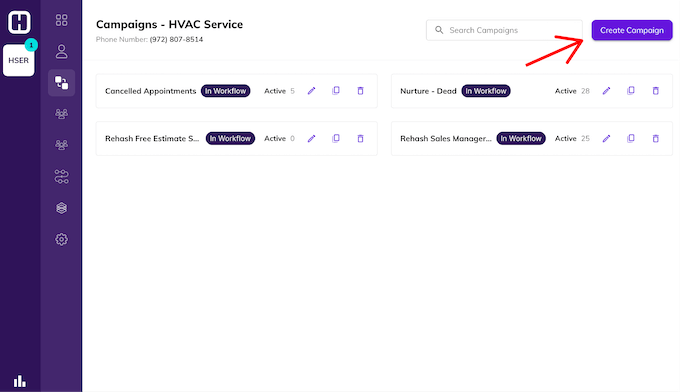
- Log in to Hatch and navigate to your campaigns tab.
-
Click on “Create Campaign”
-
You will be brought to the campaign template library, where you can choose a template or start from scratch.
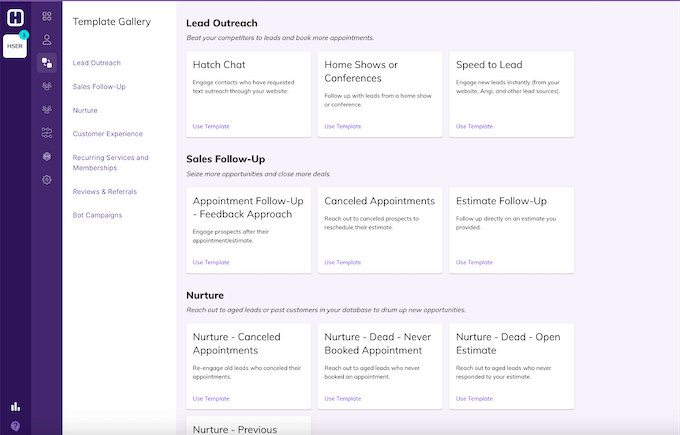
- Once you click “Use Template,” you’ll be able to modify it however you want. You can change the verbiage, add and remove messages, channels, and more.
Hatch campaign templates
Lead outreach campaign templates
Beat your competitors to leads and book more appointments.1. Hatch Chat
Engage contacts who have requested text outreach through your website.2. Home show or conference
Follow up with leads from a home show or conference.3. Speed to lead message template
Engage new leads instantly (from your website, Angi, and other lead sources.).Sales follow-up campaign templates
Seize more opportunities and close more deals.4. Canceled Appointments
Reach out to canceled prospects to reschedule their estimate.| Launch day - text | 10:00am Hi [[Contact First Name]]! This is [[User First Name]] with [[Details Company Name]]. Your appointment with us got canceled, and I’d love to get you back on the calendar. What day works best for you? Reply END to stop texts. |
| Launch day - email | 10:30am Subject line: Reschedule your appointment with [[Details Company Name]] Hi [[Contact First Name]]  , I saw that you recently canceled an appointment with us. Is your project still on the table? If so, I’m happy to reschedule you and get the ball rolling. Let me know! [[User First Name]] [[User Last Name]] , I saw that you recently canceled an appointment with us. Is your project still on the table? If so, I’m happy to reschedule you and get the ball rolling. Let me know! [[User First Name]] [[User Last Name]] [[Details Company Name]] [[Details Company Name]] |
| Day 2 - text | 11:00am When is a better day/time to get you on the books? |
| Day 3 - text | 10:00am Hi again, [[Contact First Name]]. Are you interested in rescheduling your appointment? |
| Day 5 - text | 2:00pm Before I close this out, reaching out one more time to see if we can reschedule your appointment. When works for you? |
5. Appointment Follow-Up - Feedback Approach
Engage prospects after their appointment/estimate.| Launch day - text | 10:00am Hi [[Contact First Name]]! This is [[User First Name]] with [[Details Company Name]]. I want to follow up on your recent appointment. How did everything go? Reply END to stop texts. |
| Launch day - email | 10:30am SL: [[Contact First Name]], how’d it go? Hi [[Contact First Name]], [[User First Name]] here from [[Details Company Name]]. Thanks for having us out! How did everything go during your visit? Do you have any feedback or questions I can help answer? Best, [[User First Name]] [[User Last Name]] [[Details Company Name]] |
| Day 2 - text | Hey [[Contact First Name]], checking in again to see how your appointment went. Do you have any questions or feedback? |
| Day 4 - text | 10:00am Hi [[Contact First Name]], I just want to make sure we met your expectations. A yes or no is perfectly fine! |
| Day 4 - email | 10:15am SL: [[Contact First Name]], [[Details Company Name]] Feedback Hi [[Contact First Name]], It’s [[User First Name]] at [[Details Company Name]]. Typically, people don’t get back to us for one of the below reasons: 1. Too busy (understandable!) 2. Affordability 3. Something didn’t go well at your appointment I’m happy to work with you to better understand what it will take to earn your business. Is one of the above affecting your response? Thank you, [[User First Name]] [[User Last Name]]  [[Details Company Name]] [[Details Company Name]] |
| Day 5 - text | 11:00am Is your project still on the table, [[Contact First Name]]? |
| Day 7 - text | 10:45am Hi [[Contact First Name]], are you still looking to get your project done soon, or should I touch base in a few months? |
6. Estimate Follow-Up
Follow up directly on an estimate you provided.| Launch day - text | 10:00am Hi [[Contact First Name]]! This is [[User First Name]] with [[Details Company Name]]. Do you have any questions on the estimate we sent over? Reply END to stop texts. |
| Launch day - email | 10:30am SL: [[Contact First Name]], how can I help? Hi [[Contact First Name]], [[User First Name]] here with [[Details Company Name]]. It was great to meet you in our recent appointment, thanks for giving us the opportunity to earn your business! Do you have any questions on the estimate we sent over? [[User First Name]] [[User Last Name]] [[Details Company Name]] |
| Day 2 | Skip |
| Day 3 - text | 10:30am Hey [[Contact First Name]], let me know if you have everything you need to make an informed decision. |
| Day 4 - text | 10:00am Hey [[Contact First Name]], [[User First Name]] again, checking in on your estimate. I’m happy to talk through any questions or concerns you have—let me know how I can help! |
| Day 4 - email | 10:15am SL: Your estimate with [[Details Company Name]] Hi [[Contact First Name]], It’s [[User First Name]] again from [[Details Company Name]]. I haven’t heard from you since we provided your estimate. Is it for any of these reasons? 1. Price too high 2. Not ready 3. Considering someone else I’m happy to work with you on any of these—we want to earn your business! Thank you, [[User First Name]] [[User Last Name]] [[Details Company Name]] |
| Day 5 - text | 11:00am Is your project still on the table, [[Contact First Name]]? |
| Day 7 - text | 10:45am Hi [[Contact First Name]], are you still looking to get your project done soon, or should I touch base in a few months? |
Customer experience campaign templates
Keep customers informed and engaged, to increase satisfaction, loyalty, and retention.7. Accounts Receivable
Reach out to customers for payments.| Launch day - text | 9:30am Hi [[Contact First Name]]. [[User First Name]] from [[Details Company]] here. We are ready to collect payment for your completed service. You can pay by calling or online through this link: [[Details Link]]. Thanks! Reply END to stop texts. |
| Launch day - email | 2:30pm Subject line: Your Payment is Due Hi [[Contact First Name]] - [[User First Name]] from [[Details Company]] here. We are ready to collect payment for your completed service. You can pay by calling or online through this link: [[Details Link]]. Thanks! [[User First Name]] |
| Day 2 | skip |
| Day 3 - text | 10:00am Hi again [[Contact First Name]], this is [[User First Name]] from [[Details Company]] here. Reminding you that your payment is due. Please either give me a call to resolve your payment, or you can pay online through this link: [[Details Link]]. |
| Day 4 | skip |
| Day 5 - text | 10:00am [[Contact First Name]], your payment to [[Details Company]] is due. Please either give me a call to make a payment, or you can pay online through this link: [[Details Link]]. |
| Day 6 - email | 10:00am Subject line: Reminder: Your Payment to [[Details Company]] Hi [[Contact First Name]] - We have not had luck getting in touch with you to resolve your balance for your completed service. Are there questions I can answer for you? Please call or email us if there are questions or concerns. If you’re able to make the payment online, here’s a link to do so: [[Details Link]]  Thanks! [[User First Name]]  |
| Day 6 - text | 10:00am Hi [[Contact First Name]]. We haven’t heard back from you to collect payment on your completed service. When can we get this resolved? Call me when you get a chance. |
8. Upcoming Appointment Reminder
Remind customers about their upcoming appointment9. Appointment Confirmation*
*This template is not in Hatch because the appointment date/time snippet varies depending on your CRM. If you want to use it, work with your Account Manager to identify the right snippet. Ensure clients their appointment is booked.10. Schedule installation template
Inform customers that their product has come in and that it’s time to schedule the install.| Launch day - text | 10:00am Hi [[Contact First Name]], it’s [[User First Name]] from [[Details Company Name]]! Great news, your products will be arriving soon, so I can go ahead and schedule the installation. What day/time works for you? Reply END to stop texts. |
| Launch day - email | 10:30am Subject line: [[Contact First Name]] - Your Order Is Ready Hi [[Contact First Name]], Your products from [[Details Company Name]] should be here within the next few days, so let’s schedule a day and time for the installation to begin. What day works best for you? Best, [[User First Name]] [[User Last Name]] [[Details Company Name]] |
| Day 3 - text | 10:15am Hi again - quick reminder to contact us to get scheduled for installation. We’re eager to get your job started! |
| Day 3 - email | 10:30am Subject line: Reminder - Your Order Is Ready Hi [[Contact First Name]], Reminding you that your installation is ready to be scheduled. Give me a call or shoot over a text/email with your availability. We look forward to starting your project! Thanks, [[User First Name]] [[User Last Name]] [[Details Company Name]]   |
| Day 5 - text | 11:00am Hi [[Contact First Name]]. Did you have a date in mind to start your installation? |
Nurture campaign templates
Reach out to aged leads or past customers in your database to drum up new opportunities.11. Nurture - Canceled Appointments
Re-engage old leads who canceled their appointments.| Launch day - text | 1:45pm Hi [[Contact First Name]], it’s [[User First Name]] from [[Details Company Name]]. We never met on the project you inquired about a while back. Are you still interested in getting work done? Reply END to stop texts. |
| Launch day - email | 2:30pm Subject line: Your canceled appointment with [[Details Company Name]] [[Contact First Name]], You inquired about an appointment in the past, and we were never able to meet with you. Did you complete this project, or does it make sense for us to reconnect and schedule an appointment? Thanks, [[User First Name]] [[User Last Name]] [[Details Company Name]] [[Details Company Name]] |
| Day 3 - text | 2:00pm Are you interested in us taking a look at the project you inquired about in the past? |
| Day 6 - text | 2:00pm Circling back one last time! Did you want to talk to a specialist about your project? |
12. Nurture - Dead - Open Estimate
Reach out to aged leads who never responded to your estimate.13. Nurture - Dead - Never Booked Appointment
Reach out to aged leads who never booked an appointment.14. Nurture - Previous Customer
Reach out to past customers about new projects.| Launch day - text | 1:45pm Hi [[Contact First Name]], it’s [[User First Name]] from [[Details Company Name]]. We enjoyed working with you in the past! Do you have any new projects coming up that we can help with? Reply END to stop texts. |
| Launch day - email | 2:30pm Subject line: [[Contact First Name]], another project? [[Contact First Name]], I hope you’ve been well since we completed your last project! We enjoyed working with you, so I’m reaching out to see if you have any additional projects coming up that we can help with? Let me know! [[User First Name]] [[User Last Name]] [[Details Company Name]] |
| Day 2 | skip |
| Day 3 - text | 2pm Circling back around to see if you have upcoming projects we can help with. I’m happy to jump on a quick call - are you free this week? |
| Day 3 - email | 2:30pm Subject line: [[Contact First Name]], what’s next? [[Contact First Name]], Checking in once more to see if you have any new projects on your mind that we can help with. We value our past customers and would love to talk more about what’s next. What day/time works best to catch up? Thank you, [[User First Name]] [[User Last Name]] [[Details Company Name]] |
| Day 4 | skip |
| Day 5 - text | 1:00pm I’m going to close this out. Please reach out in the future if you’re interested in working on another project with us! |
| Day 5 - email | 1:15pm [[Contact First Name]] - keep us in mind! Hi [[Contact First Name]], I haven’t heard back from you, so I’ll go ahead and close this out. Please reach out in the future when you’re ready to discuss another project! Best, [[User First Name]] [[User Last Name]] [[User Last Name]] [[Details Company Name]] [[Details Company Name]] |
Review & Referral Campaign Templates
Ask satisfied customers to spread the word about your business.15. Referrals
Tell satisfied customers about your referral program.16. Reviews
Share a link with customers to leave a review.NOTE: There is not a snippet in Hatch for your review link, so you must add this manually.