

Overview:
- Type: CRM
- Version: Prismatic/Hatch App Marketplace
- Setup: Enter Credentials
- Sync Frequency: 15 minutes
Setting Up the Integration
Requirements
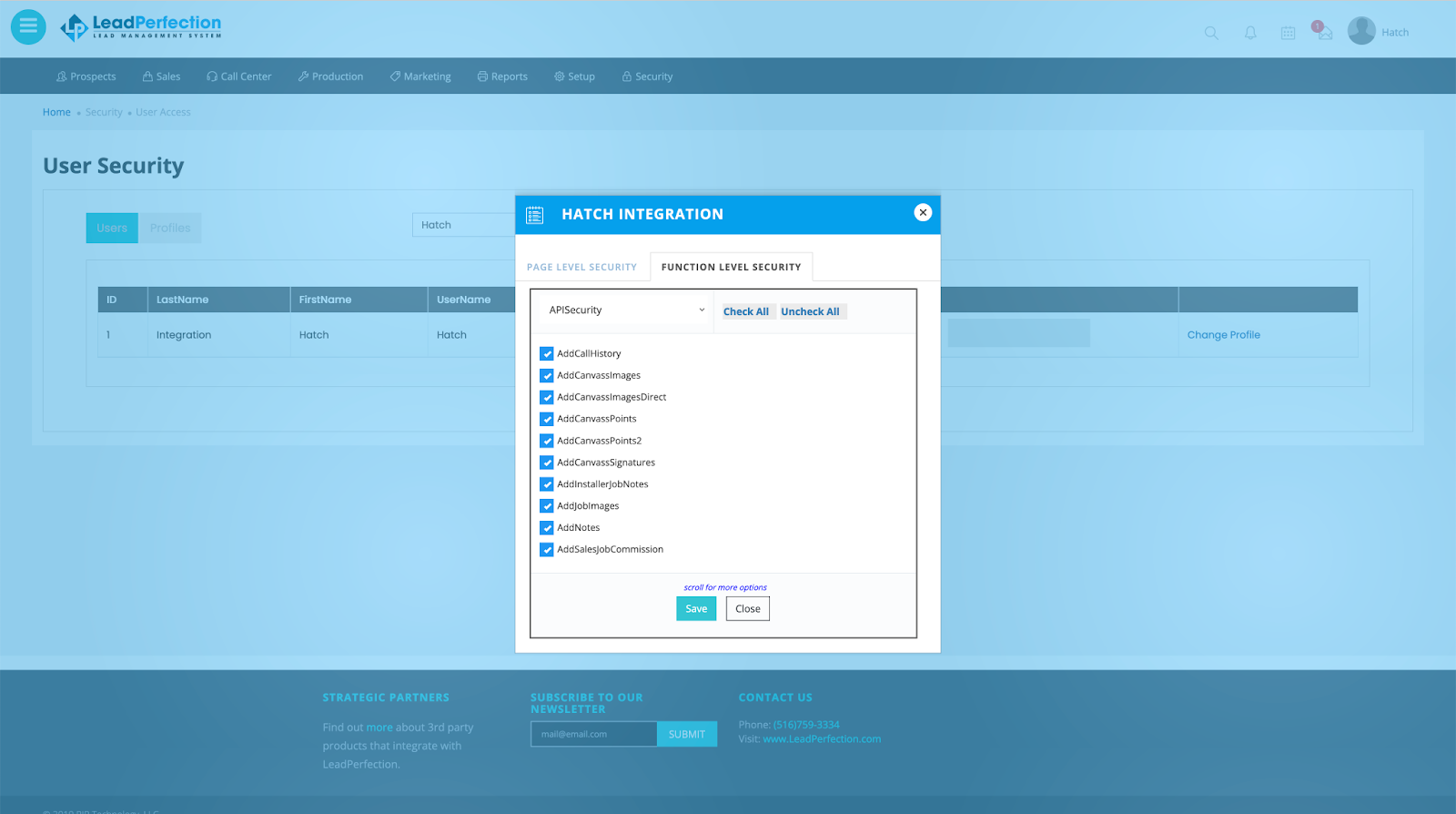
Before activating the integration, check that your LeadPerfection user has the correct security permissions to authorize the necessary API access. While it’s not required, some organizations will create a specific user to grant access for Hatch.- In LeadPerfection, navigate to Security - > User Access.
- Find the provided user and select Assign.
- Navigate to the Function Level Security tab, select APISecurity from the dropdown list
- Select Check All and click Save.
Instructions
- Navigate to the Hatch app marketplace
- Click Connect on the LeadPerfection integration
- Enter your LeadPerfection client id and the credentials of the user that will provide API access
- Complete additional configurations
- Click Finish to save.
Objects that Sync with Hatch
Every 15 minutes, Hatch will sync with LeadPerfection to retrieve recently modified records:- Lead
- Prospect
When do LeadPerfection objects sync to Hatch?
The following TRIGGERS cause the listed sync ACTIONS :- TRIGGER: A LeadPerfection Lead object is updated within the last 20 minutes before the sync began, there is at least one LeadPerfection Prospect object associated with the Lead, and all LeadPerfection fields are available that are mapped to Hatch standard fields (below)
- ACTION: All LeadPerfection Lead object fields/values are sync’d
- ACTION: The associated LeadPerfection Prospect object’s fields/values are sync’d
- In the rare case that there are multiple LeadPerfection Prospect objects associated with the Lead object, Hatch creates one opportunity for every combination of Lead and Prospect
- TRIGGER: A LeadPerfection Prospect object is updated within the last 20 minutes before the sync began, was not associated with a LeadPerfection Lead object during the sync, and all LeadPerfection fields are available that are mapped to Hatch standard fields (below)
- ACTION: All LeadPerfection Prospect object fields/values are sync’d
LeadPerfection to Hatch Opportunities
Creating a Hatch Opportunity Sync’d LeadPerfection objects will be joined into a single Hatch opportunity in one of the following combinations:- Lead + Prospect
- Prospect
- The sync’d External ID matches the existing opportunity’s External ID
- The sync’d External Created At matches the existing opportunity’s External Created At
- The sync’d External ID does not match the existing opportunity’s External ID
- The sync’d External Created At does not match the existing opportunity’s External Created At
What can be customized in LeadPerfection Integration Settings in Hatch:
User options- Push Communications — A true/false flag that indicates if the integration should push communication data back to LeadPerfection (default is true)
- Push To Call Logs — A true/false flag that indicates if communication data pushed to LeadPerfection should be created as a Call Log object (default is false)
- Push To Notes — A true/false flag that indicates if communication data pushed to LeadPerfection should be created as a Note on the Prospect object (default is true)
- Push To Production Notes — A true/false flag that indicates if communication data pushed to LeadPerfection should be created as a Note on the first Job object in the Lead object (default is false)
Hatch → LeadPerfection
Automatically Book Appointments Users of Hatch AI can benefit from our calendar integration to automatically book appointments on your schedule. Learn more about our LeadPerfection calendar bot in our dedicated Calendar: LeadPerfection article.FAQ
How often does the sync with LeadPerfection occur?
How often does the sync with LeadPerfection occur?
Hatch syncs with your CRM every 15 minutes.
What information is pushed back to LeadPerfection?
What information is pushed back to LeadPerfection?
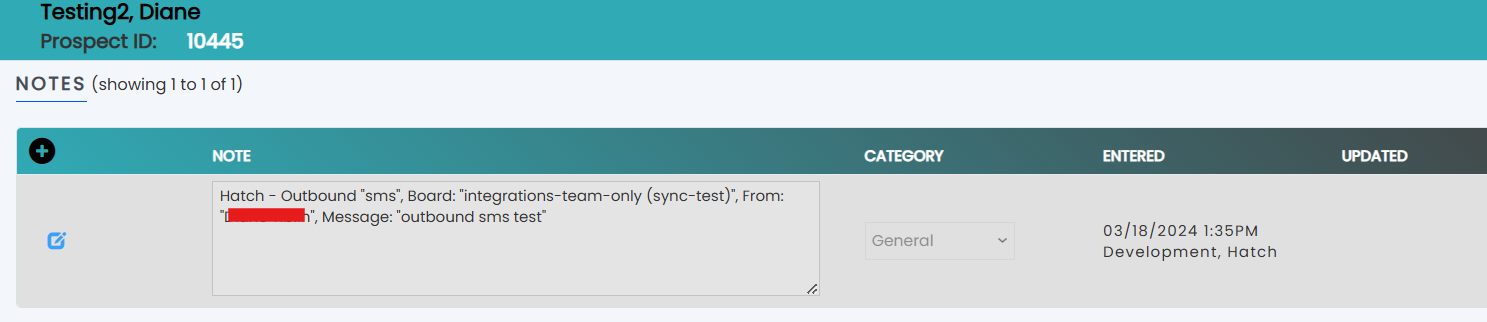
The only records Hatch will push back to LeadPerfection is the communications that occurred in Hatch. This can include inbound and outbound texts, emails, or calls.
Here is an example of what the push communications will look like in LeadPerfection:
Check out our webhooks to see what additional options might be available to create a custom integration.
Here is an example of what the push communications will look like in LeadPerfection:
Check out our webhooks to see what additional options might be available to create a custom integration.