

Requirements
You will need the following to set up the integration:- Hatch account with manager privileges
- Thumbtack Pro account with permissions to manage integrations on the businesses you want to connect
- Registered Hatch phone number in Thumbtack
How it Works
Once connected, Thumbtack will send a webhook to Hatch when a new lead is received. Hatch will create a Contact and Opportunity record for the lead, which can be launched into a Speed to Lead campaign. Once the lead is synced with Hatch, the integration will additionally send an automatic reply to the lead via the Thumbtack inbox. This ensures that Thumbtack recognizes and is able to measure that you have replied to the lead. The default automatic reply is this:Thanks for contacting us! We will reach out to you directly.
Setup Instructions
- Select Thumbtack from our App Marketplace page & click connect.
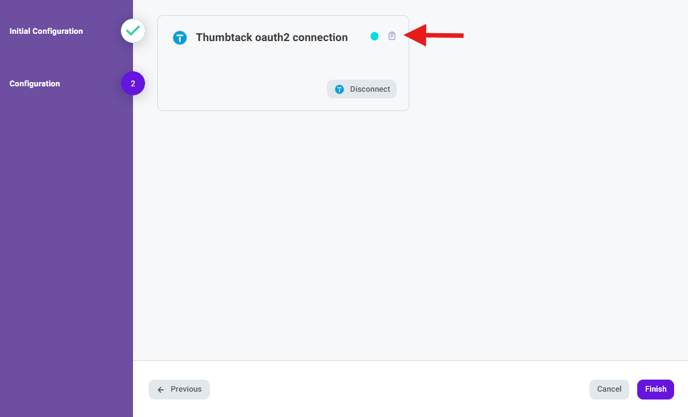
- Don’t forget to click Finish in order to save!
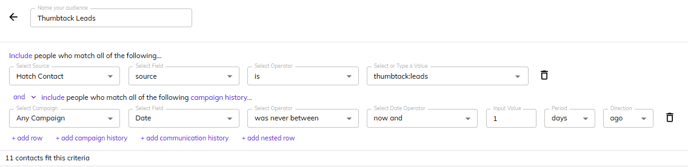
- After the integration has been activated, you will need to setup your audience and campaign workflow to launch your Thumbtack leads into a Speed to Lead campaign. Your audience should look something like this at the most basic level (you can additionally filter by different Thumbtack parameters such as business name, request category, lead type, etc):
Will the integration record my reply time with Thumbtack to help boost my rating?
Will the integration record my reply time with Thumbtack to help boost my rating?
The integration will be effective in boosting or maintaining a fast reply rate. When Hatch receives the lead from Thumbtack, the integration will send an auto-reply message back to the lead through the Thumbtack platform in order to get credit for replying.
I'm having trouble connecting my Thumbtack account, it says it's already connected?
I'm having trouble connecting my Thumbtack account, it says it's already connected?
Thumbtack only allows for 1 lead integration per account. If your account says it’s already connected to something (maybe a previous service provider or your CRM), then it needs to be disconnected from that in order to connect with Hatch. Your Hatch onboarding manager or our support team can assist with this process behind the scenes.
I have multiple Thumbtack businesses, how can I connect them all with Hatch?
I have multiple Thumbtack businesses, how can I connect them all with Hatch?
At this time, the integration instance only supports connecting a single account. Additionally, we can only support displaying a single integration instance in the app marketplace.
Luckily, our support or onboarding team can assist with setting up additional instances in our back-end: these will function the same, simply will not be accessible in the app marketplace.
Luckily, our support or onboarding team can assist with setting up additional instances in our back-end: these will function the same, simply will not be accessible in the app marketplace.
Can I customize the auto-reply message sent through Thumbtack?
Can I customize the auto-reply message sent through Thumbtack?
Yes—but this feature is currently only available in our back-end. Feel free to reach out to our support team with any changes you would like to make to the message.
Keep in mind: it is best to word the auto-reply in a way that lets the lead know you will be reaching out separately via direct methods, to discourage them from continuing to reply in Thumbtack (any subsequent Thumbtack messages will not be synced with Hatch).
Keep in mind: it is best to word the auto-reply in a way that lets the lead know you will be reaching out separately via direct methods, to discourage them from continuing to reply in Thumbtack (any subsequent Thumbtack messages will not be synced with Hatch).