

Overview
- Type: CRM
- Version: Prismatic/Hatch App Marketplace
- Set-Up: Oauth (Credentials)
- Sync Frequency: 15 minutes
Shared Data
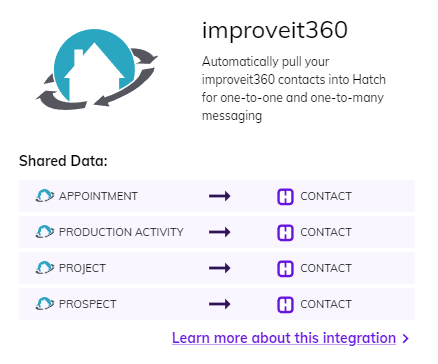
Objects that Sync with Hatch
- Appointment
- Production Activity
- Project
- Prospect
Sync Rules: How a Hatch contact gets updated by i360
The following TRIGGERS cause the listed sync ACTIONS :- TRIGGER: An improveit360 Appointment object is updated within the last 15 minutes before the sync began
- ACTION: All improveit360 Appointment object fields/values are sync’d
- ACTION: If there is an associated improveit360 Prospect object, that Prospect object’s fields/values are sync’d
- TRIGGER: An improveit360 Project object is updated within the last 15 minutes before the sync began
- ACTION: All improveit360 Project object fields/values are sync’d
- ACTION: If there are associated improveit360 Production Activity objects, those Production Activity objects’ fields/values are sync’d
- ACTION: If there is an associated improveit360 Prospect object, that Prospect object’s fields/values are sync’d
- TRIGGER: An improveit360 Prospect object is updated within the last 15 minutes before the sync began and was not associated with an improveit360 Appointment object or an improveit360 Project object during the sync
- ACTION: All improveit360 Prospect object fields/values are sync’d
i360 to Hatch Opportunities
Creating a Hatch Opportunity Sync’d improveit360 objects will be joined into a single Hatch opportunity in one of the following combinations:- Appointment
- Appointment + Prospect
- Project
- Project + Prospect
- Project + Production Activity (list)
- Project + Production Activity (list) + Prospect
- Prospect
- The sync’d External ID matches the existing opportunity’s External ID
- The sync’d External Created At matches the existing opportunity’s External Created At
- The sync’d External ID does not match the existing opportunity’s External ID
- The sync’d External Created At does not match the existing opportunity’s External Created At
Hatch → lmproveit360
Users can configure Push Communications in the integration setup. Users have the options to push a record of communications that have occurred in Hatch to one (or both) of the following i360 locations:- Contact Notes
- Tasks