

Overview
- Type: CRM
- Version: Prismatic/Hatch App Marketplace
- Setup Type: Credentials
- Sync Frequency: 15 minutes
Setting Up the Integration
Instructions
- Navigate to the Hatch app marketplace
- Click Connect on the ServiceMinder integration
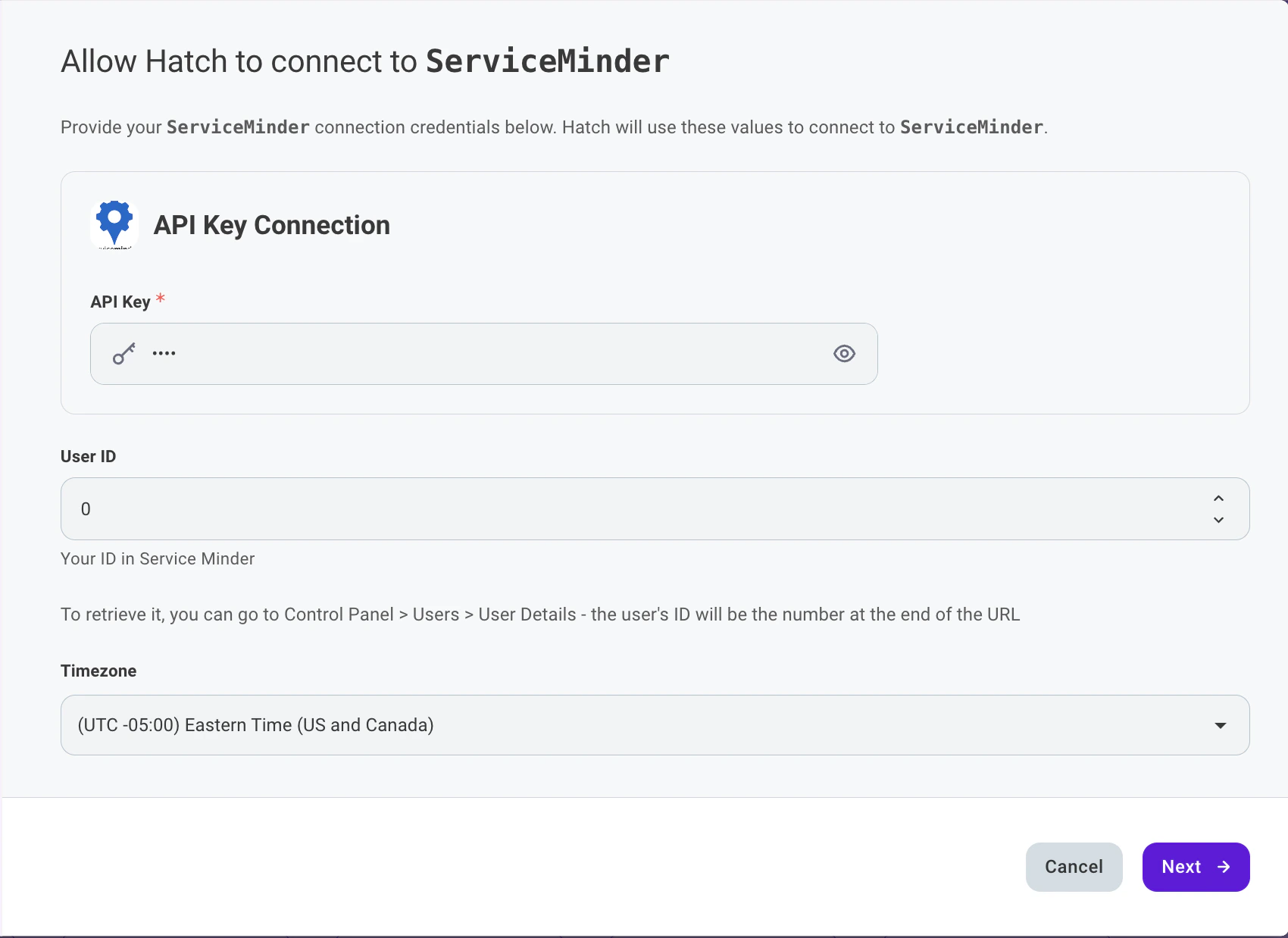
- Enter your ServiceMinder API Key, User ID, and desired timezone
- Select which data objects from ServiceMinder you would like Hatch to retrieve: Appointments, Proposals, Contacts
- Select whether you would like Hatch to sync customer communications with Contact Notes
- Click Finish to save.
Objects that Sync from ServiceMinder Into Hatch
- Appointment
- Proposals
- Contacts
How is ServiceMinder data stored in Hatch?
Opportunity Models
There are three types of Hatch opportunities that the ServiceMinder integration creates:- Contact Opportunity — Created from ServiceMinder Contact records. Includes customer details such as name, email, and phone number.
- Appointment Opportunity — Created from ServiceMinder Appointment records. Includes scheduling, service, and billing details.
- Proposal Opportunity — Created from ServiceMinder Proposal records. Includes pricing, service, and status details along with any custom fields.
Opportunity Creation & Update
When an opportunity is generated that doesn’t match an existing contact, a new contact will be created. A new opportunity will be added to an existing contact if a match is found.
- The synced Hatch External ID matches the existing opportunity’s Hatch External ID (see below for how the External ID is mapped)
- The synced Hatch External ID does not match the existing opportunity’s Hatch External ID (see below for how the External ID is mapped)
What ServiceMinder data is available in Hatch?
Standard Field Mapping
Contact OpportunityThe base object of this opportunity model is the ServiceMinder Contact. Therefore, (as an example) the
Id field below would indicate the ID of the ServiceMinder Contact record.
Appointment Opportunity
The base object of this opportunity model is the ServiceMinder Appointment. Therefore, (as an example) the
Id field below would indicate the ID of the ServiceMinder Appointment record.
Proposal Opportunity
The base object of this opportunity model is the ServiceMinder Proposal. Therefore, (as an example) the
Id field below would indicate the ID of the ServiceMinder Proposal record. If a Proposal has an empty status, Hatch will default the status to “Unknown”.Detail Fields
The following fields are available in the opportunity details for each opportunity model: Contact Opportunity
Appointment Opportunity
Proposal Opportunity
Does Hatch sync information back to ServiceMinder?
Hatch events and/or communications can be synced to ServiceMinder in the following scenarios. These options are configurable during the integration setup. If enabled, Hatch will log the push communications as a Contact Note on the associated ServiceMinder Contact record.Keep in mind that push communications occur instantaneously. There must be a ServiceMinder record in Hatch at the time of the communication event in order for it to succeed.
- When a Hatch campaign sends a text/email/voicemail to a contact
- When a contact calls or sends a text/email/voicemail to a Hatch workspace
- When a Hatch user calls or sends a text/email to a contact
- When events occur within a Hatch campaign
- A contact is launched (added) to a Hatch campaign
- A contact is sent the first message of a Hatch campaign
- A contact is removed from a Hatch campaign before it has ended
- A contact completed a Hatch campaign
FAQ
How often does my ServiceMinder information sync with Hatch?
How often does my ServiceMinder information sync with Hatch?
Every 15 minutes.
Can I choose which ServiceMinder record types to sync?
Can I choose which ServiceMinder record types to sync?
Yes. During the integration setup, you can individually enable or disable syncing for Contacts, Appointments, and Proposals.
What happens if a Proposal has no status in ServiceMinder?
What happens if a Proposal has no status in ServiceMinder?
If a ServiceMinder Proposal has an empty status field, Hatch will default the status to “Unknown”.
How does Hatch handle the Name field from ServiceMinder?
How does Hatch handle the Name field from ServiceMinder?
ServiceMinder provides a single combined Name field. Hatch automatically splits this into separate First Name and Last Name fields.
What will the communication records look like once pushed to ServiceMinder?
What will the communication records look like once pushed to ServiceMinder?
When push communications are enabled, Hatch communications will appear as Contact Notes on the associated ServiceMinder Contact record. Each note includes a title describing the communication type and a body with the message content.
Will Hatch change contact statuses in ServiceMinder?
Will Hatch change contact statuses in ServiceMinder?
Hatch does not update any status in ServiceMinder through the integration. However, if you change the status in ServiceMinder, Hatch will update that contact’s information the next time it syncs (every 15 minutes).
What timezone should I select during setup?
What timezone should I select during setup?
Select the timezone your organization operates in. Hatch uses this setting to correctly convert timestamps when syncing data between ServiceMinder and Hatch.