Text (most fields will be this type)
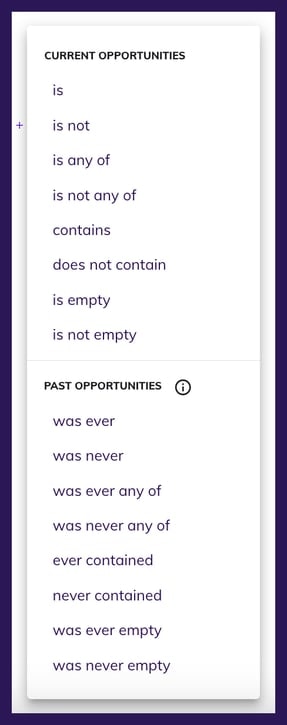
- is and is not look for a single value that matches the exact input.
- is any of and is not any of allow you to input a list of values to find an exact match for the input.
- contains and does not contain look for partial value matches.
-
is empty and is not empty simply look for contacts that either have nothing or anything in that field, respectively.
- Examples (using Field | Operator | Value):
- Appointment Result | is | Demo No Sale This would only return contacts that have exactly “Demo No Sale” in the field “Appointment Result”
- Project Type | contains | do If you had “doors” and “windows” as project types, contacts with either of those would return because both values contain “do” within them
- Sales Rep Assigned | is empty This would return any contacts that have the field “Sales Rep Assigned” blank
- Examples (using Field | Operator | Value):
Date
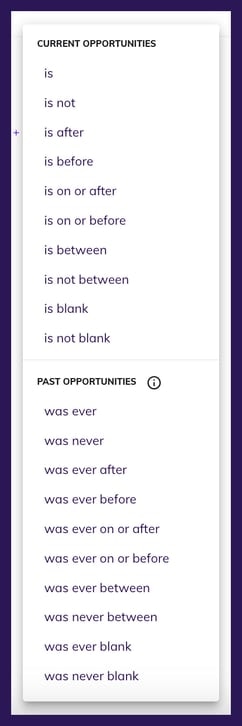
- is and is not allow you to query based on one specific time. The options are today , custom date , range (such as 2 days ago)
- is after allows you to find contacts with a date in the selected field that comes after today , custom date , or range (such as after 2 days from now)
- is before allows you to find contacts with a date in the selected field that comes before today , custom date , or range (such as before 2 days ago)
- is between allows you to find contacts with a date in the selected field that is between 2 specific dates , 2 points in a time range (such as between 2-5 days ago), or between now and some point in the past of future (such as between now and 5 days ago)
- is not between allows you to find contacts with a date in the selected field that is not between 2 specific dates , 2 points in a time range (such as is not between 2-5 days ago), or is not between now and some point in the past of future (such as is not between now and 5 days ago)
- is blank __ allows you to find contacts that do not have any date in the selected field
- is not blank allows you to find contacts that have any date in the selected field, regardless if it is in the past, present, or future
Number
- Examples (using Field | Operator | Value):
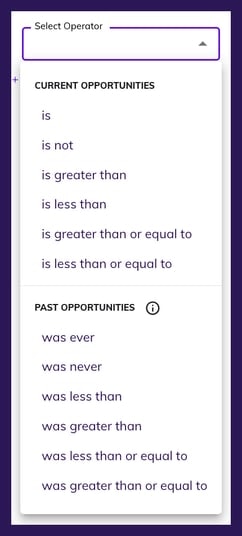
- Quote Amount | is greater than | 10000
- Number of Windows | is less than or equal to | 6
- Contract Total | is | 5000
True/False
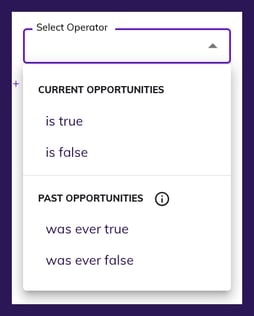
- Examples (using Field | Operator):
- Appointment Set | is true
- Contract Signed | is false
Current Opportunities vs. Past Opportunities
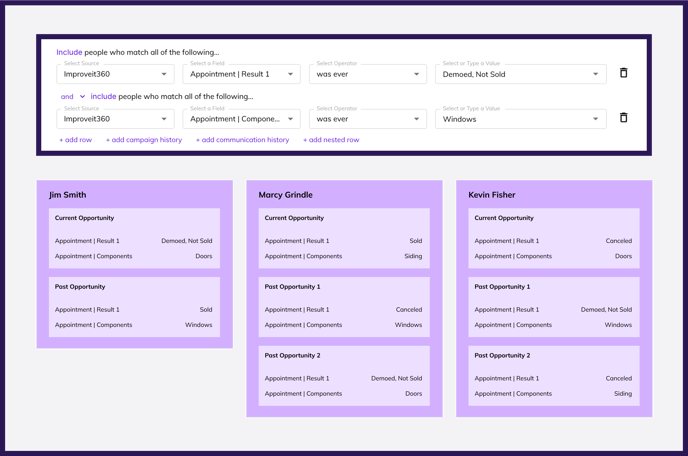
An Opportunity in Hatch is an individual set of data that belongs to a contact. For example, if a contact comes into Hatch from a Lead Source, and later that same contact comes into hatch from your CRM; those sets of data both belong to the same contact, but they are separate sets of data at a given time. Another example is if a contact had a project in 2021 and has a different project in 2024. In your CRM, it’s likely that each record has its own set of data (and usually something like a unique Project ID or Job ID) because those are distinct sets of data that belong to the same contact. Hatch considers the Current Opportunity the set of data that was either created or updated most recently. For this reason, most of the Audiences you create will rely on operators in the Current Opportunity section. There are times, however, when you may want to reference older records. This is where the Past Opportunities operators come in. Let’s say you want to target a list of contacts that currently have an appointment result of Demo No Sale , but you want to filter out contacts that ever had a Sold job in the past. Below is an example of the kind of Audience you might need: In this instance, the contacts that will show will be any contact where both of the following are true:
- The most recent set of data has Demoed, Not Sold as the Appointment Result
- No other opportunities in the past have Sold as the Appointment Result
- When using past operators, a contact will only show if all of the criteria is true on any single opportunity for that contact
- Appointment | Result 1 was ever Demoed, Not Sold
- Appointment | Components was ever Windows