

Using Snippets
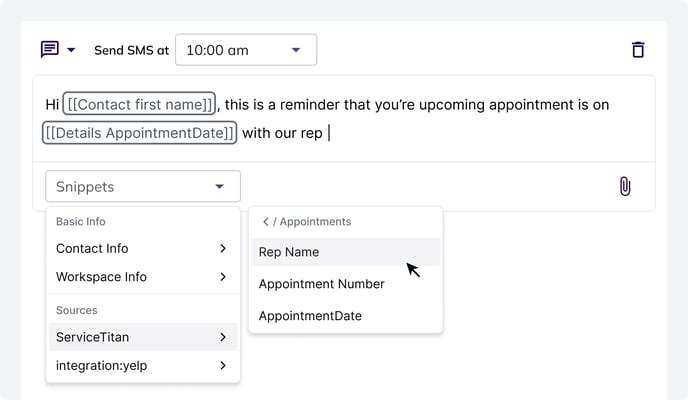
Snippets are a feature in Hatch that allow you to dynamically insert information into your campaign messages to make them more personalized, like:- Contact First Name
- User First Name
- Details Company Name
- Appointment Date
- Address
- And more
How Snippets are Populated
Snippets are formatted differently depending on the field you are targeting.- Contact Information: Snippets that pull Contact-Information, like the contact’s First Name, begin with
Contact - User Information (your information): Snippets that pull User-Information, like your First Name, begin with
User - Opportunity Information : Snippets that pull Opportunity-Information, such as the information from an Integration or CSV Import, begin with
Detailsand include theSource_Name
[[Details "Service-Titan" AppointmentDate]]
Opportunity-Information is populated from the most recent opportunity from that source. In the example above, the [[Details "Service-Titan" AppointmentDate]] will always populate from the most recent Opportunity from Service Titan.
For cases where you want to be even more specific in targeting, you can specify the model of the Opportunity you want to pull from. Some integrations provide different types of opportunities (Like Service Titan, which offers Calls, Jobs, and Membership Opportunities). If you want to ensure that a Snippet pulls from the most recent Opportunity from a certain source and a specific model, you can include the model in quotes after the source. Example: [[Details "Service-Titan" "Job" AppointmentDate]].
Contacts that don’t have a value for a Snippet
Sometimes, the Contact receiving the message does not have information to populate the Snippet you’re using. For example:- You have a Campaign Message that references the Contact’s
Appointment Date, and a Contact with noAppointment Dateenters that Campaign - You have a Campaign Message that references the Contact’s
First Name, and that Contact’s information is accidentally missing from their record
Snippet Fallbacks
Snippet Fallbacks improve the verbiage and deliverability of messages when certain dynamic information is missing from that message. Read on to understand what that means and how to use this feature.What are Snippet Fallbacks?
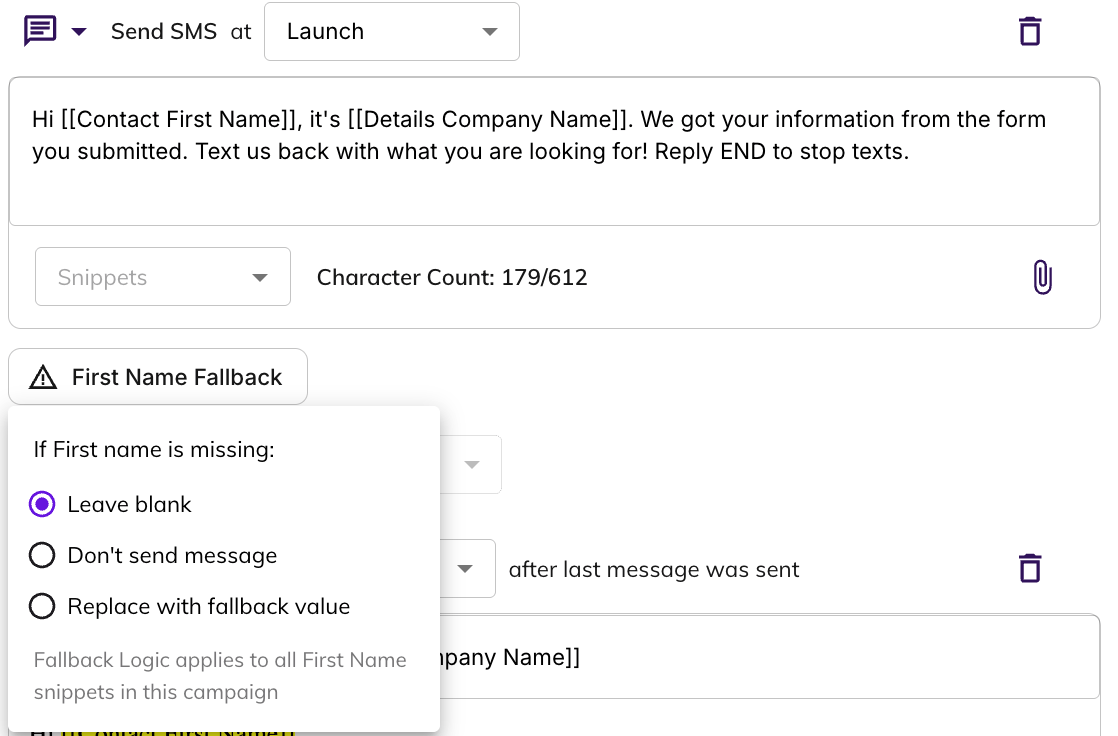
With Snippet Fallbacks, you can configure certain Snippets to change behavior if the information it’s looking to reference in a message is missing. In particular, it can:- Become blank
- Swap in a Fallback Value
How to use Snippet Fallbacks
Let’s say you have a Campaign Message that says:Hi [[Contact first name]] , this is [[User First Name]] with [[Details Company Name]]. Thanks for texting us! Can you tell me more about what you need help with?If the Contact has a value for First Name, the message would be formatted as:
Hi Tim , this is Benji with Best Home Improvement. Thanks for texting us! Can you tell me more about what you need help with?If the Contact does not have a value for First Name, you can use Snippet Fallback Logic to handle this message in the following ways:
Frequently Asked Questions
Why would First Name be missing for some of my Contacts?
Why would First Name be missing for some of my Contacts?
Certain lead sources only provide contact information like Phone Number and Email to contact a lead, and don’t provide a Name.
What about Fallbacks for Other Snippets?
What about Fallbacks for Other Snippets?
Today we only offer Fallbacks for the
[[Contact First Name]] Snippet because it’s the easiest and most logical snippet to write around. It would be challenging to write a message that can account for leaving a snippet like “Estimate Amount” blank, or fallback to a default value. But we are excited to find new ways to use this feature! If you have an idea, reach out to support@usehatchapp.com.