Once you have created a campaign, it’s easy to go back and adjust campaign messages.
Note : Any contacts that were already put into campaign before making campaign edits will receive the original campaign verbiage.
Step by Step
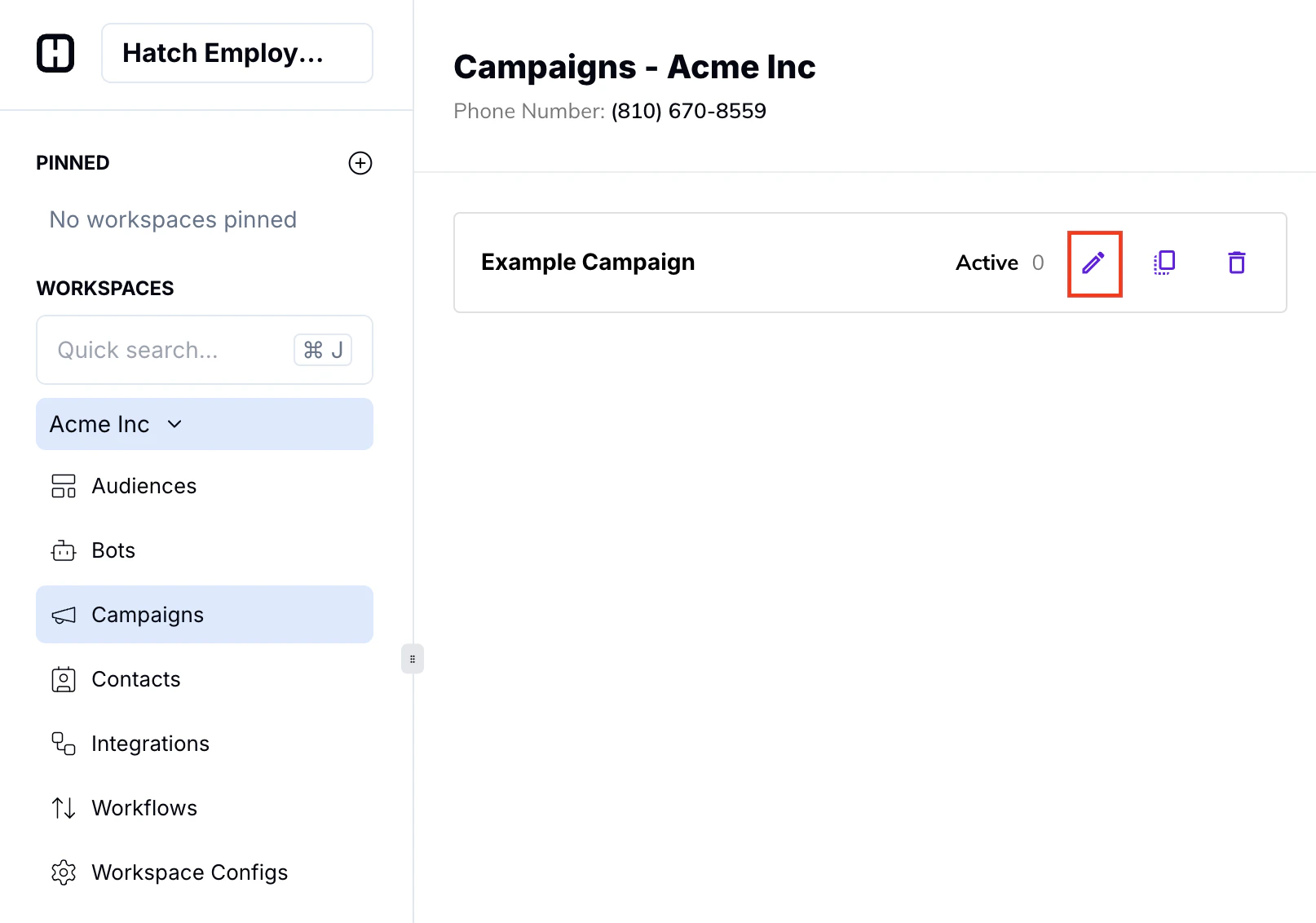
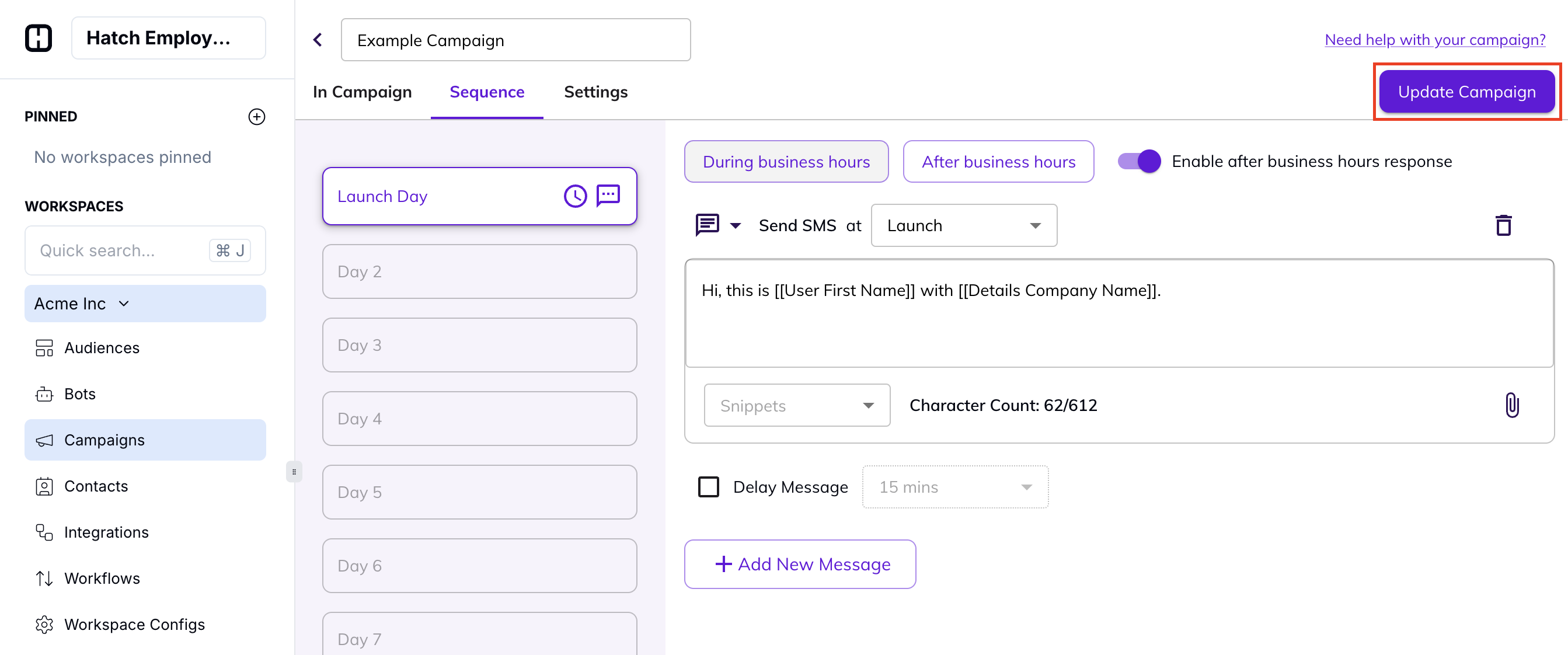
To start editing a campaign, simply click the pencil icon for the relevant campaign on the campaigns page.Once you’re in the campaign, you can see all the campaign messages that will send out each day. To make edits to the campaign, simply click on the message you want to edit and make your adjustments. You can change what time a message goes out, change the content of your messages, or any other changes you deem relevant.To save your changes, click Update Campaign.
⌘I
{"docsConfig":{"theme":"almond","$schema":"https://mintlify.com/schema.json","name":"Hatch Documentation","colors":{"primary":"#0F281B","light":"#ffffff","dark":"#0F281B"},"logo":{"light":"https://mintcdn.com/usehatchapp/9Zr4P9UDCE4u8Jx8/logo/hatch-logo.svg?fit=max\u0026auto=format\u0026n=9Zr4P9UDCE4u8Jx8\u0026q=85\u0026s=2441740d4879e1ae72139f9557bca917","dark":"https://mintcdn.com/usehatchapp/9Zr4P9UDCE4u8Jx8/logo/hatch-logo-dark-mode.svg?fit=max\u0026auto=format\u0026n=9Zr4P9UDCE4u8Jx8\u0026q=85\u0026s=331ee29575f7b6d72637b4d4c58b8c45","href":"https://docs.usehatchapp.com/"},"favicon":"https://mintlify.s3.us-west-1.amazonaws.com/usehatchapp/logo/hatch.svg","navbar":{"links":[{"href":"https://www.usehatchapp.com/get-a-demo","label":"Get a demo"}],"primary":{"type":"button","label":"Login","href":"https://app.usehatchapp.com/"}},"footer":{"socials":{"x":"https://x.com/usehatchapp","linkedin":"https://www.linkedin.com/company/usehatchapp"}},"styling":{"latex":false},"navigation":{"pages":[]}},"deployment":{"deploymentMetadataValue":{"subdomain":"usehatchapp","hasAudioNarration":false,"actualSubdomain":"usehatchapp","customDomains":["docs.usehatchapp.com"],"gitSource":{"type":"github","owner":"hatch1fy","repo":"hatch-external-docs","deployBranch":"main","contentDirectory":"","isPrivate":true,"mountPath":"","label":""},"entitlements":{"AI_CHAT":{"status":"ENABLED"},"WEB_MCP":{"status":"ENABLED"},"NARRATION":{"status":"ENABLED"}},"buildId":"6afba7c767e50413b098444f","clientVersion":"0.0.4342","searchFilterCounts":[{"language":"default","tag":"How to use Hatch","count":62},{"language":"default","tag":"Integrations","count":55},{"language":"default","tag":"Getting started","count":25},{"language":"default","tag":"Lead Sources","count":21},{"language":"default","tag":"Academy","count":20},{"language":"default","tag":"CRMs \u0026 Field Management Systems","count":19},{"language":"default","tag":"Hatch AI Agents","count":9},{"language":"default","tag":"Campaigns","count":9},{"language":"default","tag":"Account Settings","count":8},{"language":"default","tag":"Workspace Settings","count":7}]},"assistantConfig":{"enableAskAiButton":false,"enableStarterQuestions":false,"enableAskAiSearchBar":true},"basePath":"","hasChatPermissions":true,"hasWebMcpPermissions":true,"toggles":[{"name":"kill-isr","enabled":true,"variant":{"name":"disabled","enabled":false,"feature_enabled":true},"impressionData":false},{"name":"custom-rbac-roles","enabled":true,"variant":{"name":"disabled","enabled":false,"feature_enabled":true},"impressionData":false},{"name":"agent-mintlify-slack","enabled":true,"variant":{"name":"disabled","enabled":false,"feature_enabled":true},"impressionData":false},{"name":"agent-integrations-settings","enabled":true,"variant":{"name":"disabled","enabled":false,"feature_enabled":true},"impressionData":false},{"name":"rbac-expansion","enabled":true,"variant":{"name":"disabled","enabled":false,"feature_enabled":true},"impressionData":false},{"name":"automations-pr-grouping","enabled":true,"variant":{"name":"disabled","enabled":false,"feature_enabled":true},"impressionData":false},{"name":"custom-prefix","enabled":true,"variant":{"name":"disabled","enabled":false,"feature_enabled":true},"impressionData":false},{"name":"analytics-v7","enabled":true,"variant":{"name":"disabled","enabled":false,"feature_enabled":true},"impressionData":false},{"name":"user-flows-analytics","enabled":true,"variant":{"name":"disabled","enabled":false,"feature_enabled":true},"impressionData":false},{"name":"no-publish-flow","enabled":true,"variant":{"name":"disabled","enabled":false,"feature_enabled":true},"impressionData":false},{"name":"snapshot-serving-live","enabled":true,"variant":{"name":"disabled","enabled":false,"feature_enabled":true},"impressionData":false},{"name":"stripTemperatureMiddleware","enabled":true,"variant":{"name":"disabled","enabled":false,"feature_enabled":true},"impressionData":false},{"name":"support-platform-pylon-zendesk","enabled":true,"variant":{"name":"disabled","enabled":false,"feature_enabled":true},"impressionData":false},{"name":"snapshot-serving","enabled":true,"variant":{"name":"disabled","enabled":false,"feature_enabled":true},"impressionData":false},{"name":"instant-rollback","enabled":true,"variant":{"name":"disabled","enabled":false,"feature_enabled":true},"impressionData":false},{"name":"granular-notifications-server","enabled":true,"variant":{"name":"disabled","enabled":false,"feature_enabled":true},"impressionData":false},{"name":"granular-notifications","enabled":true,"variant":{"name":"disabled","enabled":false,"feature_enabled":true},"impressionData":false},{"name":"automations-fable","enabled":true,"variant":{"name":"disabled","enabled":false,"feature_enabled":true},"impressionData":false},{"name":"fixed-ai-action-pricing","enabled":true,"variant":{"name":"disabled","enabled":false,"feature_enabled":true},"impressionData":false},{"name":"site-roles","enabled":true,"variant":{"name":"disabled","enabled":false,"feature_enabled":true},"impressionData":false},{"name":"automation-resolve-merge-conflict","enabled":true,"variant":{"name":"disabled","enabled":false,"feature_enabled":true},"impressionData":false},{"name":"scoped-publishing","enabled":true,"variant":{"name":"disabled","enabled":false,"feature_enabled":true},"impressionData":false},{"name":"mintql","enabled":true,"variant":{"name":"disabled","enabled":false,"feature_enabled":true},"impressionData":false},{"name":"page-level-analytics","enabled":true,"variant":{"name":"disabled","enabled":false,"feature_enabled":true},"impressionData":false},{"name":"editor-version-history-v2","enabled":true,"variant":{"name":"disabled","enabled":false,"feature_enabled":true},"impressionData":false},{"name":"billing-page-v2","enabled":true,"variant":{"name":"disabled","enabled":false,"feature_enabled":true},"impressionData":false},{"name":"full-page-search","enabled":true,"variant":{"name":"disabled","enabled":false,"feature_enabled":true},"impressionData":false},{"name":"workspace-projects","enabled":true,"variant":{"name":"disabled","enabled":false,"feature_enabled":true},"impressionData":false},{"name":"fork-pr-previews","enabled":true,"variant":{"name":"disabled","enabled":false,"feature_enabled":true},"impressionData":false},{"name":"revalidation-jwt","enabled":true,"variant":{"name":"disabled","enabled":false,"feature_enabled":true},"impressionData":false},{"name":"hobby-abuse-scan","enabled":true,"variant":{"name":"disabled","enabled":false,"feature_enabled":true},"impressionData":false},{"name":"dashboard-inbox","enabled":true,"variant":{"name":"disabled","enabled":false,"feature_enabled":true},"impressionData":false},{"name":"turbopuffer-dual-write","enabled":true,"variant":{"name":"disabled","enabled":false,"feature_enabled":true},"impressionData":false},{"name":"approve-review-flow","enabled":true,"variant":{"name":"disabled","enabled":false,"feature_enabled":true},"impressionData":false},{"name":"editor-metadata","enabled":true,"variant":{"name":"disabled","enabled":false,"feature_enabled":true},"impressionData":false},{"name":"turbopuffer-serve","enabled":true,"variant":{"name":"disabled","enabled":false,"feature_enabled":true},"impressionData":false},{"name":"live-agents","enabled":true,"variant":{"name":"disabled","enabled":false,"feature_enabled":true},"impressionData":false},{"name":"starter-pricing","enabled":true,"variant":{"name":"treatment","enabled":true,"payload":{"type":"string","value":"treatment"},"feature_enabled":true},"impressionData":false},{"name":"llms-txt-v2","enabled":true,"variant":{"name":"disabled","enabled":false,"feature_enabled":true},"impressionData":false},{"name":"wildcard-email-auth","enabled":true,"variant":{"name":"disabled","enabled":false,"feature_enabled":true},"impressionData":false}],"starterQuestions":[],"googleFontsInlined":true},"customCss":[{"filePath":"styles.css","content":"html.light body{background:#F9F8F6}html.light #content-container,html.light .border{border:1px solid rgb(15 40 27 / 15%)}"}]}
{"page":{"pagePath":"how-to-use-hatch/campaigns/update-a-campaign","slug":"/how-to-use-hatch/campaigns/update-a-campaign","pageMetadata":{"title":"Update a Campaign","description":null,"href":"/how-to-use-hatch/campaigns/update-a-campaign"},"pageType":"default","mdx":{"mdxSource":{"compiledSource":"\"use strict\";const{Fragment:_Fragment,jsx:_jsx,jsxs:_jsxs}=arguments[0];const{useMDXComponents:_provideComponents}=arguments[0];function _createMdxContent(props){const _components={a:`a`,p:`p`,strong:`strong`,..._provideComponents(),...props.components},{Heading,Note,OptimizedImage}=_components;if(!Heading)_missingMdxReference(`Heading`,true);if(!Note)_missingMdxReference(`Note`,true);if(!OptimizedImage)_missingMdxReference(`OptimizedImage`,true);return _jsxs(_Fragment,{children:[_jsxs(_components.p,{children:[`Once you have `,_jsx(_components.a,{href:`/how-to-use-hatch/campaigns/create-a-campaign`,children:`created a campaign`}),`, it’s easy to go back and adjust campaign messages.`]}),`\n`,_jsx(Note,{children:_jsxs(_components.p,{children:[_jsx(_components.strong,{children:`Note`}),` : Any contacts that were already put into campaign before making campaign edits will receive the original campaign verbiage.`]})}),`\n`,_jsx(Heading,{level:`3`,id:`step-by-step`,children:`Step by Step`}),`\n`,_jsx(_components.p,{children:`To start editing a campaign, simply click the pencil icon for the relevant campaign on the campaigns page.`}),`\n`,_jsx(OptimizedImage,{src:`https://mintcdn.com/usehatchapp/-Zo0lQiuH8yTqJHV/images/how-to-use-hatch/campaigns/Screenshot-2025-01-13-at-11-52-09%E2%80%AFAM-png.png?fit=max\u0026auto=format\u0026n=-Zo0lQiuH8yTqJHV\u0026q=85\u0026s=ac9bf4783106fda21f14c2c538a76095`,alt:``,\"data-og-width\":`1614`,width:`1614`,\"data-og-height\":`1132`,height:`1132`,\"data-path\":`images/how-to-use-hatch/campaigns/Screenshot-2025-01-13-at-11-52-09 AM-png.png`,\"data-optimize\":`true`,\"data-opv\":`3`,srcset:`https://mintcdn.com/usehatchapp/-Zo0lQiuH8yTqJHV/images/how-to-use-hatch/campaigns/Screenshot-2025-01-13-at-11-52-09%E2%80%AFAM-png.png?w=280\u0026fit=max\u0026auto=format\u0026n=-Zo0lQiuH8yTqJHV\u0026q=85\u0026s=d4ce1e400c9e811add9dcbe19e552eb5 280w, https://mintcdn.com/usehatchapp/-Zo0lQiuH8yTqJHV/images/how-to-use-hatch/campaigns/Screenshot-2025-01-13-at-11-52-09%E2%80%AFAM-png.png?w=560\u0026fit=max\u0026auto=format\u0026n=-Zo0lQiuH8yTqJHV\u0026q=85\u0026s=bd0141abe17176bcfc22c64eb97d4a1b 560w, https://mintcdn.com/usehatchapp/-Zo0lQiuH8yTqJHV/images/how-to-use-hatch/campaigns/Screenshot-2025-01-13-at-11-52-09%E2%80%AFAM-png.png?w=840\u0026fit=max\u0026auto=format\u0026n=-Zo0lQiuH8yTqJHV\u0026q=85\u0026s=7e09667d56ef68c18d3b43e4503ca3e8 840w, https://mintcdn.com/usehatchapp/-Zo0lQiuH8yTqJHV/images/how-to-use-hatch/campaigns/Screenshot-2025-01-13-at-11-52-09%E2%80%AFAM-png.png?w=1100\u0026fit=max\u0026auto=format\u0026n=-Zo0lQiuH8yTqJHV\u0026q=85\u0026s=0986b5844ebc6f34dc3e6b090354be0b 1100w, https://mintcdn.com/usehatchapp/-Zo0lQiuH8yTqJHV/images/how-to-use-hatch/campaigns/Screenshot-2025-01-13-at-11-52-09%E2%80%AFAM-png.png?w=1650\u0026fit=max\u0026auto=format\u0026n=-Zo0lQiuH8yTqJHV\u0026q=85\u0026s=b7bee07aff5375389a7abc4c871d5040 1650w, https://mintcdn.com/usehatchapp/-Zo0lQiuH8yTqJHV/images/how-to-use-hatch/campaigns/Screenshot-2025-01-13-at-11-52-09%E2%80%AFAM-png.png?w=2500\u0026fit=max\u0026auto=format\u0026n=-Zo0lQiuH8yTqJHV\u0026q=85\u0026s=03a77127dea0b3644bf9d74b4abf7368 2500w`}),`\n`,_jsx(_components.p,{children:`Once you’re in the campaign, you can see all the campaign messages that will send out each day. To make edits to the campaign, simply click on the message you want to edit and make your adjustments. You can change what time a message goes out, change the content of your messages, or any other changes you deem relevant.`}),`\n`,_jsxs(_components.p,{children:[`To save your changes, click `,_jsx(_components.strong,{children:`Update Campaign`}),`.`]}),`\n`,_jsx(OptimizedImage,{src:`https://mintcdn.com/usehatchapp/-Zo0lQiuH8yTqJHV/images/how-to-use-hatch/campaigns/Screenshot-2025-01-13-at-11-53-49%E2%80%AFAM-png.png?fit=max\u0026auto=format\u0026n=-Zo0lQiuH8yTqJHV\u0026q=85\u0026s=77393e9bb53d9cd6e873746a2d3404ce`,alt:``,\"data-og-width\":`2686`,width:`2686`,\"data-og-height\":`1122`,height:`1122`,\"data-path\":`images/how-to-use-hatch/campaigns/Screenshot-2025-01-13-at-11-53-49 AM-png.png`,\"data-optimize\":`true`,\"data-opv\":`3`,srcset:`https://mintcdn.com/usehatchapp/-Zo0lQiuH8yTqJHV/images/how-to-use-hatch/campaigns/Screenshot-2025-01-13-at-11-53-49%E2%80%AFAM-png.png?w=280\u0026fit=max\u0026auto=format\u0026n=-Zo0lQiuH8yTqJHV\u0026q=85\u0026s=f430b2fceb5b136fd69bdd3f10b164d7 280w, https://mintcdn.com/usehatchapp/-Zo0lQiuH8yTqJHV/images/how-to-use-hatch/campaigns/Screenshot-2025-01-13-at-11-53-49%E2%80%AFAM-png.png?w=560\u0026fit=max\u0026auto=format\u0026n=-Zo0lQiuH8yTqJHV\u0026q=85\u0026s=5aa8220a84bf206ef9668577f853c56a 560w, https://mintcdn.com/usehatchapp/-Zo0lQiuH8yTqJHV/images/how-to-use-hatch/campaigns/Screenshot-2025-01-13-at-11-53-49%E2%80%AFAM-png.png?w=840\u0026fit=max\u0026auto=format\u0026n=-Zo0lQiuH8yTqJHV\u0026q=85\u0026s=2b17f84e0c300516f3aeb268d86154a8 840w, https://mintcdn.com/usehatchapp/-Zo0lQiuH8yTqJHV/images/how-to-use-hatch/campaigns/Screenshot-2025-01-13-at-11-53-49%E2%80%AFAM-png.png?w=1100\u0026fit=max\u0026auto=format\u0026n=-Zo0lQiuH8yTqJHV\u0026q=85\u0026s=5fd46c96ddcdfe8e7b86feb8b955b33b 1100w, https://mintcdn.com/usehatchapp/-Zo0lQiuH8yTqJHV/images/how-to-use-hatch/campaigns/Screenshot-2025-01-13-at-11-53-49%E2%80%AFAM-png.png?w=1650\u0026fit=max\u0026auto=format\u0026n=-Zo0lQiuH8yTqJHV\u0026q=85\u0026s=0b628a62a500ff95124d082a4f7e2c11 1650w, https://mintcdn.com/usehatchapp/-Zo0lQiuH8yTqJHV/images/how-to-use-hatch/campaigns/Screenshot-2025-01-13-at-11-53-49%E2%80%AFAM-png.png?w=2500\u0026fit=max\u0026auto=format\u0026n=-Zo0lQiuH8yTqJHV\u0026q=85\u0026s=c953413a5c16e4271ef66670ffbbbd00 2500w`})]})}function MDXContent(props={}){const{wrapper:MDXLayout}={..._provideComponents(),...props.components};return MDXLayout?_jsx(MDXLayout,{...props,children:_jsx(_createMdxContent,{...props})}):_createMdxContent(props)}return{default:MDXContent};function _missingMdxReference(id,component){throw new Error(`Expected `+(component?`component`:`object`)+\" `\"+id+\"` to be defined: you likely forgot to import, pass, or provide it.\")}","frontmatter":{},"scope":{"config":{},"pageMetadata":{"title":"Update a Campaign","description":null,"href":"/how-to-use-hatch/campaigns/update-a-campaign"}}},"mdxSourceWithNoJs":null},"mdxExtracts":{"tableOfContents":[{"title":"Step by Step","slug":"step-by-step","depth":3,"children":[]}],"codeExamples":{}},"jsLinks":[],"subdomain":"usehatchapp","siteName":"Hatch Documentation","title":"Update a Campaign - Hatch Documentation","contextualStarterQuestions":[],"navMaps":{"firstHrefInVersion":{},"firstHrefInLanguage":{}},"lastModified":"2026-09-23T13:17:29.257Z","originalFileLocation":"how-to-use-hatch/campaigns/update-a-campaign.mdx"},"headHtml":"\u003cscript data-mint-head>(function(){var d=document.documentElement,p=null;if(!p){try{p=localStorage.getItem(\"isDarkMode\")}catch(e){}if(p==='true')p='dark';else if(p==='false')p='light';if(p!=='light'\u0026\u0026p!=='dark'\u0026\u0026p!=='system')p=\"system\"}var r=p==='system'?(matchMedia(\"(prefers-color-scheme: dark)\").matches?'dark':'light'):p;d.classList.remove(r==='dark'?'light':'dark');d.classList.add(r);d.setAttribute(\"data-theme-preference\",p)})();\u003c/script>\u003cmeta data-mint-head name=\"application-name\" content=\"Hatch Documentation\">\u003cmeta data-mint-head name=\"generator\" content=\"Mintlify\">\u003clink data-mint-head rel=\"apple-touch-icon\" type=\"image/svg+xml\" sizes=\"180x180\" href=\"https://mintlify.s3.us-west-1.amazonaws.com/usehatchapp/logo/hatch.svg\">\u003clink data-mint-head rel=\"icon\" type=\"image/svg+xml\" sizes=\"32x32\" href=\"https://mintlify.s3.us-west-1.amazonaws.com/usehatchapp/logo/hatch.svg\">\u003clink data-mint-head rel=\"icon\" type=\"image/svg+xml\" sizes=\"16x16\" href=\"https://mintlify.s3.us-west-1.amazonaws.com/usehatchapp/logo/hatch.svg\">\u003clink data-mint-head rel=\"shortcut icon\" type=\"image/svg+xml\" href=\"https://mintlify.s3.us-west-1.amazonaws.com/usehatchapp/logo/hatch.svg\">\u003cmeta data-mint-head property=\"og:title\" content=\"Update a Campaign - Hatch Documentation\">\u003cmeta data-mint-head property=\"og:site_name\" content=\"Hatch Documentation\">\u003cmeta data-mint-head property=\"og:url\" content=\"https://docs.usehatchapp.com/how-to-use-hatch/campaigns/update-a-campaign\">\u003cmeta data-mint-head property=\"og:type\" content=\"website\">\u003cmeta data-mint-head property=\"og:image\" content=\"https://usehatchapp.mintlify.site/_mintlify/api/og/v2?division=Campaigns\u0026amp;title=Update+a+Campaign\u0026amp;theme=eac1166312522336122e3e13\u0026amp;signature=5dc2d480c6b766e1312bd8973288f961c695cf96749e8852110520c0b47fbd28\">\u003cmeta data-mint-head property=\"og:image:width\" content=\"1200\">\u003cmeta data-mint-head property=\"og:image:height\" content=\"630\">\u003cmeta data-mint-head name=\"twitter:card\" content=\"summary_large_image\">\u003cmeta data-mint-head name=\"twitter:title\" content=\"Update a Campaign - Hatch Documentation\">\u003cmeta data-mint-head name=\"twitter:image\" content=\"https://usehatchapp.mintlify.site/_mintlify/api/og/v2?division=Campaigns\u0026amp;title=Update+a+Campaign\u0026amp;theme=eac1166312522336122e3e13\u0026amp;signature=5dc2d480c6b766e1312bd8973288f961c695cf96749e8852110520c0b47fbd28\">\u003cmeta data-mint-head name=\"twitter:image:width\" content=\"1200\">\u003cmeta data-mint-head name=\"twitter:image:height\" content=\"630\">\u003cmeta data-mint-head name=\"msapplication-config\" content=\"https://mintlify.s3.us-west-1.amazonaws.com/usehatchapp/_generated/favicon/browserconfig.xml?v=3\">\u003cmeta data-mint-head name=\"apple-mobile-web-app-title\" content=\"Hatch Documentation\">\u003cmeta data-mint-head name=\"msapplication-TileColor\" content=\"#0F281B\">\u003clink data-mint-head rel=\"canonical\" href=\"https://docs.usehatchapp.com/how-to-use-hatch/campaigns/update-a-campaign\">\u003clink data-mint-head rel=\"alternate\" type=\"application/xml\" href=\"/sitemap.xml\">\u003clink data-mint-head rel=\"alternate\" type=\"text/markdown\" href=\"/how-to-use-hatch/campaigns/update-a-campaign.md\">\u003cscript data-mint-head type=\"application/ld+json\">{\"@context\":\"https://schema.org\",\"@graph\":[{\"@type\":\"Organization\",\"@id\":\"https://docs.usehatchapp.com/#organization\",\"name\":\"Hatch Documentation\",\"url\":\"https://docs.usehatchapp.com\",\"logo\":{\"@type\":\"ImageObject\",\"url\":\"https://mintcdn.com/usehatchapp/9Zr4P9UDCE4u8Jx8/logo/hatch-logo.svg?fit=max\u0026auto=format\u0026n=9Zr4P9UDCE4u8Jx8\u0026q=85\u0026s=2441740d4879e1ae72139f9557bca917\"}},{\"@type\":\"WebSite\",\"@id\":\"https://docs.usehatchapp.com#website\",\"name\":\"Hatch Documentation\",\"url\":\"https://docs.usehatchapp.com\",\"publisher\":{\"@id\":\"https://docs.usehatchapp.com/#organization\"}},{\"@type\":\"WebPage\",\"@id\":\"https://docs.usehatchapp.com/how-to-use-hatch/campaigns/update-a-campaign#webpage\",\"url\":\"https://docs.usehatchapp.com/how-to-use-hatch/campaigns/update-a-campaign\",\"name\":\"Update a Campaign\",\"dateModified\":\"2026-09-23T13:17:29.257Z\",\"isPartOf\":{\"@id\":\"https://docs.usehatchapp.com#website\"},\"breadcrumb\":{\"@id\":\"https://docs.usehatchapp.com/how-to-use-hatch/campaigns/update-a-campaign#breadcrumb\"}},{\"@type\":\"BreadcrumbList\",\"@id\":\"https://docs.usehatchapp.com/how-to-use-hatch/campaigns/update-a-campaign#breadcrumb\",\"itemListElement\":[{\"@type\":\"ListItem\",\"position\":1,\"name\":\"Campaigns\",\"item\":\"https://docs.usehatchapp.com/how-to-use-hatch/campaigns/campaign-basics\"},{\"@type\":\"ListItem\",\"position\":2,\"name\":\"Update a Campaign\",\"item\":\"https://docs.usehatchapp.com/how-to-use-hatch/campaigns/update-a-campaign\"}]},{\"@type\":[\"Article\",\"TechArticle\"],\"@id\":\"https://docs.usehatchapp.com/how-to-use-hatch/campaigns/update-a-campaign#article\",\"headline\":\"Update a Campaign\",\"name\":\"Update a Campaign\",\"url\":\"https://docs.usehatchapp.com/how-to-use-hatch/campaigns/update-a-campaign\",\"mainEntityOfPage\":{\"@id\":\"https://docs.usehatchapp.com/how-to-use-hatch/campaigns/update-a-campaign#webpage\"},\"dateModified\":\"2026-09-23T13:17:29.257Z\",\"publisher\":{\"@id\":\"https://docs.usehatchapp.com/#organization\"},\"isPartOf\":{\"@id\":\"https://docs.usehatchapp.com#website\"}}]}\u003c/script>\u003cscript data-mint-head type=\"application/ld+json\">{\"@context\":\"https://schema.org\",\"@type\":\"WebSite\",\"name\":\"Hatch Documentation\",\"publisher\":{\"@type\":\"Organization\",\"name\":\"Hatch Documentation\"},\"provider\":{\"@type\":\"Organization\",\"name\":\"Mintlify\",\"url\":\"https://mintlify.com\"}}\u003c/script>","agentPointerHref":"/how-to-use-hatch/campaigns/update-a-campaign.md","siteName":"Hatch Documentation","nav":{"global":null,"tabs":[{"tab":"Getting started","pages":[{"title":"Getting started","href":"/getting-started/intro-to-hatch/what-is-hatch"}]},{"tab":"How to use Hatch","groups":[{"group":"Board \u0026 Contact Card","pages":[{"title":"Salesboard Basics","href":"/how-to-use-hatch/board-contact-card/salesboard-basics"},{"title":"Contact Card Basics","href":"/how-to-use-hatch/board-contact-card/contact-card-basics"},{"title":"Add Contact to Campaign from the Contact Card","href":"/how-to-use-hatch/board-contact-card/add-contact-to-campaign-from-the-contact-card"},{"title":"Suggested Responses","href":"/how-to-use-hatch/board-contact-card/suggested-responses"},{"title":"Dispositions in Hatch","href":"/how-to-use-hatch/board-contact-card/dispositions-in-hatch"}]},{"group":"Contacts","pages":[{"title":"Contacts Page","href":"/how-to-use-hatch/contacts/contacts-page"},{"title":"Looking at Contact Information","href":"/how-to-use-hatch/contacts/looking-at-contact-information"},{"title":"Adding and Importing Contacts","href":"/how-to-use-hatch/contacts/adding-and-importing-contacts"},{"title":"Importing Contacts with a CSV","href":"/how-to-use-hatch/contacts/importing-contacts-with-a-csv"},{"title":"How do I Search in Hatch?","href":"/how-to-use-hatch/contacts/how-do-i-search-in-hatch"}]},{"group":"Campaigns","pages":[{"title":"Campaign Basics","href":"/how-to-use-hatch/campaigns/campaign-basics"},{"title":"Create a Campaign","href":"/how-to-use-hatch/campaigns/create-a-campaign"},{"title":"Launching Contacts Into Campaigns","description":null,"href":"/how-to-use-hatch/campaigns/launching-contacts-into-campaigns"},{"title":"Update a Campaign","href":"/how-to-use-hatch/campaigns/update-a-campaign"},{"title":"Removing Contacts from Campaign","description":null,"href":"/how-to-use-hatch/campaigns/removing-contacts-from-campaigns"},{"title":"Using Voicemail Drops in Campaigns","href":"/how-to-use-hatch/campaigns/using-voicemail-drops-in-campaigns"},{"title":"The Sender Identification Requirement in Hatch","href":"/how-to-use-hatch/campaigns/the-sender-identification-requirement-in-hatch"},{"title":"Snippets","href":"/how-to-use-hatch/campaigns/snippets"},{"title":"Campaign History","href":"/how-to-use-hatch/campaigns/campaign-history"}]},{"group":"Workflows","pages":[{"title":"Workflows Overview","href":"/how-to-use-hatch/workflows/workflows-overview"}]},{"group":"Removal Rules Templates","pages":[{"title":"Removal Rule Templates","href":"/how-to-use-hatch/removal-rules-templates"}]},{"group":"Dashboard","pages":[{"title":"Dashboard Overview","href":"/how-to-use-hatch/dashboard/dashboard-overview"},{"title":"CSR and Agents Table","href":"/how-to-use-hatch/dashboard/csr-and-agents-table"},{"title":"Voice AI Scorecard","href":"/how-to-use-hatch/dashboard/voice-ai-scorecard"}]},{"group":"Conversations","pages":[{"title":"Conversations Page","href":"/how-to-use-hatch/conversations/conversations"},{"title":"How to Review Conversations","href":"/how-to-use-hatch/conversations/reviewing-conversations"},{"title":"Flagging a Call (Beta)","href":"/how-to-use-hatch/conversations/flagging-a-call"},{"title":"Glossary","href":"/how-to-use-hatch/conversations/glossary"}]},{"group":"Account Settings","pages":[{"title":"Managing Workspaces","href":"/how-to-use-hatch/account-settings/managing-workspaces"},{"title":"Add a Workspace","href":"/how-to-use-hatch/account-settings/add-a-workspace"},{"title":"Deactivate a Workspace","href":"/how-to-use-hatch/account-settings/deactivate-a-workspace"},{"title":"Managing Users","href":"/how-to-use-hatch/account-settings/managing-users"},{"title":"Add or Remove a Member from Workspace","href":"/how-to-use-hatch/account-settings/add-or-remove-member-from-workspace"},{"title":"Remove User from Hatch","href":"/how-to-use-hatch/account-settings/remove-user-from-hatch"},{"title":"Account Settings Overview","href":"/how-to-use-hatch/account-settings/account-settings-overview"},{"title":"Holidays","href":"/how-to-use-hatch/account-settings/holidays"}]},{"group":"Workspace Settings","pages":[{"title":"Overview","href":"/how-to-use-hatch/workspace-settings/overview"},{"title":"General Settings","href":"/how-to-use-hatch/workspace-settings/general-settings"},{"title":"Features","href":"/how-to-use-hatch/workspace-settings/features"},{"title":"Voicemail Greeting","href":"/how-to-use-hatch/workspace-settings/voicemail-greeting"},{"title":"Call Forwarding","href":"/how-to-use-hatch/workspace-settings/how-to-setup-call-forwarding-for-your-workspace"},{"title":"Recording calls in Hatch","href":"/how-to-use-hatch/workspace-settings/recording-calls-in-hatch"},{"title":"Team","href":"/how-to-use-hatch/workspace-settings/team"}]},{"group":"Profile Settings","pages":[{"title":"Notifications","href":"/how-to-use-hatch/profile-settings/notifications"},{"title":"Changing or Adding your Mobile Number in Hatch","href":"/how-to-use-hatch/profile-settings/changing-or-adding-your-mobile-number-in-hatch"},{"title":"Signing into Hatch","href":"/how-to-use-hatch/profile-settings/signing-into-hatch"}]},{"group":"Reporting Settings","pages":[{"title":"Configuring Dispositions","href":"/how-to-use-hatch/reporting-settings/configuring-dispositions"},{"title":"Attribution Settings","href":"/how-to-use-hatch/reporting-settings/attribution-settings"}]},{"group":"Legacy Reporting","pages":[{"title":"Sales and Appointments Reports","href":"/how-to-use-hatch/legacy-reporting/sales-and-appointments-reports"},{"title":"Messaging and Campaign Reports","href":"/how-to-use-hatch/legacy-reporting/messaging-and-campaign-reports"},{"title":"User and Trend Reports","href":"/how-to-use-hatch/legacy-reporting/user-and-trend-reports"},{"title":"Legacy Reporting FAQ","href":"/how-to-use-hatch/legacy-reporting/legacy-reporting-faq"}]},{"group":"Business Hours Features","pages":[{"title":"Organization-Level Business Hours","href":"/how-to-use-hatch/business-hours-features/organization-level-business-hours"},{"title":"Speed to Lead Alternate Messaging","href":"/how-to-use-hatch/business-hours-features/speed-to-lead-alternate-messaging"},{"title":"Workspace-Level Business Hours","href":"/how-to-use-hatch/business-hours-features/workspace-level-business-hours"}]},{"group":"Frequently Asked Questions","pages":[{"title":"Reset Password","href":"/how-to-use-hatch/frequently-asked-questions/reset-password"},{"title":"'The message From/To pair violates a blacklist rule' when sending messages","href":"/how-to-use-hatch/frequently-asked-questions/the-message-from-to-pair-violates-a-blacklist-rule-when-sending-messages"}]},{"group":"Audience Builder","pages":[{"title":"Audience Builder: Manage Data","href":"/how-to-use-hatch/audience-builder-v2/audience-builder-v2-manage-data"},{"title":"Audience Builder: Field Picker","href":"/how-to-use-hatch/audience-builder-v2/audience-builder-v2-field-picker"},{"title":"Audience Builder: Operators","href":"/how-to-use-hatch/audience-builder-v2/audience-builder-v2-operators"},{"title":"Audience Builder: Source Picker","href":"/how-to-use-hatch/audience-builder-v2/audience-builder-v2-source-picker"},{"title":"Audience Builder: Glossary and FAQ","href":"/how-to-use-hatch/audience-builder-v2/audience-builder-v2-glossary-and-faq"}]}]},{"tab":"Academy","pages":[{"title":"Academy","href":"/academy/overview"}]},{"tab":"Integrations","pages":[{"title":"Integrations","href":"/integrations/general/integration-overview"}]}]},"basePath":"","title":"Update a Campaign - Hatch Documentation","deploymentId":"dpl_QQ3G2kinQNQFFK6Sh8dmX2teK74w","buildId":"dpl_QQ3G2kinQNQFFK6Sh8dmX2teK74w","dynamics":["a74be98ba7"],"chunks":["zoom-image-lightbox-lceUjs6n.js","lightbox-handle-r17bVUz3.js"]}