

Getting there
Go to Dashboard in the left-hand sidebar.The two tables
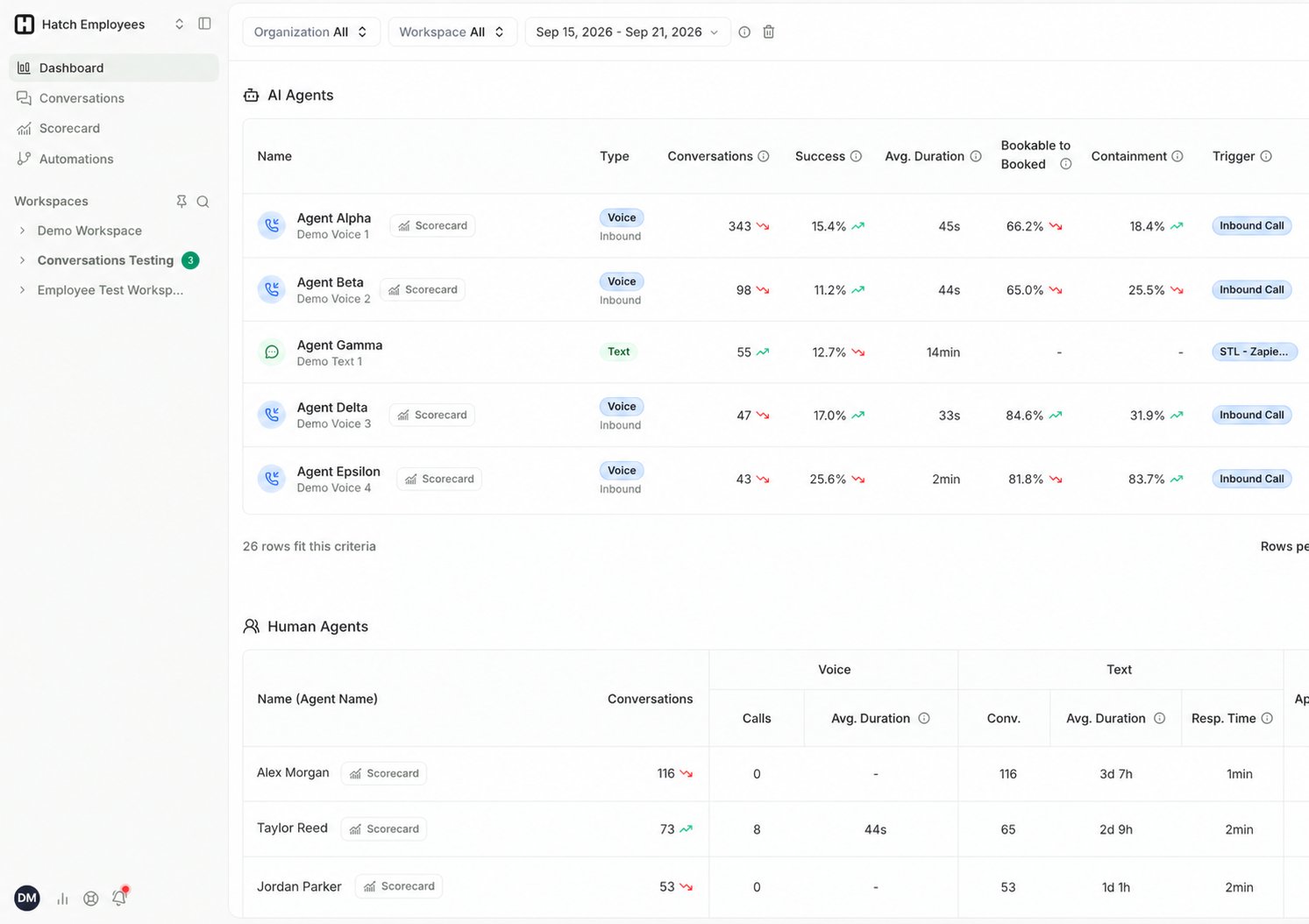
The Dashboard lists every agent in your organization across two tables:- AI Agents — your Voice and Text AI agents, with AI-specific measures such as Bookable to Booked and Containment.
- Human Agents — your CSRs, split into Voice and Text columns since a CSR may work both channels.
What you can do
- See which of your AI agents are currently turned on or off.
- Track how many conversations each agent is handling, and how much of it is landing.
- Filter by organization, workspace, or time period, or jump to a specific agent.
- Open the Voice AI Scorecard for a single Voice AI agent, using the Scorecard button.
- Click into any agent to view the specific conversations they have had.
Going deeper
The Dashboard tells you how much and how often. When you need to know why:- Open the Voice AI Scorecard for booking performance, not booked reasons, handling, and call categories on a single agent.
- Click through to the Conversations page to read the individual conversations behind any number.
Related Articles
- CSR and Agents Table: every column in both tables.
- Voice AI Scorecard: per-agent Voice AI performance.
- Conversations Page: the individual conversations behind the numbers.
- Configuring Dispositions: set which dispositions count as successful.